Search
-
$0.00
(0 items)
- No products in the cart.

-
$0.00
(0 items)
- No products in the cart.
Mixed Integers (adding and subtracting positive and negative numbers)
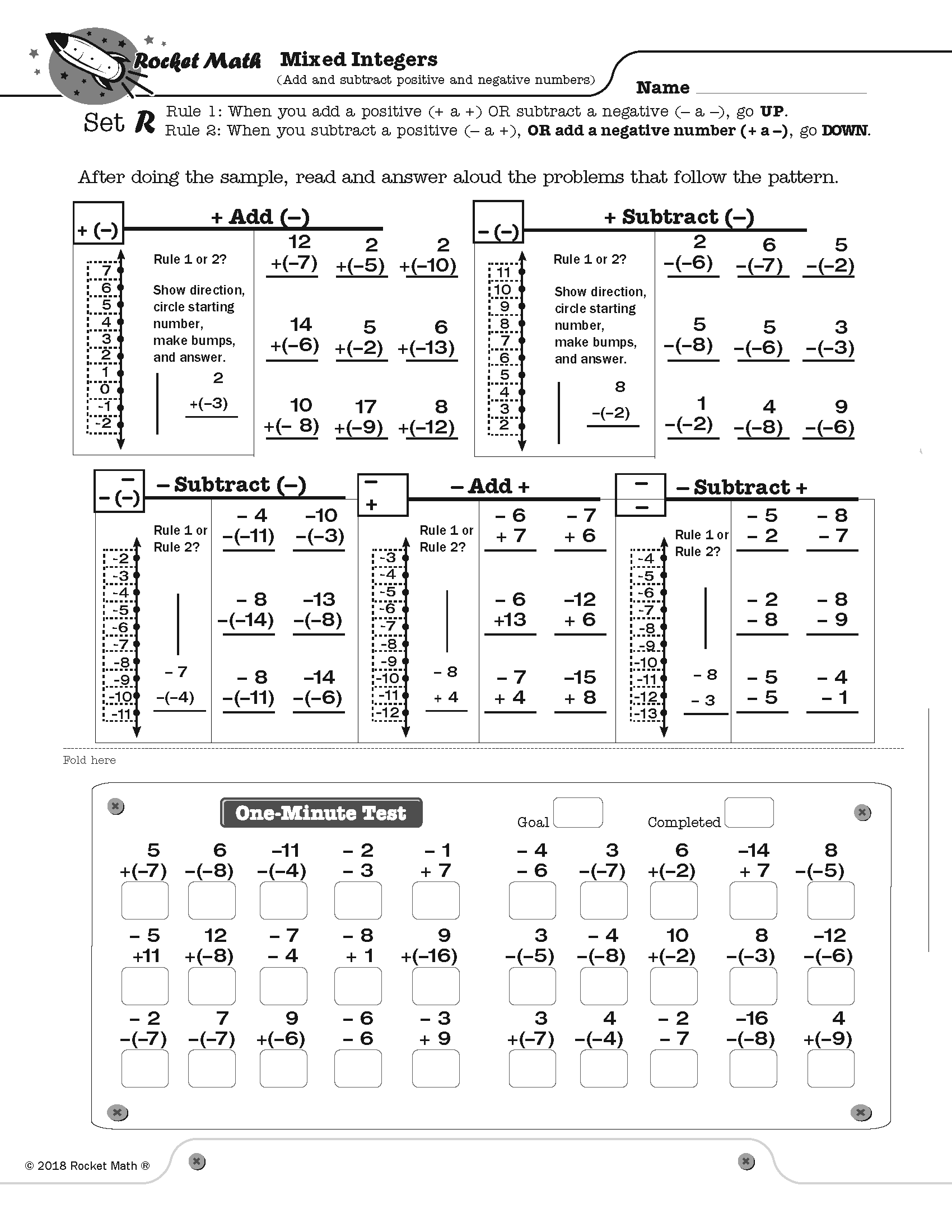
Mixed Integers displays problems on a vertical number line and then teaches students two rules about how to solve problems that add or subtract positive and negative numbers.
Rule 1: When you add a positive number OR subtract a negative number, go UP.
Rule 2: When you subtract a positive number OR add a negative number, go DOWN.
Students learn how these rules play out when starting with a positive number and a negative number, gradually learn these two variations of all four types of problems. They learn to solve a problem type using the number line and then to recognize the pattern of each problem type by working several examples of each type. This practice gives them a chance to build fluency with each problem type as they work with their partner on the top half of the page. You will probably not be surprised that there is a one-minute test on each set. The goals are slightly different than before. Students are to be 100% accurate and to meet or beat their goal from the special writing speed test for mixed integers.
8 online lessons teach students how each type of problem is solved and why it is correct.
(1) Mixed Integers Set A1 Positive add a positive
(2) Mixed Integers Set A2 Positive subtract a positive
(3) Mixed Integers Set D Negative add a positive
(4) Mixed Integers Set G Negative subtract a positive
(5) Mixed Integers Set J Negative subtract a negative
(6) Mixed Integers Set M Positive subtract a negative
(7) Mixed Integers Set P Positive add a negative
(8) Mixed Integers Set S Negative add a negative
[otw_shortcode_button href=”https://www.rocketmath.com/worksheet-program-subscription-levels-comparison/” size=”medium” bgcolor=”#06427f” icon_type=”general foundicon-left-arrow” icon_position=”left” shape=”radius” color_class=”otw-blue”]Back to Comparison[/otw_shortcode_button] [otw_shortcode_button href=”https://www.rocketmath.com/members/signupuniversal-subscription-options” size=”medium” bgcolor=”#F9BF00″ icon_type=”general foundicon-right-arrow” icon_position=”right” shape=”radius” color_class=”otw-blue”]Continue to Checkout[/otw_shortcode_button]
Related Products
-
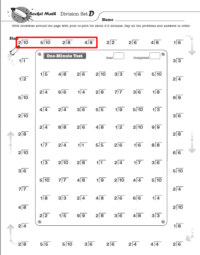
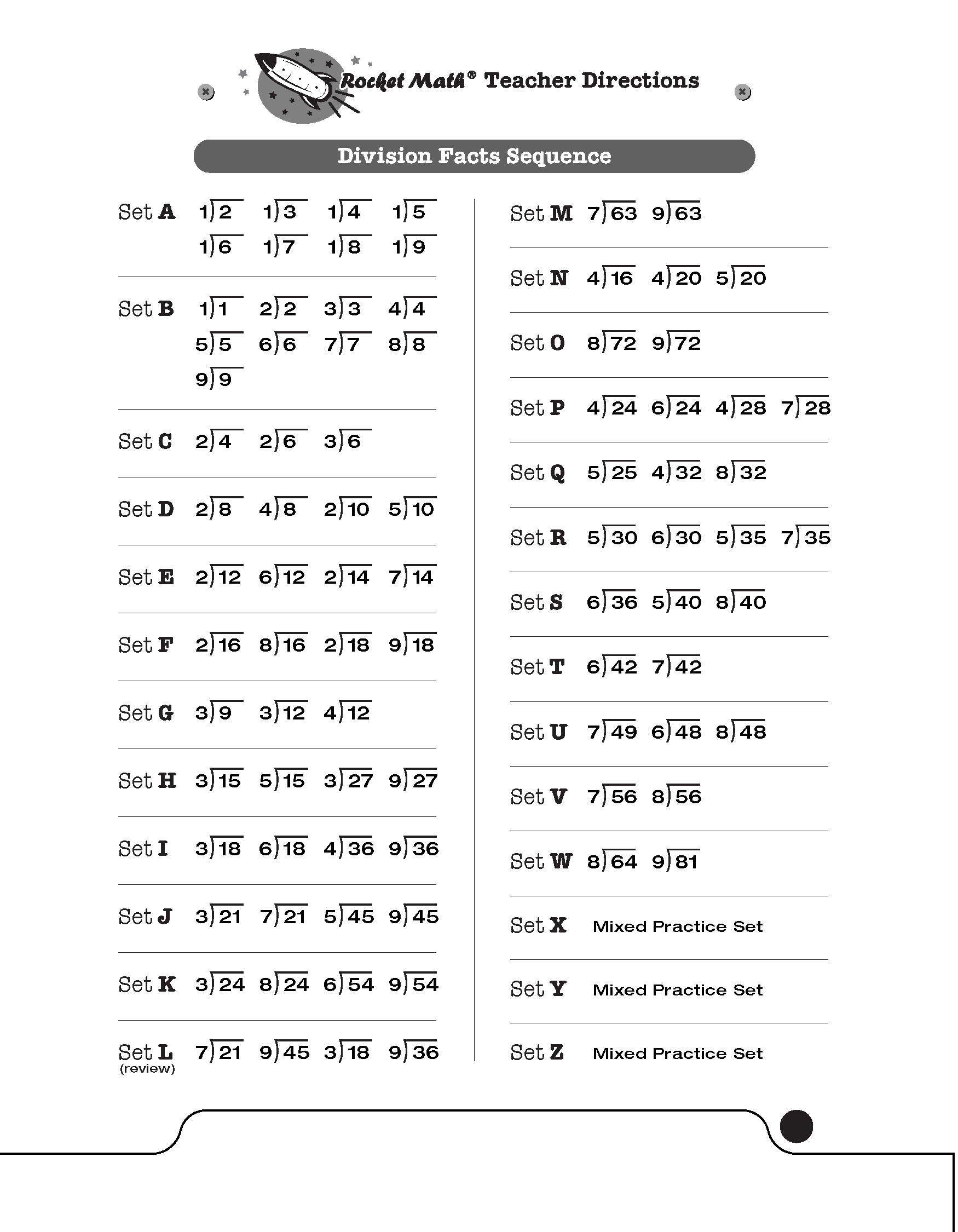 These are the basic single digit Division facts 1s through 9s. Each of the 26 levels, A through Z, introduces two facts and their reverses. You can see in the picture above of Set D, I have outlined the new facts in red.
Students practice orally with a partner, reading and answering the facts going around the outside of the sheet. The partner has the answer key. Then the two students switch roles. After practice everyone takes a one minute test on the facts in the box–which are only the facts learned up to this level. Each student has individual goals based on writing speed, but no one can pass a level if there are any errors. You must give the special Writing Speed Test to set individual goals for your students.
Students should be able to pass a level in a week, if they practice the right way. To the right you can see the sequence of facts that will be learned in the Division 1s-9s program. The program uses the four forms–that can be found in the forms and information drawer.
The most succinct way to be introduced to this program is this 8 minute video.
[otw_shortcode_button href=”https://www.rocketmath.com/worksheet-program-subscription-levels-comparison/ ” size=”medium” bgcolor=”#06427f” icon_type=”general foundicon-left-arrow” icon_position=”left” shape=”radius” color_class=”otw-blue”]Back to Comparison[/otw_shortcode_button] [otw_shortcode_button href=”https://www.rocketmath.com/members/signupuniversal-subscription-options” size=”medium” bgcolor=”#F9BF00″ icon_type=”general foundicon-right-arrow” icon_position=”right” shape=”radius” color_class=”otw-blue”]Continue to Checkout[/otw_shortcode_button]