Description
only 1s-9s add,subtract,multi,div
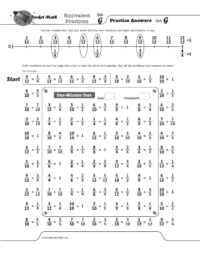
Students need to know that six-eighths is equivalent to three-fourths and that four-twelfths is equivalent to one-third. While they can calculate these, it is very helpful to know the most common equivalent fractions by memory. One of the most common problems students have in fractions is not “reducing their answers to simplest form.”
Here’s a 5 minute Educreations lessons on How the Equivalent Fractions program works.
Part of the Universal subscription package.
Equivalent fractions will help students commit 100 common equivalent fractions to memory. Each set (A through Z) has four fractions which are displayed on a fraction number line. Students frequently learn fractions equivalent to one,such as ten-tenths, as well as fractions that can’t be reduced, for example three-fourths is equivalent to three-fourths. Using the fraction number line will help with student understanding of why those fractions are equivalent.
Click here for the full sequence of 100 Equivalent fractions that students will learn in this program.
Equivalent fractions, Factors, and Integers, are all pre-algebra programs that are appropriate for middle school students who already know the basic facts.
[otw_shortcode_button href=”https://www.rocketmath.com/worksheet-program-subscription-levels-comparison/ ” size=”medium” bgcolor=”#06427f” icon_type=”general foundicon-left-arrow” icon_position=”left” shape=”radius” color_class=”otw-blue”]Back to Comparison[/otw_shortcode_button] [otw_shortcode_button href=”https://www.rocketmath.com/members/signupuniversal-subscription-options” size=”medium” bgcolor=”#F9BF00″ icon_type=”general foundicon-right-arrow” icon_position=”right” shape=”radius” color_class=”otw-blue”]Continue to Checkout[/otw_shortcode_button]
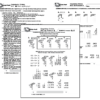
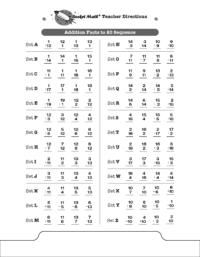
These are the rest of the Addition facts that the Common Core suggests that students be able to compute mentally such as 11 + 7, 4 + 13, and 16 + 3. These obviously build on the basic single digit facts such as 1 + 7, 4 + 3, and 6 + 3. Students should find these fairly easy to master but they still need some practice to commit them to memory. LOOK OUT! Because all the answers are two digits, the number of problems students can be expected to answer will go down! You must give the special Add to 20 Writing Speed Test to set new lower goals for your students. To the left you can see the sequence of facts that will be learned in the Add to 20 program. Otherwise the program is exactly the same as the basic Addition Rocket Math program and uses the same forms–that can be found in the forms and information drawer.
[otw_shortcode_button href=”https://www.rocketmath.com/worksheet-program-subscription-levels-comparison/ ” size=”medium” bgcolor=”#06427f” icon_type=”general foundicon-left-arrow” icon_position=”left” shape=”radius” color_class=”otw-blue”]Back to Comparison[/otw_shortcode_button] [otw_shortcode_button href=”https://www.rocketmath.com/members/signupuniversal-subscription-options” size=”medium” bgcolor=”#F9BF00″ icon_type=”general foundicon-right-arrow” icon_position=”right” shape=”radius” color_class=”otw-blue”]Continue to Checkout[/otw_shortcode_button]

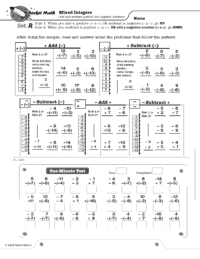
Mixed Integers displays problems on a vertical number line and then teaches students two rules about how to solve problems that add or subtract positive and negative numbers.
Rule 1: When you add a positive number OR subtract a negative number, go UP.
Rule 2: When you subtract a positive number OR add a negative number, go DOWN.
Students learn how these rules play out when starting with a positive number and a negative number, gradually learn these two variations of all four types of problems. They learn to solve a problem type using the number line and then to recognize the pattern of each problem type by working several examples of each type. This practice gives them a chance to build fluency with each problem type as they work with their partner on the top half of the page. You will probably not be surprised that there is a one-minute test on each set. The goals are slightly different than before. Students are to be 100% accurate and to meet or beat their goal from the special writing speed test for mixed integers.
8 online lessons teach students how each type of problem is solved and why it is correct.
(1) Mixed Integers Set A1 Positive add a positive
(2) Mixed Integers Set A2 Positive subtract a positive
(3) Mixed Integers Set D Negative add a positive
(4) Mixed Integers Set G Negative subtract a positive
(5) Mixed Integers Set J Negative subtract a negative
(6) Mixed Integers Set M Positive subtract a negative
(7) Mixed Integers Set P Positive add a negative
(8) Mixed Integers Set S Negative add a negative
[otw_shortcode_button href=”https://www.rocketmath.com/worksheet-program-subscription-levels-comparison/” size=”medium” bgcolor=”#06427f” icon_type=”general foundicon-left-arrow” icon_position=”left” shape=”radius” color_class=”otw-blue”]Back to Comparison[/otw_shortcode_button] [otw_shortcode_button href=”https://www.rocketmath.com/members/signupuniversal-subscription-options” size=”medium” bgcolor=”#F9BF00″ icon_type=”general foundicon-right-arrow” icon_position=”right” shape=”radius” color_class=”otw-blue”]Continue to Checkout[/otw_shortcode_button]
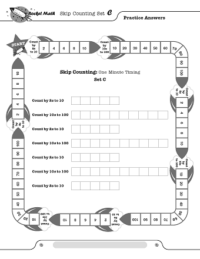
Skip counting is the best way for students to prepare for multiplication. Students practice with a partner who has the answers. Because of the way the rockets go around the page, students and their checkers will have to pick up the pages and turn them as they are working. You’ll be able to see if they are really engaged and they will have fun turning the page around. Students learn part of each sequence on a page, then the next page they learn the rest. For example: in Set O students learn to count by 3s to 12, then in Set P they learn to count by 3s to 21, and then in Set Q they learn to count by 3s to 30. The test in the center has them write the count-by series they have learned for one-minute and they need to meet or beat their best–just like the rest of Rocket Math. Here is the sequence students will learn in this order: 2s, 5s, 10s, 9s, 4s, 25s (so they can count quarters), 3s, 8s, 7s, and 6s. Probably our most fun product.
[otw_shortcode_button href=”https://www.rocketmath.com/worksheet-program-subscription-levels-comparison/ ” size=”medium” bgcolor=”#06427f” icon_type=”general foundicon-left-arrow” icon_position=”left” shape=”radius” color_class=”otw-blue”]Back to Comparison[/otw_shortcode_button] [otw_shortcode_button href=”https://www.rocketmath.com/members/signupuniversal-subscription-options” size=”medium” bgcolor=”#F9BF00″ icon_type=”general foundicon-right-arrow” icon_position=”right” shape=”radius” color_class=”otw-blue”]Continue to Checkout[/otw_shortcode_button]