• LOGIN CENTRAL
    • Worksheet Program
    • Online Game–admin
    • Online Game–play
    • Shopping/ordering
    • login
Search
  • $0.00 (0 items)
    • No products in the cart.
Rocket Math
  • Worksheet Program
    • Pre-tests (Do you need this?)
    • Subscription Comparison
    • Subscription Preview
    • Sign Up
    • Worksheet Samples
    • HELP teaching Worksheet Program
    • HELP managing Worksheet subscription
    • Video Training
  • Online Game
    • How It Works?
    • Get started video walk-throughs
    • Test Drive Demo student account!
    • HELP — FAQs
    • Basic Training for Players
    • iOS App
  • About
    • About Rocket Math
    • Sample worksheets show how Rocket Math works
    • Studies and Results
    • Testimonials
    • Privacy Policy
    • Contact
    • Blog
  • Resources
    • Pre-tests (Do you need this?)
    • Purchase Order Info
    • Catalog & Price List
    • Parent resources
    • Educator Resources
    • Dr. Don’s Hints and Tips
    • Flashcards (Print-Yourself)
    • FAQs on How to implement Worksheet Program: teaching directions
    • Directions for products
    • Fluency Tests
    • How to access (get into) my subscription?
    • Add Subusers
  • Rocket Math Store
    • WORKSHEET PROGRAM
    • ONLINE GAME ONLY
    • FLASHCARDS
    • BRAG TAGS
    • RACE FOR THE STARS GAMES
    • POSTERS AND MOTIVATION
    • ORGANIZATION AND TRAINING
    • HARD PRODUCTS PACKAGES
    • Rocket Math iOS App
  • $0.00 (0 items)
    • No products in the cart.
Rocket Math
  • Worksheet Program
    • Pre-tests (Do you need this?)
    • Subscription Comparison
    • Subscription Preview
    • Sign Up
    • Worksheet Samples
    • HELP teaching Worksheet Program
    • HELP managing Worksheet subscription
    • Video Training
  • Online Game
    • How It Works?
    • Get started video walk-throughs
    • Test Drive Demo student account!
    • HELP — FAQs
    • Basic Training for Players
    • iOS App
  • About
    • About Rocket Math
    • Sample worksheets show how Rocket Math works
    • Studies and Results
    • Testimonials
    • Privacy Policy
    • Contact
    • Blog
  • Resources
    • Pre-tests (Do you need this?)
    • Purchase Order Info
    • Catalog & Price List
    • Parent resources
    • Educator Resources
    • Dr. Don’s Hints and Tips
    • Flashcards (Print-Yourself)
    • FAQs on How to implement Worksheet Program: teaching directions
    • Directions for products
    • Fluency Tests
    • How to access (get into) my subscription?
    • Add Subusers
  • Rocket Math Store
    • WORKSHEET PROGRAM
    • ONLINE GAME ONLY
    • FLASHCARDS
    • BRAG TAGS
    • RACE FOR THE STARS GAMES
    • POSTERS AND MOTIVATION
    • ORGANIZATION AND TRAINING
    • HARD PRODUCTS PACKAGES
    • Rocket Math iOS App
Skip to content
  • Worksheet Program
    • Pre-tests (Do you need this?)
    • Subscription Comparison
    • Subscription Preview
    • Sign Up
    • Worksheet Samples
    • HELP teaching Worksheet Program
    • HELP managing Worksheet subscription
    • Video Training
  • Online Game
    • How It Works?
    • Get started video walk-throughs
    • Test Drive Demo student account!
    • HELP — FAQs
    • Basic Training for Players
    • iOS App
  • About
    • About Rocket Math
    • Sample worksheets show how Rocket Math works
    • Studies and Results
    • Testimonials
    • Privacy Policy
    • Contact
    • Blog
  • Resources
    • Pre-tests (Do you need this?)
    • Purchase Order Info
    • Catalog & Price List
    • Parent resources
    • Educator Resources
    • Dr. Don’s Hints and Tips
    • Flashcards (Print-Yourself)
    • FAQs on How to implement Worksheet Program: teaching directions
    • Directions for products
    • Fluency Tests
    • How to access (get into) my subscription?
    • Add Subusers
  • Rocket Math Store
    • WORKSHEET PROGRAM
    • ONLINE GAME ONLY
    • FLASHCARDS
    • BRAG TAGS
    • RACE FOR THE STARS GAMES
    • POSTERS AND MOTIVATION
    • ORGANIZATION AND TRAINING
    • HARD PRODUCTS PACKAGES
    • Rocket Math iOS App
Home Uncategorized extras Learning to Add Integers (positive and negative numbers)

Learning to Add Integers (positive and negative numbers)

Four Problem Types to Learn

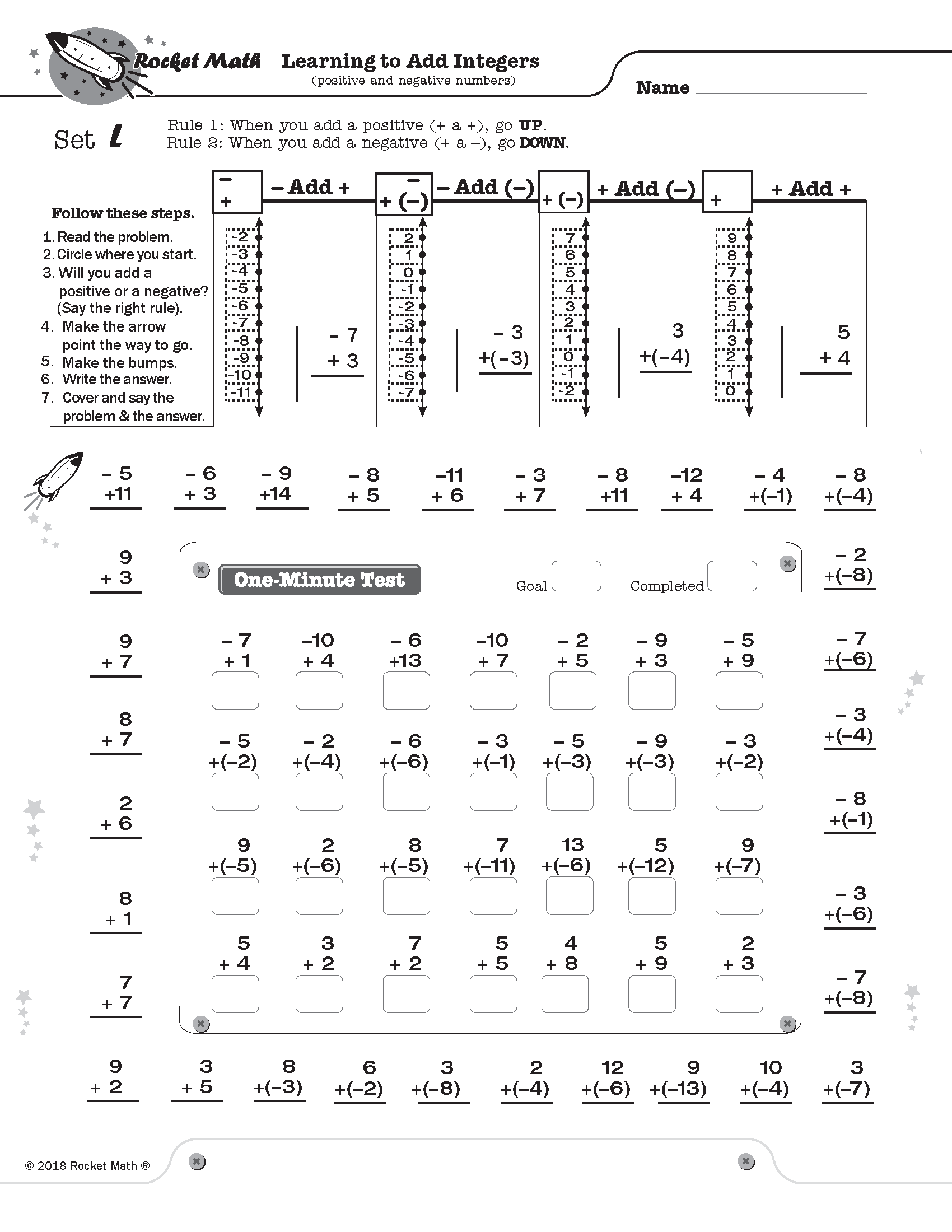
Learning to Add Integers displays problems on a vertical number line and then teaches students two rules about how to solve problems that add positive and negative numbers.
Rule 1:  When you add a positive number, go UP.
Rule 2:  When you add a negative number, go DOWN.

Doing problems on the vertical number line is more intuitively appealing because UP is more and DOWN is always less.  This makes crossing zero a little easier to comprehend.

Students learn how these two rules play out with two types of problems: when starting with a positive number and when starting with a negative number. Students gradually learn all four types of problems.  On each worksheet they see how to solve each problem type using the number line working with their partner.  Then students learn to recognize the pattern of each problem type by orally answering several examples of each type with their partner (going around the outside of the page).  You will probably not be surprised that there is a one-minute test on each set.   Students are to be 100% accurate and to meet or beat their goal from the special writing speed test for Learning to Add integers (the fastest goal is only 28 problems in a minute).

4 online lessons teach students how each type of problem is solved and why it is correct.

(1) Add Integers Set A Positive add a positive

(2) Add Integers Set B Positive add a negative

(3) Add Integers Set G Negative add a negative

(4) Add Integers Set L Negative add a positive

[otw_shortcode_button href=”https://www.rocketmath.com/worksheet-program-subscription-levels-comparison/ ” size=”medium” bgcolor=”#06427f” icon_type=”general foundicon-left-arrow” icon_position=”left” shape=”radius” color_class=”otw-blue”]Back to Comparison[/otw_shortcode_button] [otw_shortcode_button href=”https://www.rocketmath.com/members/signupuniversal-subscription-options” size=”medium” bgcolor=”#F9BF00″ icon_type=”general foundicon-right-arrow” icon_position=”right” shape=”radius” color_class=”otw-blue”]Continue to Checkout[/otw_shortcode_button]
Category: Uncategorized extras.

Related Products

  • Read more
    Uncategorized extras Identifying Fractions

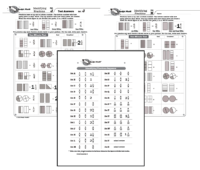
    This is a program to ensure that students have a firm and correct understanding of fractions.  This will prepare them well for all subsequent work in fractions.  They will learn the essential rule about what the numerator and denominator mean, although they won’t be working with those terms.  They just learn through examples, practiced over and over.

    The number on the top tells how many parts are shaded.  The number on the bottom indicates the number of parts in a whole.  If a whole is not divided into parts, it is a whole number.

    Right from the beginning of Set A students will encounter improper fractions and mixed numbers.  They will see examples of every fraction first at the top of the page before they are asked to identify it on their own. You see that students see the fraction, see the words for how we say it and they see the fraction they are to write.

    Unlike other Rocket Math programs, the test and the practice items are the same.  Of course the students have a page without the answers, while their partner holds the answer key. Students practice by saying aloud to their partner the fractions shown in the test.  Then they take the test on those same items, but write the answer.

    [otw_shortcode_button href=”https://www.rocketmath.com/worksheet-program-subscription-levels-comparison/ ” size=”medium” bgcolor=”#06427f” icon_type=”general foundicon-left-arrow” icon_position=”left” shape=”radius” color_class=”otw-blue”]Back to Comparison[/otw_shortcode_button] [otw_shortcode_button href=”https://www.rocketmath.com/members/signupuniversal-subscription-options” size=”medium” bgcolor=”#F9BF00″ icon_type=”general foundicon-right-arrow” icon_position=”right” shape=”radius” color_class=”otw-blue”]Continue to Checkout[/otw_shortcode_button]
  • Read more
    Uncategorized extras Subtraction–Learning Computation

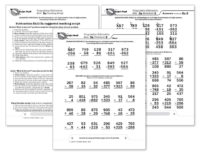
    After becoming fluent with subtraction facts the best way for students to retain the knowledge of those facts is by doing subtraction computation.  If students have not been taught subtraction computation, Subtraction–Learning Computation breaks it down into 18 small, easy-to-learn steps that are numbered in a teaching sequence that leaves nothing to chance.  Even better the instructional materials include an assessment of all the skills in subtraction computation in order, so you can test the knowledge of the student(s) before beginning instruction to see where to start. You can use this assessment to find very specific “holes” in student skills and then have the exact problems and explanation to fill that hole.


    Note that the number for each skill gives the grade level as well as indicating the teaching sequence.  Skill 3b is a 3rd grade skill and after skill 3g is learned the next in the sequence, skill 4a is best taught in fourth grade.  Minor changes have been made, but for the most part, the sequence of skills is drawn from M. Stein, D. Kinder, J. Silbert, and D. W. Carnine, (2006) Designing Effective Mathematics Instruction: A Direct Instruction Approach (4th Edition) Pearson Education: Columbus, OH.


    (1b) Subtract from 2 digits; no renaming.

    (2a) Subtract from 2digits; renaming required.

    (2b) Subtract from 3 digits; borrow from 10s.

    (3a) Subtract from 3 digits; borrow from 100s.

    (3b) Subtract from 3 digits; borrow either place.

    (3c) Subtract tens minus one facts.

    (3d) Subtract from 3 digits; zero in 10s; borrow 10s or 100s.

    (3e) Read and write thousands numbers, use commas.

    (3f) Subtract from 4 digits; borrow from 1000s.

    (3g) Subtract from 4 digits; borrow once or more.

    (4a) Subtract from 4 digits; zero in 10s or 100s column

    (4b) Subtract from 4 digits; zero in 10s column, 1 in 100s.

    (4c) Subtract hundreds minus one facts.

    (4d) Subtract from 4 digits; zero in 10s and 100s column.

    (4e) Subtract 1, 2, or 3 digits from 1,000.

    (4f) Subtract 5 and 6 digits with borrowing.

    (5a) Subtract thousands minus one facts.

    (5b) Subtract from a number with four zeroes.


    For each skill there is a suggested Teaching Script giving the teacher/tutor/parent consistent (across all the skills we use the same explanation) language of instruction on how to do the skill.  My favorite part is the rule students are taught for when to borrow (often confusing for students): Bigger bottom borrows.  Simple, easy-to-remember and consistently correct.  The script helps walk the student through the computation process.  For the teacher, in addition to the script, there are answer keys for the five worksheets provided for each skill.


    Each worksheet is composed of two parts.  The top has examples of the skill being learned that can be worked by following the script.  After working through those examples with the teacher the student is then asked to work some review problems of addition problems that are already known.  The student is asked to do as many as possible in 3 minutes—a kind of sprint.  If all is well the student should be able to do all the problems or nearly all of them, but finishing is not required.  Three minutes of review is sufficient for one day.


    There are five worksheets for each skill.  Gradually as the student learns the skill the teacher/tutor/parent can provide progressively less help and the student should be able to do the problems without any guidance by the end of the five worksheets.  There are suggestions for how to give less help in the teaching scripts.


    [otw_shortcode_button href=”https://www.rocketmath.com/worksheet-program-subscription-levels-comparison/ ” size=”medium” bgcolor=”#06427f” icon_type=”general foundicon-left-arrow” icon_position=”left” shape=”radius” color_class=”otw-blue”]Back to Comparison[/otw_shortcode_button] [otw_shortcode_button href=”https://www.rocketmath.com/members/signupuniversal-subscription-options” size=”medium” bgcolor=”#F9BF00″ icon_type=”general foundicon-right-arrow” icon_position=”right” shape=”radius” color_class=”otw-blue”]Continue to Checkout[/otw_shortcode_button]
  • Read more
    Uncategorized extras Subtract from 20 (e.g., 18-15, 15-5, 19-8)

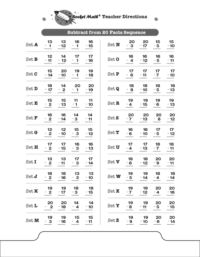
    These are the rest of the Subtraction facts that the Common Core suggests that students be able to compute mentally such as 18-15, 15-5, and 19-8. These obviously build on the basic single digit facts such as 8-5, 5-5, and 9-8. Students should find these fairly easy to master but they still need some practice to commit them to memory. LOOK OUT! Because all the answers are two digits, the number of problems students can be expected to answer will go down!  You must give the special Subtract from 20 Writing Speed Test to set new, lower, goals for your students.  To the left you can see the sequence of facts that will be learned in the Subtract from 20 program.  Otherwise the program is exactly the same as the basic Subtraction Rocket Math program and uses the same forms–that can be found in the forms and information drawer.
    [otw_shortcode_button href=”https://www.rocketmath.com/worksheet-program-subscription-levels-comparison/ ” size=”medium” bgcolor=”#06427f” icon_type=”general foundicon-left-arrow” icon_position=”left” shape=”radius” color_class=”otw-blue”]Back to Comparison[/otw_shortcode_button] [otw_shortcode_button href=”https://www.rocketmath.com/members/signupuniversal-subscription-options” size=”medium” bgcolor=”#F9BF00″ icon_type=”general foundicon-right-arrow” icon_position=”right” shape=”radius” color_class=”otw-blue”]Continue to Checkout[/otw_shortcode_button]
  • Read more
    Uncategorized extras Rocket Writing for Numerals

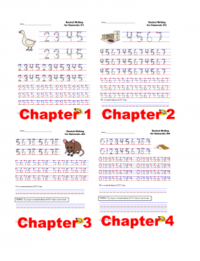
    Rocket Writing for Numerals prepares students to write numerals efficiently, quickly and legibly. There are 72 pages of practice divided into four chapters which gradually increase in difficulty. (The red “Chapter 1, Chapter 2” etc don’t show in the actual program!)

    • Chapter 1 starts with simply having students tracing the numerals and learning to form them in the correct manner. Students work through each of the numerals and practice them in concert with other previously learned numerals.
    • Chapter 2 gives more practice tracing but also requires students to learn to copy smaller examples and then write the numerals the appropriate size to fit 20 on a line.
    • Chapter 3 gives more practice tracing but also has students do a one-minute timing to see if they can write 20 digits in a minute.
    • Chapter 4 gives more practice tracing but also has students aim for writing 40 digits in one minute. Once they achieve this milestone they are fast enough for Rocket Math.


    [otw_shortcode_button href=”https://www.rocketmath.com/worksheet-program-subscription-levels-comparison/ ” size=”medium” bgcolor=”#06427f” icon_type=”general foundicon-left-arrow” icon_position=”left” shape=”radius” color_class=”otw-blue”]Back to Comparison[/otw_shortcode_button] [otw_shortcode_button href=”https://www.rocketmath.com/members/signupuniversal-subscription-options” size=”medium” bgcolor=”#F9BF00″ icon_type=”general foundicon-right-arrow” icon_position=”right” shape=”radius” color_class=”otw-blue”]Continue to Checkout[/otw_shortcode_button]
Get Started Today With

Rocket Math

Game Subscription Worksheet Subscription

Contact Rocket Math

(We’re open during school hours!)

14435 SE Donatello Loop
Happy Valley, OR 97086
Toll-Free: 888-488-4854
Fax: 866-960-4700

email: don (at) rocketmath (dot) com

Satisfaction Guaranteed or your money back

Worksheet Subscriptions

  • SUBSCRIPTION COMPARISON
  • ACCESS MY SUBSCRIPTION
  • RESET ACCESS
  • EXPIRED SUBSCRIPTION?

Game Subscription

  • HOW IT WORKS?
  • REGISTER
  • PLAY THE GAME
  • MANAGE ACCOUNT – PLAYERS
  • FAQs and DIRECTIONS
  • iOS APP
Subscribe for Email Updates

Add a descriptive message telling what your visitor is signing up for here.

© 2009–2019 Rocket Math. All rights reserved. Terms & Conditions | Privacy Policy | Home

v.1.1.2