
How Can We Help?
(C) Renew (purchase)
No gotcha’s on the complimentary initial subscription. It just ends unless you take action. If you do not choose to renew your subscription, that will be all there is to it. There’s really no way to “purchase” a subscription, you can only “renew” your initial complimentary subscription. There are three options.
Start on tab (F) Payment/Renew to renew
This is the bright yellow tab on the main rainbow navigation on the left-hand side of every admin page.
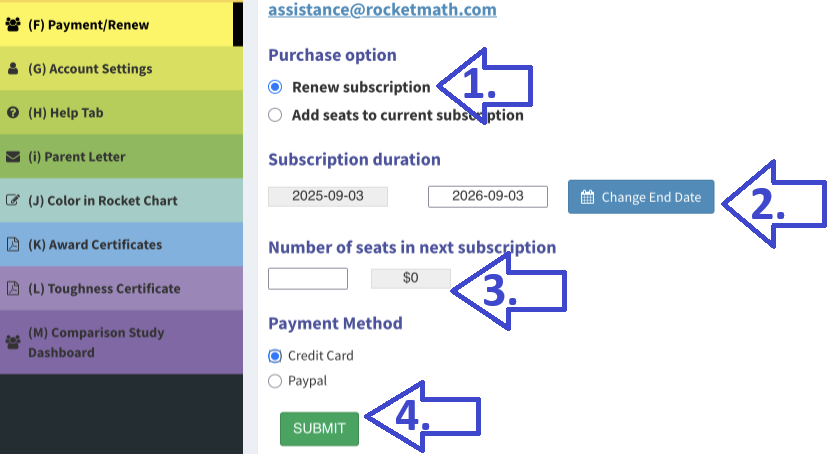 Step 1. Click on Renew Subscription.
Step 2. Change the end date
…if you want fewer than 12 months. Perhaps you want your subscription to end on a different date?
Step 3. Enter the number of seats for your next subscription.
You can play with different amounts in the “number of seats field” and it will show you the price.
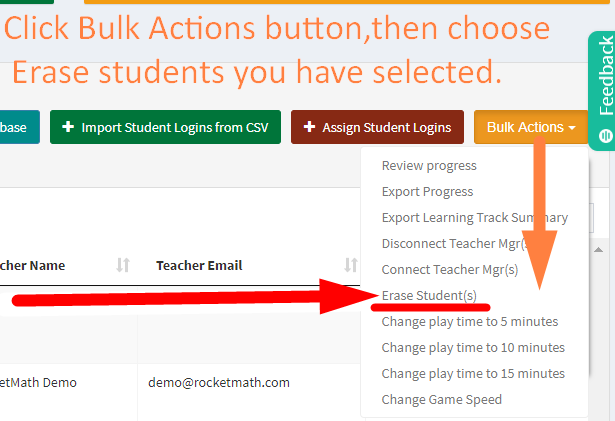
 WARNING! You cannot renew with fewer seats than you are currently using. If you want FEWER seats than you have currently assigned, you’ll need to ERASE some seat assignments. You can ERASE seat assignments on the Bulk Actions button by selecting the ones you want to erase and then choosing the “Erase Students” action in Bulk Actions pull-down menu.
- If you want more seats NOW, then you have to choose to “ADD SEATS” which will add that number to your current subscription. There’s no limit to the number of seats you can add to your initial complimentary subscription, and they’re free!
Step 4. Choose your payment option and hit the green “SUBMIT” button.
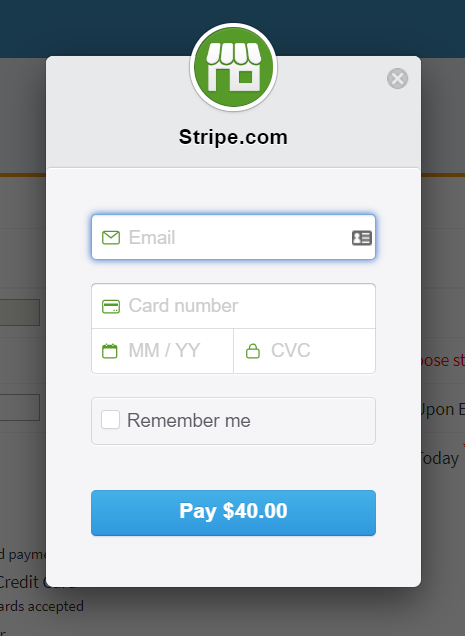
Credit card payments operate through Stripe.com. It will ask for the email of your account–so we can credit the payment to the right account. Then it will ask you for your credit card number and verification info. You will be charged as soon as it goes through.