Beginning Numerals–Kindergarten counting Learning Track


List of Learning Tracks Continue to purchase


What do students learn?

This is a beginning program for kindergarten students.  You are teaching them to count objects aloud and then match the word with the numeralHere is a link to a video explanation of how to teach this learning track.

In this Learning Track students learn through teacher-led instruction.

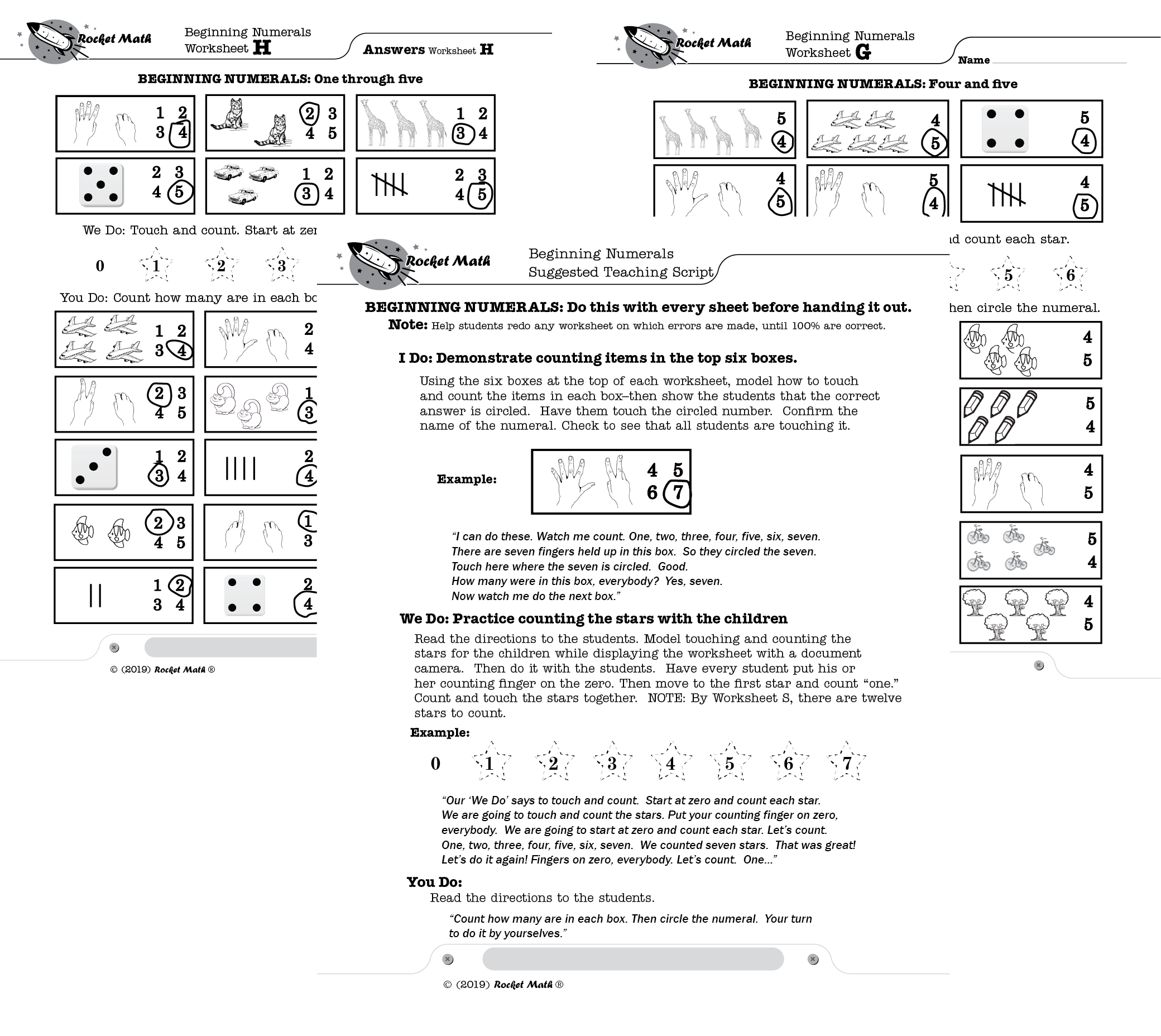
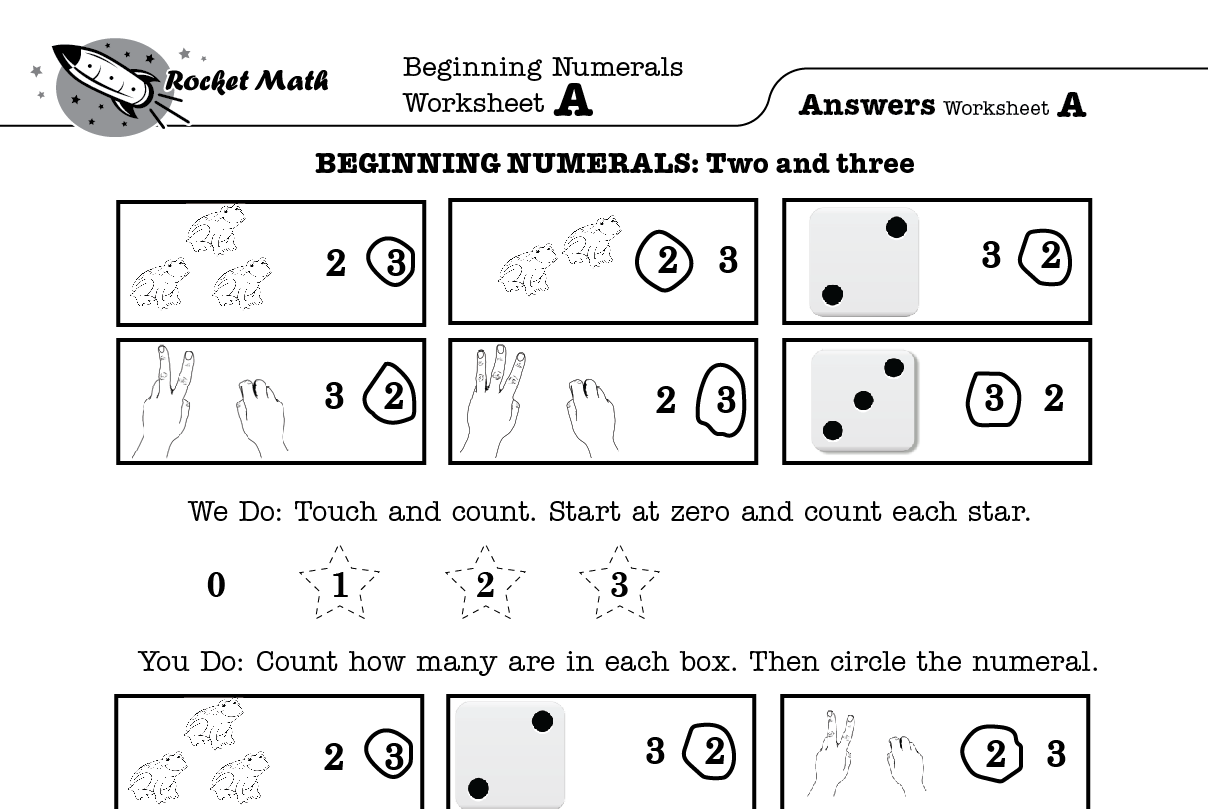
I Do portion–count objects and see the number circled (above picture).

Each worksheet begins with a teacher demonstration of counting objects and circling the numeral that matches.  On Worksheet A there are two and three only to learn.  The teacher demonstrates (best with a document camera so all students can see) how she counts the objects and then points out that the answer is circled.

We Do portion–counting stars together (also above picture).

In the “We do” portion of the worksheet the teacher counts the stars first as a demo and then with the students.  Worksheet A you all just count 3 stars.   By Worksheet S the teacher and the students are  counting 12 stars together.


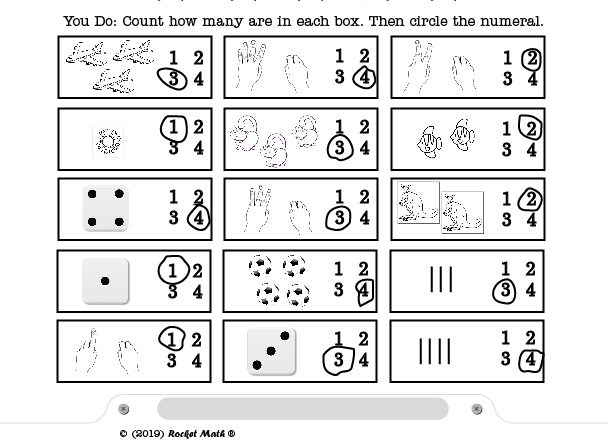
You do portion (above picture).

In the “You do” portion of the worksheet after learning the numerals with the teacher, the students are asked to count the items in each box and circle the correct number.  They are not asked to form the numerals–that’s numeral writing skill.  They just identify the numeral and circle it. Besides cute items there are also dice to count, fingers to count and hash marks to count–so students can learn multiple ways of keeping track of numbers.

Passing a level requires 100% accuracy.  Students who make any errors should be worked with until they can complete the worksheet independently and get all the items correct.  Read an explanation of how to bring a small group to mastery in a program like this one.

This will build strong beginning math skills for kindergarteners learning the meaning of numerals.  Combined with Rocket Writing for Numerals it will set students up for success in elementary math.


Teacher-led instruction for mastery at the kindergarten level

A note about teacher led instruction at the kindergarten level 

Two Learning Tracks in the Rocket Math Worksheet Program, Beginning Numerals and Conceptual Addition, are teacher led instruction. At the kindergarten level teacher led instruction is generally only successful if done in small groups.  Kindergarteners do not pay good attention to whole class instruction, and so will make errors because of inattention to the lesson and directions, rather than confusion about the concepts.  The worksheets in these programs are very straightforward so that students will be able to do them successfully if they are paying attention to the teacher “I do” and “We do” portions of the lesson.  Successful instruction is dependent upon the teacher having the attention of ALL the students while doing the “I do” and “We do” parts of the lesson, which is much easier in small groups.

The goal is that all the students in the group do it 100% correctly. If more than 1/4 of the students in the group make confused errors (wrong answers), the teacher should re-do the sheet as a group the next day.  And keep doing that until fewer than 1/4 make errors.

If fewer than 1/4 of the group are making errors, then the teacher should give those students remedial help and bring them to mastery before moving the whole group on to the next worksheet.  By working with only the confused sub-group, the teacher is better able to make sure they are attending to the instruction.  The teacher should lead instruction and re-do the worksheet with the confused sub-group until they come to mastery too, before reforming the group and moving on.

Ideally, the teacher could work with the confused sub-group immediately after the lesson or later the same day to clarify their misunderstanding quickly.  If not, then work with the smaller sub-group to have them re-do the worksheet at the same time the next day, while the successful students do something else.

Most of the time, if mastery is fully achieved (100% correct doing the independent work independently) then the next worksheet will be able to be brought to mastery without extra sessions.  This is why the 100% criteria for all students is stated at the top.  However, regrouping may be necessary if some students consistently require multiple times through the worksheet to come to mastery (and should be in a different group) while others can do it easily in one session.

Rocket Writing for Numerals Learning Track


List of Learning Tracks Continue to purchase

What do students learn?

Click here for the Rocket Writing for Numerals Teacher Directions.

Students learn to write numerals efficiently, quickly and legibly using the Rocket Writing for Numerals Learning Track.

There are 72 pages of practice divided into four chapters (each 18 worksheets long) which gradually increase in difficulty.

Read this blog on “How much practice is enough in Rocket Writing for Numerals?”

Chapter 1 Learn to trace numerals correctly and efficiently.

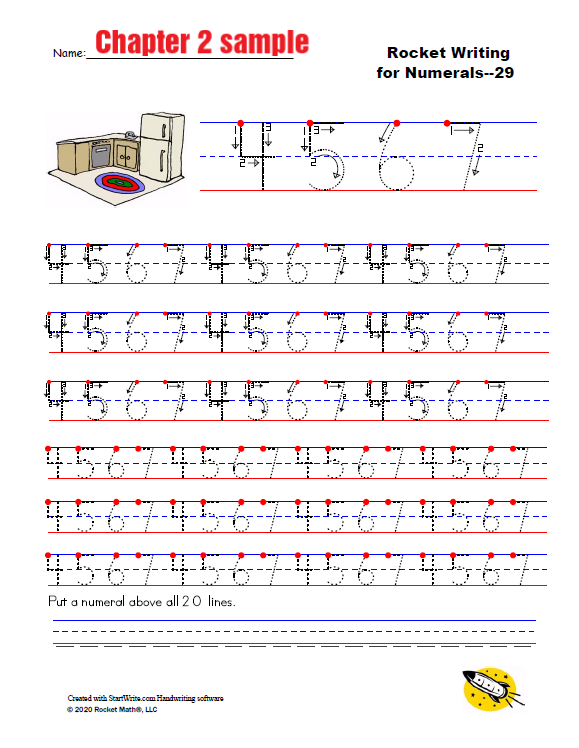
  • Chapter 1 has students tracing the numerals and learning to form them in the correct manner. The correct manner is from the top down which is the most efficient way to write numerals. Students work through each of the numerals individually.   Then they practice them in concert with other previously learned numerals.  Teacher directions suggest fun ways of teaching numerals by tracing them in the air. Students should stay in this chapter until they habitually form the numerals in the correct manner. (See the chapter 1 sample.)

Chapter 2 Learn to write numerals free-hand (without tracing) and smaller.

  • Chapter 2 (see the sample) gives more practice tracing but also requires students to learn to copy smaller examples.  The big challenge is to write the numerals free-hand (without tracing them) and to do so the appropriate size to fit 20 on a line.

Chapter 3 Learn to form numerals fluently (20 per minute).

  • Chapter 3 (see the sample) gives more practice tracing and more practice writing the numerals freehand and to put 20 on a line.  The big challenge is for students to do a one-minute timing to see if they can write 20 digits on a line and in one-minute. There are 18 worksheets in this chapter, so the goal is by the end of the chapter for students to be able to write 20 numerals in one minute. These one-minute timings can be done at the same time as other students who are doing Rocket Math worksheets.

Chapter 4 Learn to form numerals more fluently (40 digits per minute).

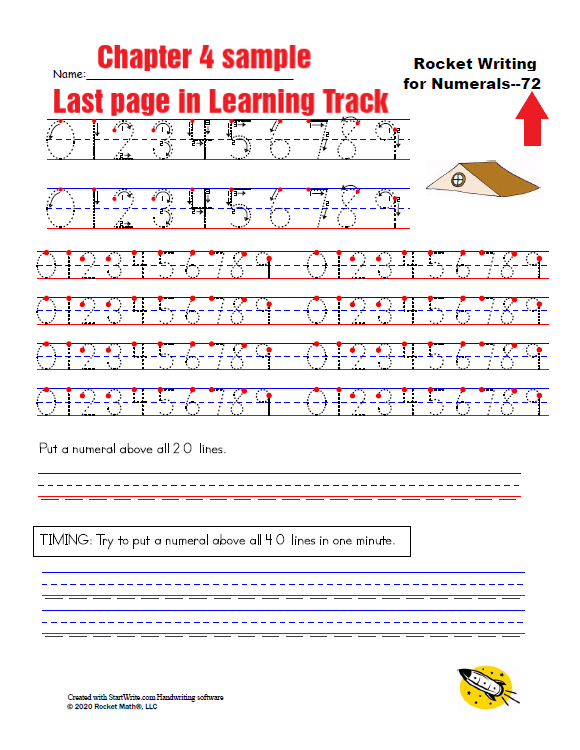
  • Chapter 4  gives more practice tracing and writing free-hand with 20 on  a row, but also has students aim for writing 40 digits in one minute. Once they achieve this milestone they are fast enough for Rocket Math. The last page of the program (the end of Chapter 4) is shown at the top of this article.


Get students ready for the times tables with Conceptual Multiplication

Who needs Conceptual Multiplication?

Students need this learning track only if they have NOT been introduced to the concept of multiplication. This is for students who are not able to figure out the answer to any multiplication fact. When you ask them, for example, “What’s seven times eight?” if they can figure out the answer to that question, then they already understand the concept of multiplication.

Teaches the concept of multiplication.

Conceptual Multiplication is based upon practicing skip counting or count-bys.  It will be easiest for students after they finish the “Skip Counting” Learning Track. However, in this Learning Track students can read all of the count-by series except the last number, making this somewhat easier than Skip Counting. Students in fourth grade and above (we are in a hurry, as they are late) should be able to do this Learning Track without doing Skip Counting first. Also, students in fourth grade and above (we’re still in a hurry!) do not need to finish all the way to level Z.  They probably have the concept by the time they finish Set H and can go on into the Multiplication (1s-9s) Learning Track.  Just sayin’ we’re in a hurry!

How do students practice?

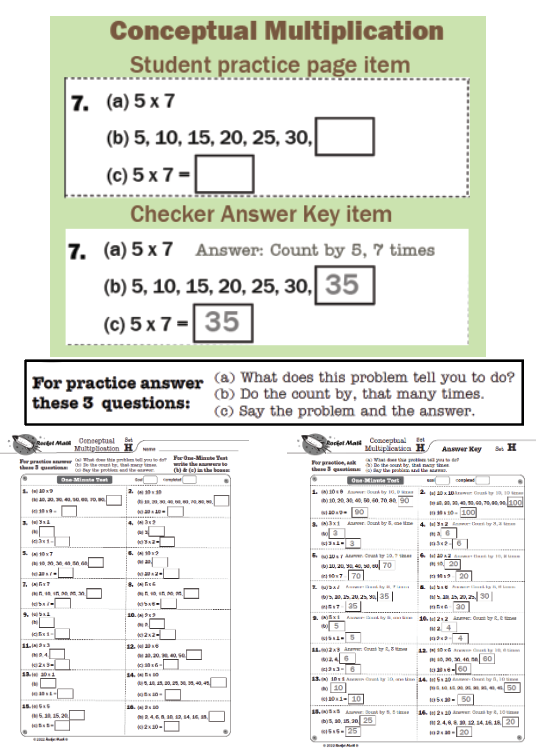
In each box there are 3 items: a, b, and c.

The checker will only need to read the three questions a couple of times until the student knows what is expected at each letter.

(a)  What does this problem tell you to do? (ex: 5 x 7)    Answer: Count by five, seven times.

(b)  Do the count by, that many times. Answer: 5, 10, 15, 20, 25, 30, 35.

(c) Say the problem and the answer. Answer: Five times seven equals 35.

After a time, the student should just say the answers, for example, “Count by 5 seven times. 5, 10, 15, 20, 25, 30, 35.  Five times seven equals 35.” 

For the One-Minute Test students just write the answers in the boxes. In the above example the student would write “35” in both boxes.

Video of how students should practice?

Eliminate test anxiety and timed tests with Rocket Math

Rocket Math without timed tests

Some students have a lot of test anxiety around timed tests.  They become anxious and visibly tense up on timed tests.  They actually get worse instead of better when being timed.  Parents and special education teachers hate to see that and often want to give up on teaching math facts.  Rather than give up, you can use the Rocket Math worksheets without doing any timing.  You don’t have to have your student work against the timer.  If the student is doing everything right during the practice with you, then whatever he or he gets to after six days of practice, will be good enough. Tell your student,

“Stop worrying, we aren’t going to do the timed tests anymore.” 

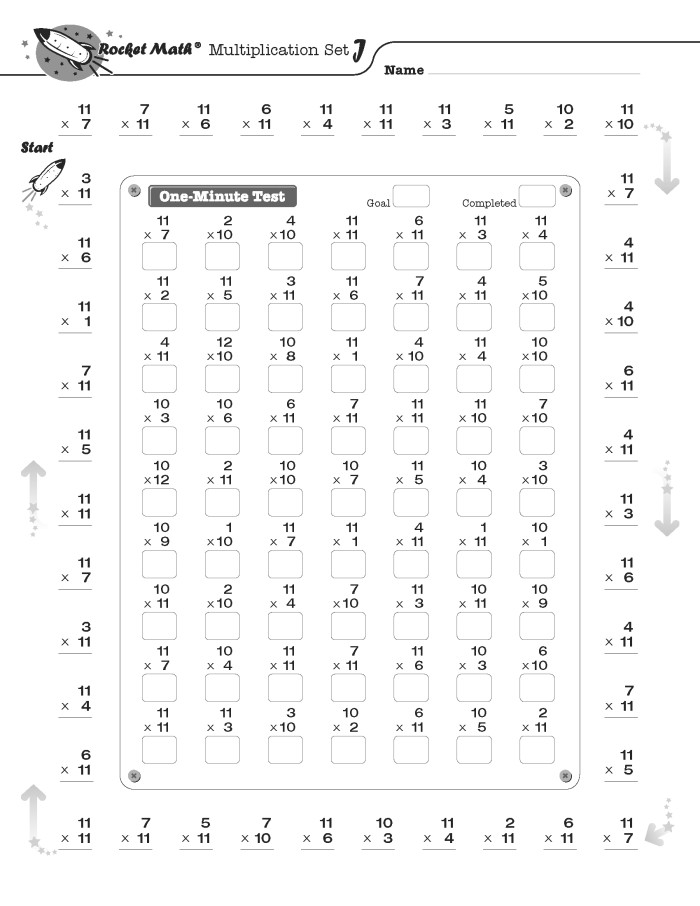
Your student should continue to practice by saying the facts aloud with the answers while you’re correcting any hesitations.  Corrections consist of you interrupting and saying the fact and the answer aloud, having the student say the fact and the answer aloud three times, backing up three problems and going at it again.  Have your student do that practice until they have gone around the outside twice instead of for a set amount of time.
After practicing around the outside, and before writing on the inside “One-Minute Test,” have your student also practice orally with you for all of the problems in the One Minute test. Use the same correction procedure.

The One-Minute test does not need to be timed.

Then each day, in place of the timed test, do this.  Let your student complete the sheet (the whole page) without working against the timer.  Write the answers as quickly as possible without errors.  Have the student do this, like I said, for six days and then they graduate to the next page. The only point of the timing is to see if the student has mastered all of those facts.  The student will have mastered the facts, if they do the practice correctly every day, so no need for timing at all, really. I have seen students with severe learning problems, who need to do a sheet a dozen times to reach a good level of fluency, but for almost everybody, six days is enough–especially if they will practice both the test and the outside thoroughly and correctly with an adult practice partner who keeps them on task.

If the student wants to do fewer than six days on a set, here’s how.

If your student ever stops being worried during the writing/testing time, you can ask if they’d like to be able to do fewer problems each day.  If so, here’s how to set goals.  You quietly use the timer on your phone and just mark where the student is on the test after one minute. Count how many were done in one minute and record it on the Rocket chart. Still have the student do all the problems, but keep track of how many they answer in the first minute.  By the sixth day you will see that the student has leveled off and hasn’t increased for a couple of days.  After counting what’s done in one minute on the last day of three sets, use whatever number they leveled off at, as the goal, and allow them to pass when they reach that goal.

How to Set Math Fact Fluency IEP Goals (The Easy Way!)

Setting IEP goals and short-term objectives is a snap when you measure growth in fluency. Not only are fluency growth goals easy to write and set, but they are also easy to measure and monitor. You can adjust the intensity of the intervention ensuring the student can achieve the goals and objectives. Finally, you’ll be able to demonstrate growth and improve student achievement.

Child working on his math fact fluency iep goals

What are Math fact fluency IEP goals?

Math fact fluency goals are specifically designed to help students master basic math facts so that they can move on to more advanced topics. These goals should be tailored to each individual student’s level of understanding. They should focus on mastering basic operations such as addition/subtraction or multiplication/division, as well as developing problem-solving skills. In addition, these goals should also focus on increasing the speed at which the student can answer questions correctly in order to improve their overall math performance. 

Why are math fact fluency IEP goals important?

In addition to targeting academic performance, math fact fluency goals can also help improve overall mathematical fluency, which is defined as being able to solve mathematical problems quickly and accurately without relying too heavily on counting strategies or written algorithms. Mathematical fluency is important because it allows students to think critically about numbers and apply strategies learned from one problem type (i.e., fractions) across different contexts (i.e., decimals). Thus, having an IEP goal related to increasing math fact fluency can help foster overall mathematical fluency by providing students with the necessary building blocks for success in more advanced topics.

How to set math fact fluency IEP goals

When setting math fact fluency IEP goals, it is imperative to consider the student’s current abilities when determining the target goal. Each student should have individualized goals based on their specific needs and abilities. A good starting point for setting these goals would be to identify the number of correct responses per minute (RPM) that the student currently achieves and then set incremental increases from there. For example, if a student achieves five correct responses per minute (RPM), this could be the baseline starting point for setting future IEP goals. 

In addition to increasing RPM, other possible goals include mastering certain operations or combinations of operations within a given timeframe or reducing errors in computation tasks. The ultimate goal should be for every student to reach mastery over all four operations by the end of their educational program—which would equate to correctly answering all four operations at 10 RPM without any errors. 

Step1: Test the student’s present level of performance (PLOP) on math fact fluency

evaluation chart for pre-testIt only takes a minute or two to have students take a timed test in an operation to see how well they know their facts. You want to know how many facts the student can answer in that operation in one minute. Test first-grade students in addition and second-graders on subtraction. Starting in 3rd grade and up, multiplication has priority, so test and focus on multiplication facts for your IEP. You can move on to other operations once multiplication facts are fluent. Here is a link to a page with Rocket Math’s one-minute pre-tests in all four basic operations. However, you can’t evaluate whether a given student is fluent until you know how fast they can write. Students who are fluent with facts can answer them about as fast as they can write. But they cannot answer them any faster than they can write.

Step2: Test the student’s writing speed

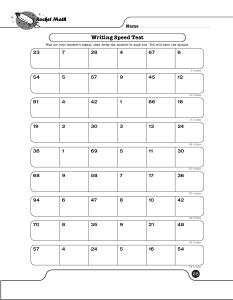
writing speed test for match fact fluency iep goalsYou cannot set achievable goals of how many facts a student should answer in a minute without first knowing how fast they can write. That sets the upper limit. So test their writing speed by having them write a mix of one and two-digit numbers for one minute.  See above, the Rocket Math’s one-minute Writing Speed Test. From the link you can print it out for free. Once you know how fast your student can write you can evaluate their performance on the one-minute fluency tests.

Step 3: Set the progress monitoring measure

If you’re going to test every week with 1-minute timings and you have a bunch of those available, you already have a 1-minute timing starting point.  If you’re using the Rocket Math Worksheet Program as your intervention, it uses 2-minute timings to measure progress weekly, so you’ll want to use one of those for your starting point. (You can’t double the 1-minute score because students don’t usually keep up at the same rate for two minutes.) So give one of the 2-minute timings in the operation you will focus on to set a starting point.

Step 4: Set the math fact fluency goal based on writing speed

Students who have successfully developed math fact fluency in an operation can write answers to math facts almost as fast as they can write. As fast as their fingers can carry them is the most you could expect. You could set a goal at 80% of their writing speed. It would still be rigorous enough. If they met that goal the student would be fluent in math facts.

goal worksheet

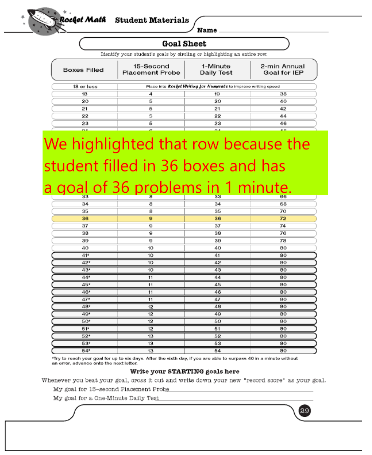
You can do the math yourself from their writing speed test. The Rocket Math Worksheet Program has weekly progress monitoring 2-minute timings. In that case, your student’s goal for the 2-minute timing is on the handy goal sheet ** that you put into each student’s folder. You can see the student shown here filled in 36 boxes on the Writing Speed Test, so his or her goal for 2-minute timings would be 72 for the annual goal for the IEP.

Step 5: Create a graph with an aimline

Now the coolest thing about progress-monitoring a fluency goal is that it is easy to graphically see on a weekly basis if the student is on track to meet the goal. You simply create a graph, with enough spots at the bottom for all the weeks in the year. Next you put in the starting point performance in the first week of the graph (or whenever you tested). Then put in your goal performance at the end of the year. Then draw a line between those two points. That line is called the aimline and is shown in the example below.

iep goals graph with an aimline

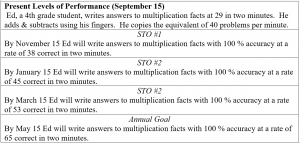
The student, whose aimline is pictured above, began at 29 problems in 2-minutes. Their present level of performance, or PLOP, was 29 problems correct in 2 minutes.  The student had a writing speed of 40 problems in a minute. Therefore 80% of that is 32 problems in a minute or an Annual Goal of answering 64 problems in two minutes by the end of the year. The aimline is simply a straight line between those two. You can see that the first couple of two-minute tests did not meet the aimline, but by the third test the student was right on track for meeting the goal by the end of the year.

Step 6: Document the short term objectives (STOs)

short term objectives worksheetOnce the aimline is drawn, the STOs are found by reading up from the date of the quarterly STO reporting date. Wherever the aimline is on that date, that’s the STO. In the example above the quarter 1 objective looks to be about 38 problems in two minutes. The second quarter looks to be 45 problems in two minutes with the 3rd quarter at 53. Very simple and easy to set and to read and report. Since every student in Rocket Math should have a graph like this, reporting to parents on a quarterly basis would be no more than showing them this graph.

What if the student fails to meet the IEP goals?

child practicing math fact fluency iep goalsSo if a student is not meeting the aimline when we monitor their progress we should re-double our efforts. With Rocket Math that’s quite doable. If the student is falling below the aimline for three weeks in a row, add another practice session each day. The standard ten minutes a day for Rocket Math may not be enough for this student. Arrange for them to get in another practice session each day. Often a daily short trip to the Special Education room for a second quick practice session with the teacher or an aide will do the trick. If two a day at school aren’t enough, maybe you can add one each evening at home. Some students do need more practice to meet these goals. The good news is that you can find out quickly with your graph and get going soon.

**The Rocket Math Goal Sheet was updated in 2021 to reflect the 80% expectation for IEP goals. The update shows that students who can fill in 15 boxes in a minute can go ahead and do Rocket Math, while those who can only fill in 14 boxes are candidates for help with writing numerals in the Rocket Writing for Numerals Learning Track.

Purchase a 60-day trial or a 1-year subscription to Rocket Math Worksheet Program

Motivating Students & Recognizing Effort Keeps Kids Engaged

The Rocket Math Online Game app is a demonstrably effective intervention–meaning if students engage and participate, they will learn and improve achievement. However, assigning an effective intervention will improve achievement only if students are engaged and participate in the intervention. The key is by motivating students to reach higher goals.

In today’s world, many students do not habitually give you their best effort. When you praise and recognize only excellent outcomes, many students are not motivated. They doubt their own abilities and think they are out of the running for achievement awards. Motivating students, ALL students, including low performers to participate is essential. But how to motivate students to learn math? You need to begin by praising and recognizing participation and effort instead of success. A good intervention helps you do that.

Motivate Students by Recognizing Effort Instead of Achievement


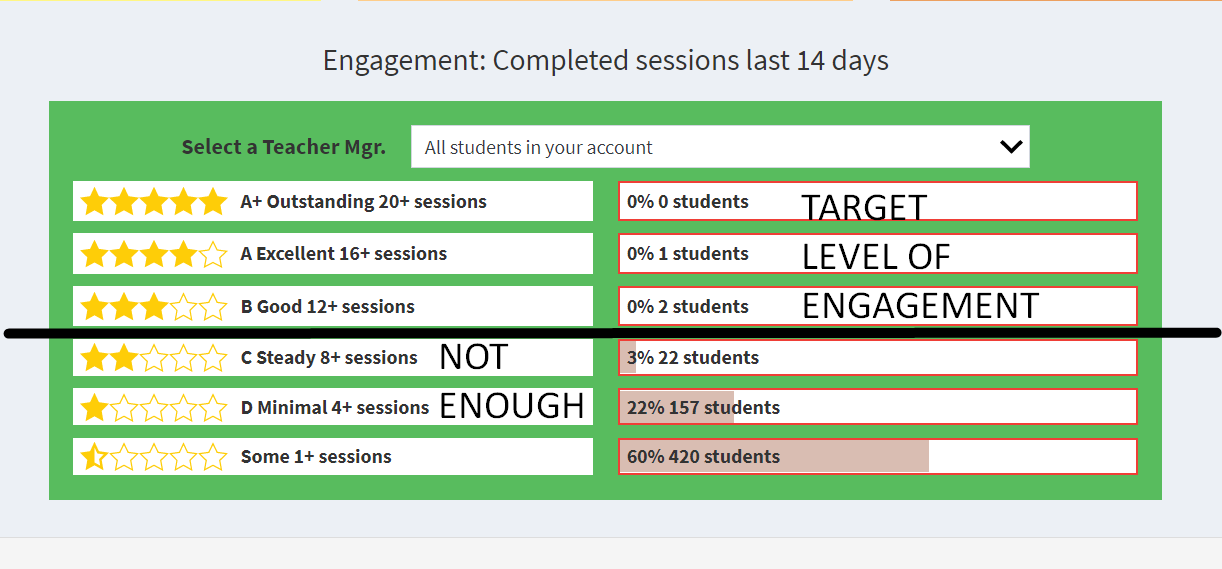
Instead of reporting and recognizing on benchmarks of academic achievement, why not report on benchmarks of effort? The Rocket Math Online Game, gives you data on effort and participation. The Engagement Chart (see above) how many of your students completed how many sessions in the last 14 days. Sessions can be set at five, ten, or fifteen minutes in length. 

Who is working the hardest–recognize them! 

The Engagement chart shows how many students are getting up to the higher levels of engagement.

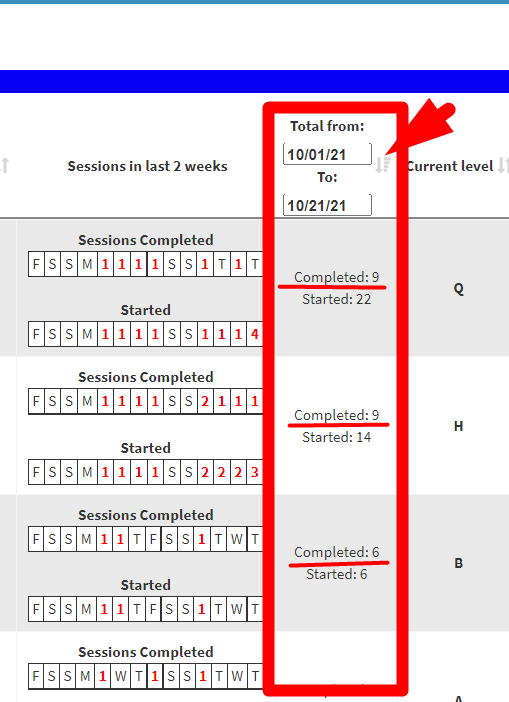
To find the individuals who are working the hardest look further down in the Review Progress page.  Down below the engagement chart there is a “Total” column which shows the number of sessions over the last two weeks.  It is adjustable as to which dates to be covered.  This selection shows from 10/01 to 10/21.   This column will tell you exactly who is working the hardest.  Click at the top of the column to sort it going downward to see which students is logging in the most sessions. The first student shows 22 sessions started and 9 completed (all the way to the end of the session). The second student started 14 sessions, but completed 9. The third student also started 6 sessions, but completed 6. This total data tells us the level of effort students have been putting forth to learn their math facts.  If you monitor this number and recognize students putting forth the most effort, you’ll get more students engagement.  School managers can do this for the whole school.  Teacher managers can do it for their class.  This is key to motivating their learning. 

What is a Good Effort and Participation?

You should expect, at a minimum that students do a complete session each day at school–which is 10 sessions in the last 14 days.  Therefore, 8 to 11 sessions in the last two weeks indicates a good “C” effort.  A good “B” effort would be completing 12 to 15 sessions in two weeks. That many sessions translate into a session every school day and more than one session a day, half the time. Any student with 16 or more sessions in the last two weeks is putting forth a great “A” effort.  Be sure to praise and recognize them and hold them up as an example, no matter what they have accomplished.

Motivating Students with the Award Certificates to Recognize & Reward Effort

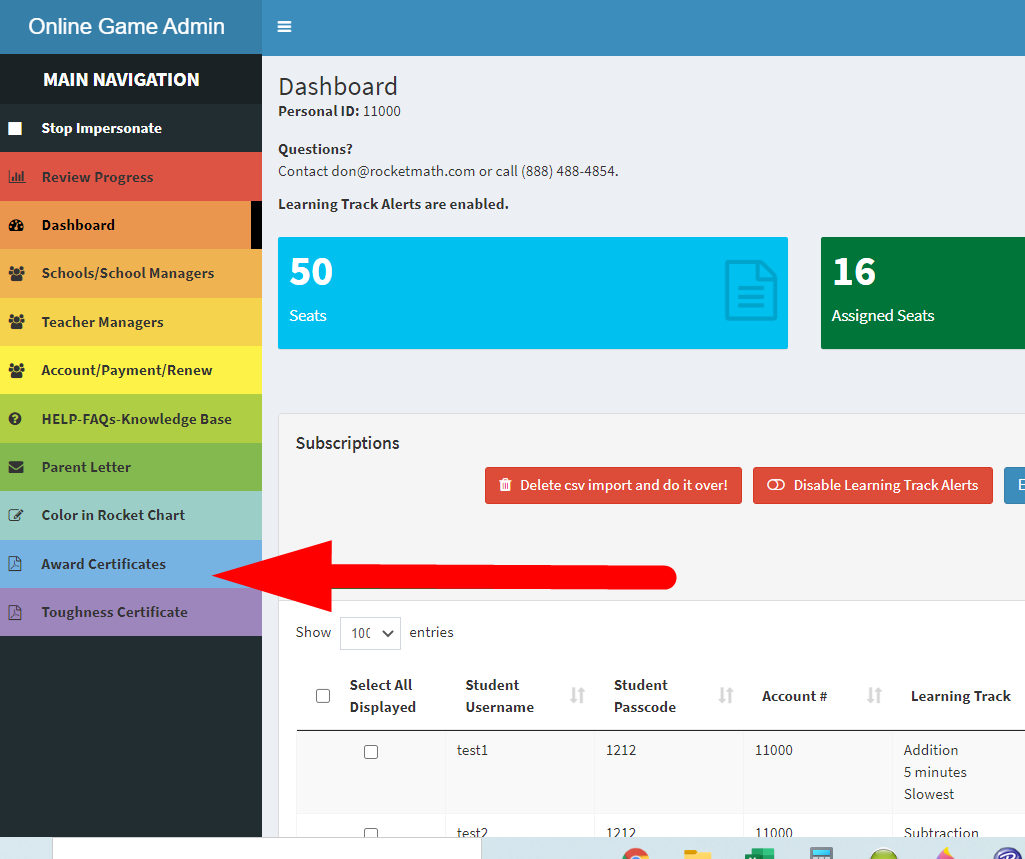
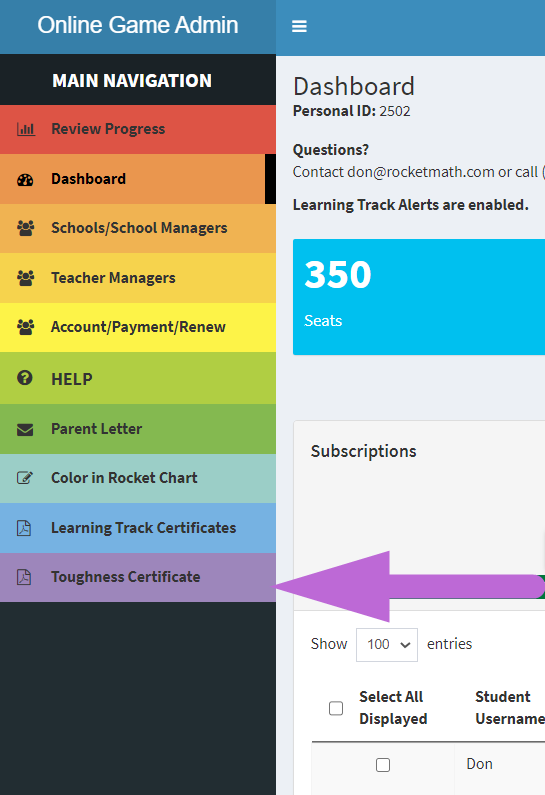
The Rocket Math Online Game has Award Certificates, available to print out. You can find these right from your dashboard. “Award Certificates” are on the blue tab on the left-hand “rainbow” navigation.

Screenshot of Rocket Math's reward cards.
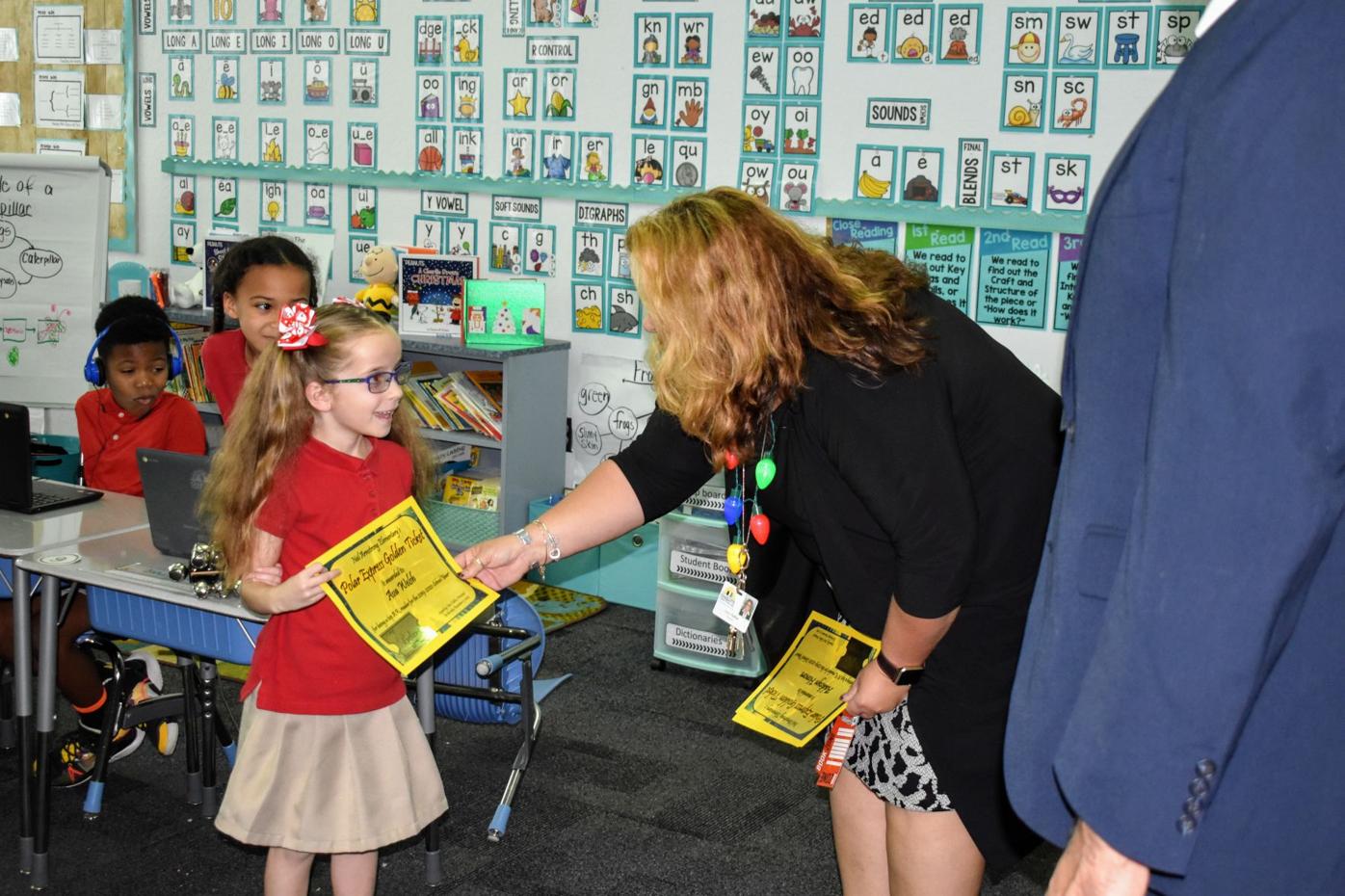
Give out some Award Certificates once every two to four weeks. Give them to the students who are putting forth the most effort in your class. For it to be effective, you have to make it kind of a big deal to get one of these. Sign the awards and then give them out in a little ceremony.

To have a successful ceremony, we recommend these steps:

  1. Having two adults to award the certificates
  2. Calling each student up to the room individually
  3. Handing them the certificate and shake their hand
  4. Having the awarded student stand in a line at the front 
  5. Calling the next student and repeated the first three steps, but adding that they shake hands with their fellow classmates before joining the line beside them


Motivation is most effective for students who don’t get it!

When you reward students for their effort, students who are watching, realize they can do it. They know they can get an award if they try.  The benefit of the motivation is for the ones sitting in their seats watching. If you reward everyone, the ceremony will have no effect. The students watching the ceremony will feel motivated to win the next one. Rocket Math can guarantee you’ll get improved fluency because it is an effective intervention.

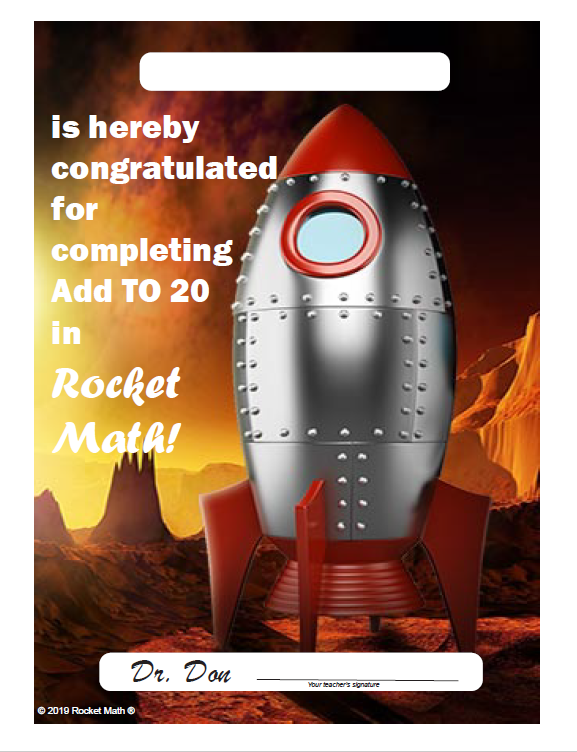
Note, you are not rewarding achievement. You aren’t measuring them on how fast they are. You are noting that they did accomplish the goal of finishing the Learning Track. Rocket Math guarantees they will have improved their fluency. The Learning Track certificates are also available on the Award Certificates tab in the main rainbow navigation bar. The same ceremony you’ve been using for the general awards can include awards for completing Learning Tracks.

We also have sets of these Award certificates on card stock and glossy print available on our supplements store site.

After Effort Improves Accomplishment, Begin Rewarding Accomplishment also

Soon after starting regular awards ceremonies for effort, you’ll see students beginning to complete Learning Tracks. As they work through a Learning Track they develop fluency with the math facts in that Learning Track. So you can start awarding Learning Track certificates for the accomplishment of completing a Learning Track.

This is a powerful process. Rewarding effort first, then rewarding accomplishment, leads to learning. Once you see how well this process works, you can apply this elsewhere. It works in any area of your curriculum where effort will pay off in improved accomplishments. Motivating students only works if they believe they can succeed. That is why it is so important to begin by recognizing “effort,” something that everyone can do.

Rocket Math Knows How to Motivate Students to Excel in Math 

Rocket Math Online Game and Worksheet programs will help students reach each grade level math benchmark while motivating students to reach higher goals with the award certificates. Systematically teaching students to develop math fact fluency will pay off. Students will not only succeed at but learn to enjoy math.

Instant assessment for basic math fact fluency: Ask ’em!

Teachers and parents often ask, “How do I know if my children need to study math facts?” Here’s an instant math assessment you can do to test them for math fact fluency. Ask a student a “hard one” such as, “What’s 9 times 7?” or if they are in first or second grade, “What’s 8 plus 9?” If they start counting on their fingers or hesitate while puzzling it out, they do not have “math fact fluency.” They need a program of systematic math facts practice until they know them all “by memory,” as the Common Core State Standards (CCSS) say.

Math fact fluency means instant recall

A student thinks through an equation by recalling their math facts.Some teachers and schools teach “tricks” for remembering facts that are supposed to help children. However, they should at most be a temporary crutch. Such techniques need to be replaced with instant recall. The student shown here is using the commonly-taught “doubles plus one” trick for figuring out the answer to, “What’s 8 plus 9?” This is not fluency. He needs practice in math facts so they become “automatic” in recall. If he is still having to do this in fourth or fifth grade, he’ll find math work slow-going and drudgery. He’ll also find it hard to follow a math lesson when he has to stop and puzzle out simple facts like this.

Math fact fluency makes math easy

Students who know the math facts instantly can fly through their math assignments. They enjoy the exercise and feel good about their math abilities. On the other hand, students who have to count on their fingers, or use a number line or a times tables chart to do their math assignments come to hate math. It is so-o-o-o-o slow. I’m sad to say that when I taught elementary and middle school remedial students I knew they hated math because they had to puzzle out most of the facts. What else could I do but assign lots of math fact practice that they hated?

In graduate school, I learned how to design a math facts practice program in a way that every student can succeed in memorizing the facts. I put a paper-and-pencil program together back in the ‘90s and have been sharing it with people ever since. I called it Mastering Math facts, but everyone else just called it Rocket Math. That became its official name in 2007.

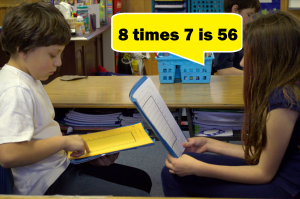
Teachers have been successfully using my nearly secret curriculum with wild success for decades. Oddly enough, students actually enjoy the Rocket Math Worksheet program. They enjoy the paired practice with a partner, and can actually see themselves learning and getting better.

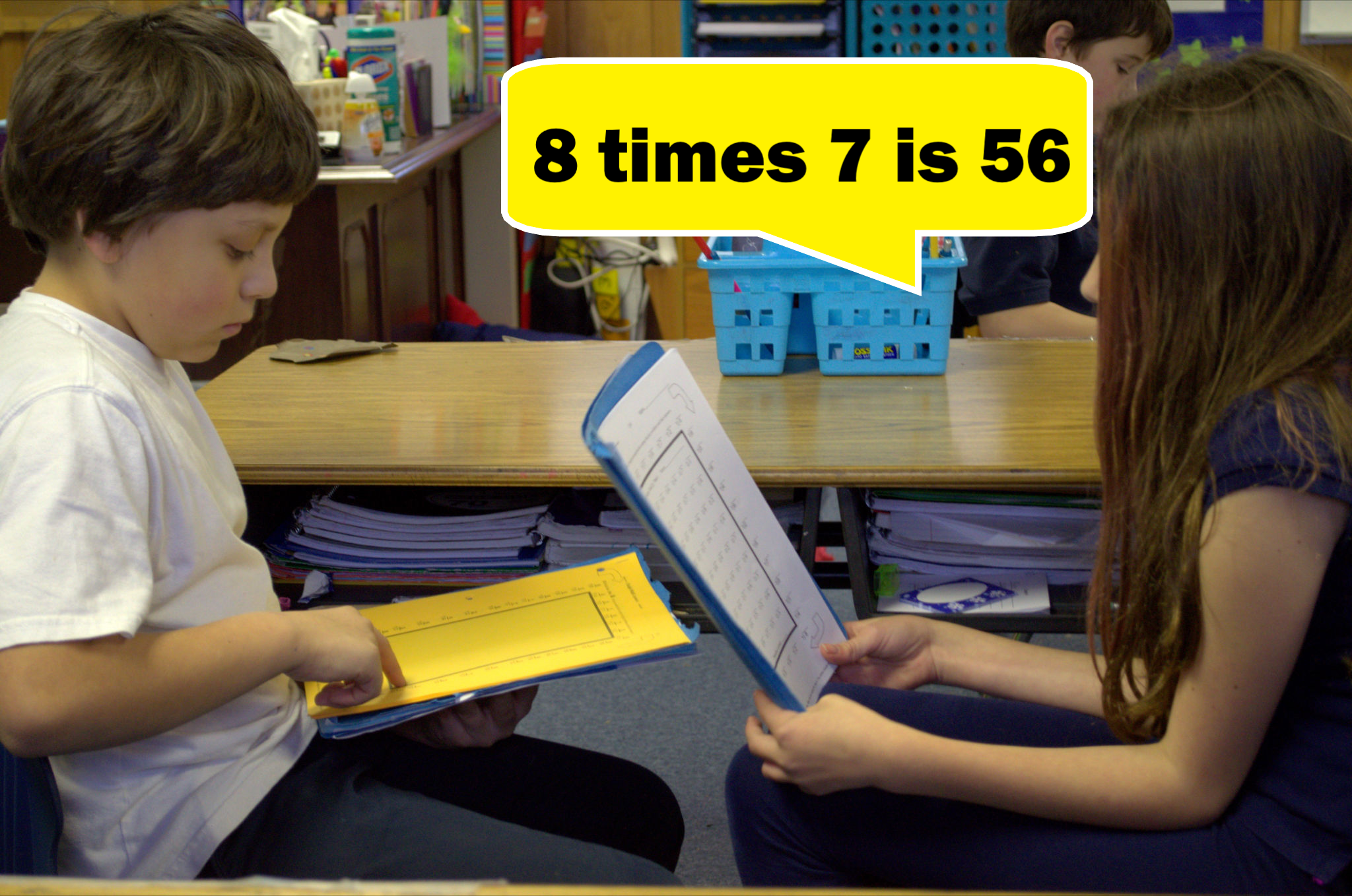
Two students participating in one of Rocket Math's math fluency programs

How to assess students in math

Before you start Rocket Math’s Online Game or Worksheet Program, it’s a good idea to find out which operations your student needs to practice most. Rocket Math offers a few tests to identify where your student should start their Rocket Math journey.


Writing Speed Test

Many students aren’t able to write the answers to 40 problems in one minute, which is normal and doesn’t affect their math fact knowledge. Before administering the Operation Pretests, evaluate your student’s writing speed to make sure the results reflect your student’s true proficiency, and that they are not held back by their writing speed. 

Get the One-Minute Rocket Math Writing Speed Test.


Operation Pretests

Once your student has completed the Writing Speed Test, give them a pretest in one or more of the four basic operations. 


Evaluate Results 

For students in 3rd grade and above, test multiplication first and then division. If students struggle with either of those two operations, they should start learning those operations. For 3rd graders and above who don’t struggle with multiplication and division, test addition and subtraction to assess any weakness. For students in 1st and 2nd grade, test addition first and then subtraction. 

Evaluate your student’s results based on their individual writing speed with the Evaluation Chart for Pretests. Use their writing speed to determine if their performance on the Pretest is weak and shows a real need for work on math facts, or is good but could use some help, or strong and no practice is needed. 

Free Online Game subscription as long as you need to decide

There is no reason for students to be bogged down and discouraged by math, especially by lack of math fact fluency. This doesn’t need to happen to children. Every student is capable of memorizing basic math facts with a little effort and a carefully sequenced curriculum, like the Rocket Math Worksheet Program.

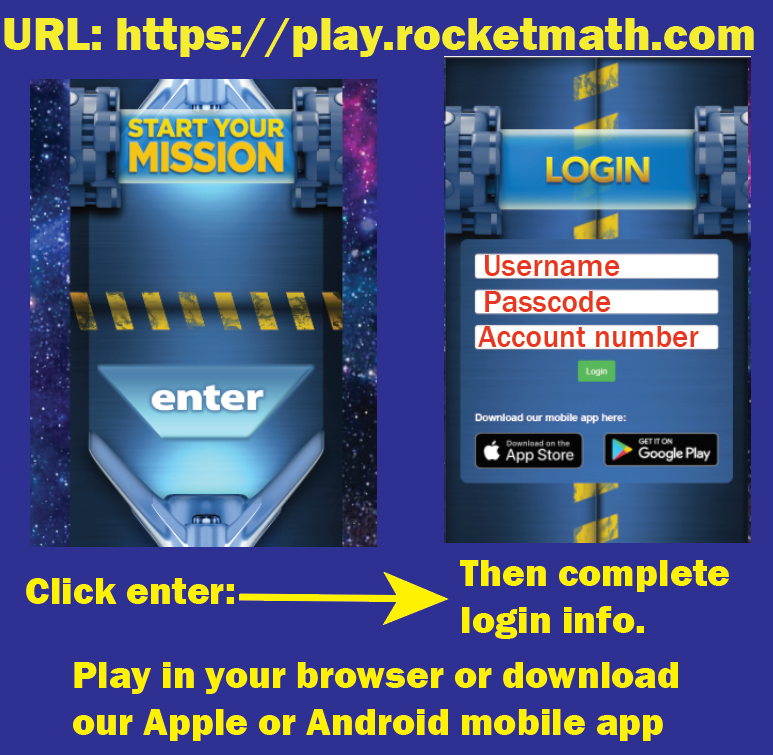
Or if a paper-and-pencil curriculum like the Rocket Math Worksheet Program involves standing at the copy machine, is not what you are looking for, Rocket Math is now online. The Online Game app starts with a complimentary initial subscription of 14 days. You can learn more about it at that link. Or you can just go ahead and register an account and start it on this link


Send an email to me at don at rocketmath.com and I’ll extend the complimentary subscription as long as you need to decide.** If you need one to ten seats it is a whopping $4.50 a seat for a year. Twenty or more seats are $2.50 each for the year and per-seat prices go down from there. Really there’s no reason to leave kids counting on their fingers.

A student must re-do part of Rocket Math? Motivate with the Toughness Certificate.

To encourage perseverance recognize and promote it when it is needed.

Print the Toughness Certificate pdf from here.

There are a variety of circumstances in which a student must re-do part of Rocket Math.  Sometimes you may accidentally re-set them back to Set A in the Online Game.  On occasion, a student’s folder may be lost in the Worksheet Program.  Sometimes they move in from elsewhere claiming they already completed up to some level for which they have no evidence.  You may see they are not at mastery at the level they are on and wisely decide to have them repeat the sequence over  at Set A.  These all call for perseverance and call for the Toughness Certificate.

Introduce the student to the Toughness Certificate

To make use of the Toughness Certificate, post it somewhere in your room.  When a student has to re-do part of Rocket Math or when they complain about too many Start-Overs in the Online Game, or starts to complain about having to re-do part of a Learning Track, take them over to the certificate, point to it and introduce them to the Toughness Certificate.

Toughness Certificate pep talk

“This certificate is for people who have to do hard things.  I know it is hard having to re-do Rocket Math.  It takes a lot of perseverance to keep going all the way to Z.  If you can do it without whining about it, then you will earn this Toughness Certificate.  Not everyone can earn this, but if you can prove you’re NOT A WHINER, I will award this to you.  Dr Don knows how hard this is and he and I will have signed this for you and you will have earned it!  Do you think you can do this even though it is hard?  Are you tough enough?”

Remind them of the certificate when they complain

Each time a student complains about having to re-do Rocket Math, remind them of the Toughness Certificate and that they can earn it, if they can hang in without complaining.  If they don’t complain, also remind them of the Toughness Certificate and how they are clearly earning it by not complaining. “You are really tough.  I can see you are earning a Toughness Certificate.”

When the student passes Level Z award the Toughness Certificate publicly

When students complete a Learning Track or pass Set Z in the Worksheet Program, you should make a ceremony of awarding the Toughness Certificate.   Call them to the front of the room.  Read the copy at the bottom aloud in front of the class.  Say, “Dr. Don and I are awarding this Toughness Certificate to (insert name) for extraordinary perseverance for starting over in parts of Rocket Math without whining about it.  We know it was tough, but we admire how you did it anyway.”  Encourage a round of applause for the student and shake their hand as you hand it to them.  You might also award a Learning Track certificates for finishing a Learning Track.  You’ll make the student proud and you’ll be on your way to teaching a valuable life lesson: perseverance.

Rocket Math’s Foolproof Method to Finding Factors (A.K.A. Factor Pairs)

In order for a student to expand or reduce fractions or to add and subtract unlike fractions, they need to know how to find factors for each number in the fraction. Students may know multiplication facts, but still, find it difficult to come up with all the possible factor pairs for a given number. The key to helping students with this task is to teach students a systematic method of identifying all factor pairs and then committing both the process and some common numbers to memory.  

Both the Rocket Math Online Game and Worksheet Program uses a foolproof, systematic method for teaching students how to find all the factors of a number. By reading this article, you’ll learn what factors are, how to help students find all the factors systematically, and how both the game and worksheets incorporate the method into each program.


What are Factors of a Number

Factors of a number, such as 12, are pairs of whole numbers whose product is that number. For example, 2 x 6 = 12, 12 is the product, and the factor pair is 2 x 6. Other factor pairs for 12 include 1 x 12 and 3 x 4 because multiplied together, each of those factor pairs equals 12. 


Finding Factors: How do You Know When You Have Found all of them?

Identifying some of the factors of a target number isn’t hard, but knowing when you have accounted for ALL the factors can be hard for students. Rocket Math’s Worksheet Program helps students find and memorize all the factors for 22 common numbers. Watch this video to see how Dr. Don uses the worksheet program to teach students how to find all of a number’s factors in a systematic way.
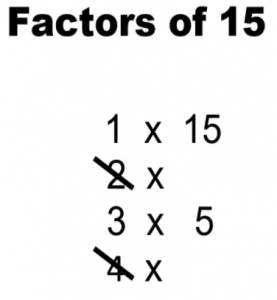
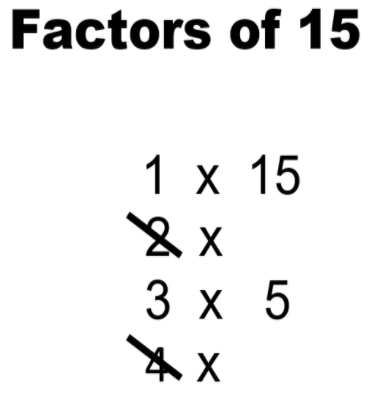
Worksheet finding the factors of the number 15.

  1. The best method for teaching students how to find factor pairs is to have them start at 1 and work their way up. Give your students a target number and ask them to put “1 x” below it. Let them fill in the right side with the number itself. We know that any number has one “factor pair” of 1 times itself. 
  2. Then ask them to move on to 2, and ask themselves, “What number times 2 equals the target number?” If the target number is even, there will be a number on the right-hand side of that pair. If the target number is odd (like 15), there won’t be, and the student should cross out the 2, as it is not a factor of the target number.
  3. Next, the student moves on to 3. They ask themselves, “What number times 3 equals 15?” Because 3 x 5 equals 15, students write 5 down because that is the next factor pairing 15. 
  4. Next, students move on to 4. They ask themselves, “What number times 4 equals 15?” When students run across a number that is not a factor of the target number, they should cross it out. So they cross out the 4.
  5. The next number is 5, but it is already showing on the right side of the factor pairs. When that happens, students can be sure they have found all the factor pairs of the target number.

In the end, students will be left with a list of factor pairs that multiply to create the target and a list of crossed-out numbers that are not factors.


Rocket Math Online Game – Finding Factors & Primes Track

Building on what the Worksheet Program has to offer students, Learning Track #15 (Factors & Primes) of the Rocket Math Online Game helps students systematically identify, practice, and memorize factor pairs of every number from 2 through 40 and 42, 45, 48, 49, 50, 64, 72, 75, and 100.


Students answer with the NEXT factor pair in order

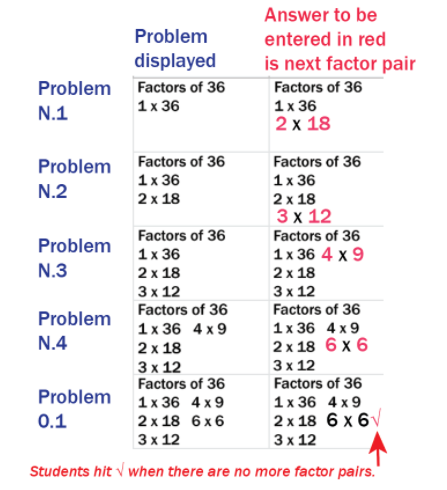
Example of Rocket Math's Finding Factors worksheet.The Learning Track Factors and Primes has a unique way of teaching students the factors. Students learn the factor pairs, in order, starting with 1 and itself. For example the factor pairs of 36, in order, are 1 x 36, 2 x 18, 3 x 12, 4 x 9 and 6 x 6.   Students are shown some factor pairs in the display (see problems displayed in N.1 through O.1). They must either enter the next factor pair in order or hit the checkmark if there are no more pairs. You can see the five problems that deal with the factors of 36 that students encounter in the Factors and Primes Learning Track.  

When students see problem N.1 displaying “Factors of 36, 1 x 36” they learn that the next factor pair is 2 x 18, so they enter a 2, a 1, and an 8, and the game displays them as shown.  If the student does not enter the next correct factor pair, the game’s audio voice recording (called Mission Control) says, “The factors of 36, in order, are 1 times 36 then, 2 times 18. Go again.” The game then provides an opportunity to answer that problem again, twice, and then interspersed with other problems, twice more before the game considers that pair of factors learned.    

When students see problem O.1 they see all the factor pairs of 36 displayed. They know that they have all the factor pairs because the same number is in the left-hand column and the right-hand column. Students are to hit the checkmark √, to indicate there are no more factor pairs. The game’s audio voice recording correction is, “There are no more factors of 36. Just hit the checkmark. Go again.”


Prime numbers
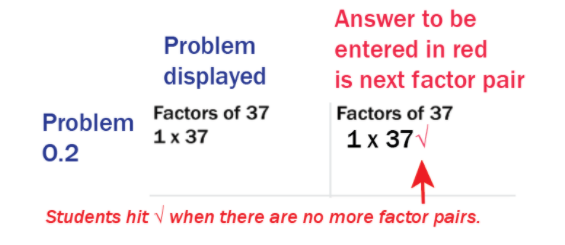
An example of the Rocket Math's Finding Prime numbers worksheet.Any of the numbers that students learn are prime numbers will begin with the first factor pair of 1 times the number itself. For example, in problem, O.2 students see “Factors of 37. 1 x 37.”  Students are to hit the checkmark to indicate that a number is a prime number.  The game’s audio voice correction is, “37 is a prime number because its only factors are 1 times itself. Just hit the checkmark. Go again.”  In this manner, students learn all the prime numbers from 2 to 40 in this Learning Track.  

Students should learn their multiplication and division facts first before working on Factors and Primes. Once those are mastered in the Online Game, students who are already trying to find the greatest common denominators in working with fractions the Factors & Primes Learning Track will help them greatly.  They will exit knowing the factor pairs of these most common numbers and they will find this work much easier.


Make finding factors easier (and more fun!) for your students with Rocket Math

With Rocket Math’s Factor Worksheet and the Online Game, your students can say goodbye to slow progress and hit-and-miss strategies. The Worksheet and Online Game can be used separately or in tandem for extra practice.

Get Rocket Math’s Factor Worksheet!   
Try Learning Track #15 (Factors & Primes) of the Rocket Math Online Game for Free!