Dictating Sentences, do students need automaticity in spelling too?

Few teachers realize how similar spelling and math facts are.

Both spelling and math facts are tool skills. Tool skills are things which one needs to do academic work, tools you use to do other things.  The tool skills of spelling and math facts (like decoding) need to become so automatic that students don’t have to think about them.

If students have to think up the answer to math facts, it makes doing computation harder.  The process of figuring out a math fact distracts from the mathematics being done.  Similarly, if you have to stop and think of the spelling of a word (like the boy pictured above) while you are trying to write, it distracts you from thinking about what you are trying to write.  Students are more successful and better able to show what they know and better able to focus on learning when their tool skills have developed to the level of automaticity.

Daily practice develops automaticity.  Developing automaticity with math facts and with spelling requires a lot of practice.  Daily practice is best and a few minutes a day is optimal.  That is why Rocket Math is designed the way it is–to provide that daily practice.  So Dictating Sentences gives each member of the pair ten minutes a day of practice writing sentences composed of words they know how to spell.

Dictating Sentences is spelling with a twist.  Instead of spelling one word at a time, in Dictating Sentences (now part of the Universal Level Rocket Math Worksheet Program) students are asked to write an entire sentence from memory.  They work in pairs and their tutor has the student repeat the sentence until it is learned.  Then the student has to write the whole sentence from memory.  It turns out this is considerably harder than writing words on a spelling test, so it is challenging practice, and does a lot to help students develop automaticity with spelling.

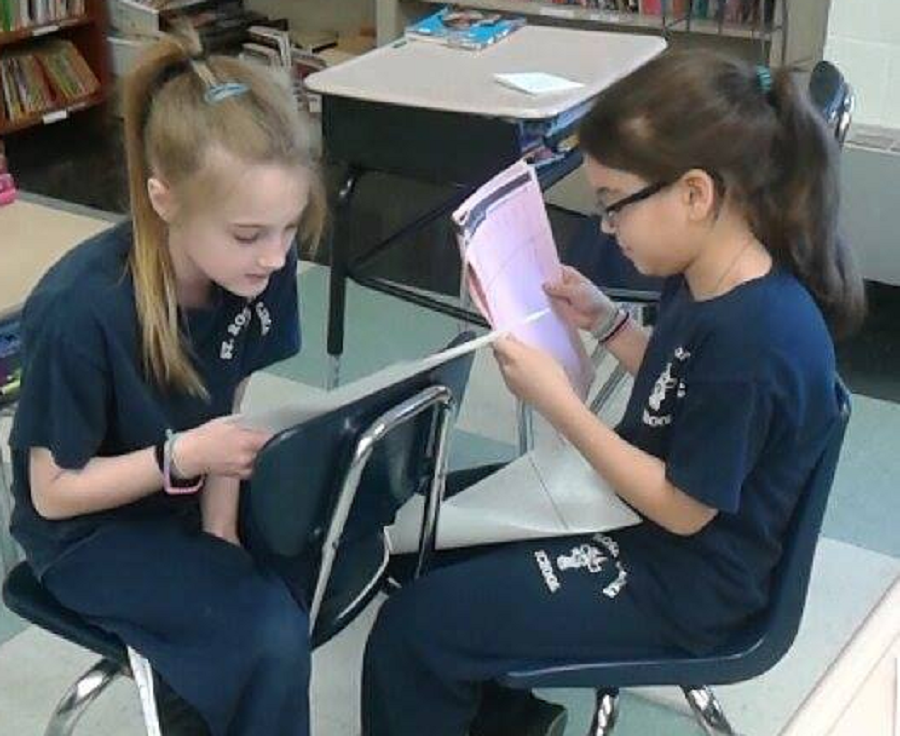
Working in pairs.  As you know from Rocket Math practice, students enjoy working in pairs.  And when one partner has an answer key the practice can be checked and corrected.  Sound research shows that immediate correction and editing of misspelled words is the fastest way to learn the correct spelling, so that’s what we have the student tutor do.  After each sentence is written every word is checked and practiced again until it is correct.

Mastery learning. The program is structure so that all the words are learned to the level of automaticy.  Students keep working on a sentence until it can be written without any errors.  They work on the same lesson for as many days as is needed for them to spelling every word perfectly in all three sentences.  Each sentence persists for two or three lessons, so that the student is required to write it from memory and spell every word perfectly for several days in a row.

Earning points by being correct and going fast.  Students earn two points for every word that is spelling correctly the first time.  Every word on which there is an error is worked on until it too can be spelled correctly, earning one point.  The faster students go during their ten minutes, the more points they can earn.  Students graph the amount of points earned and try to beat their own score from previous days.  Teams can be set up and competition for the glory of being on the winning team can enhance the motivation.

Individual Placement.  There is a placement test.  Students begin at the level where they first make a mistake.  Student partners do not need to be at the same level, so every student can be individually placed at the level of success.
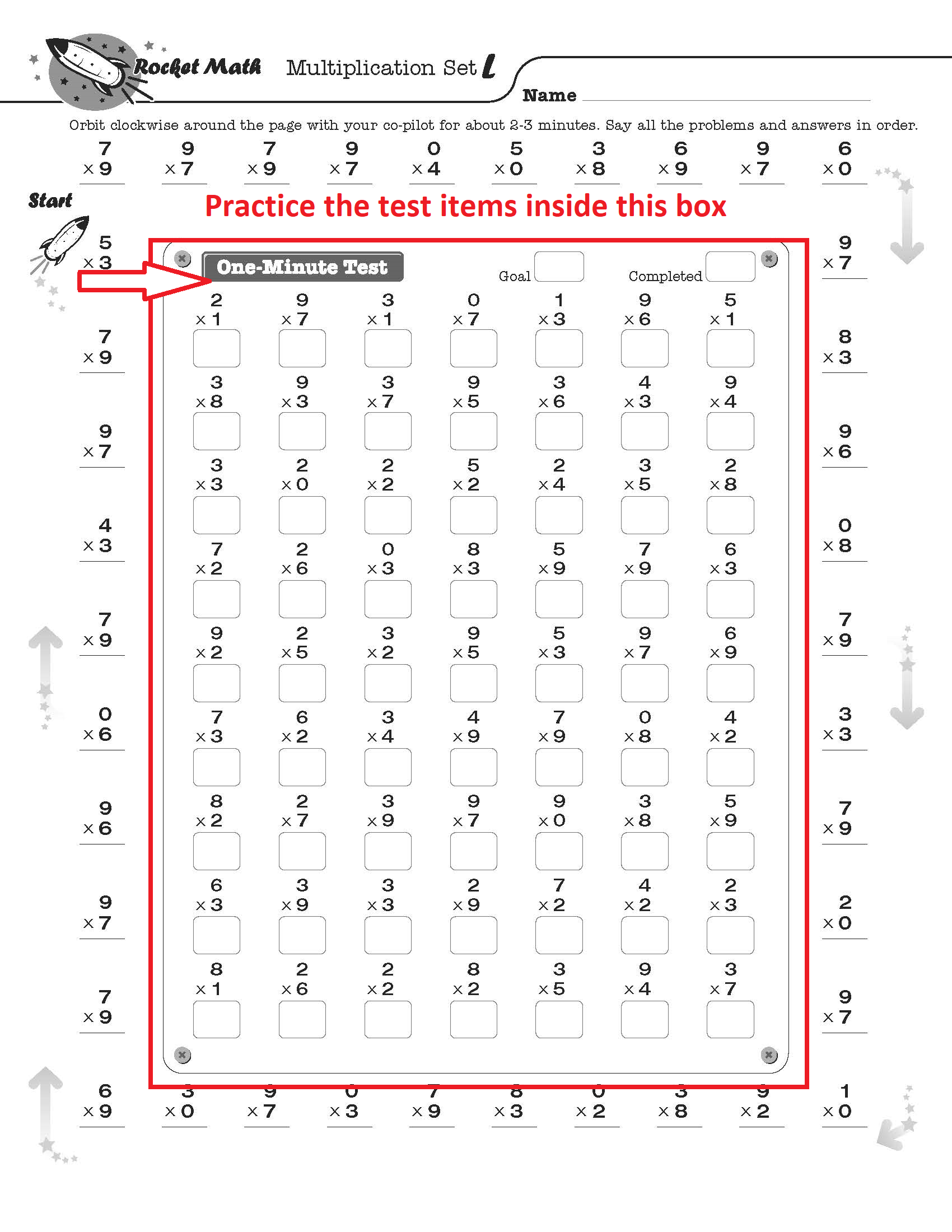
Intervention Tip: Have students practice test

Sometimes students need to review test problems also.

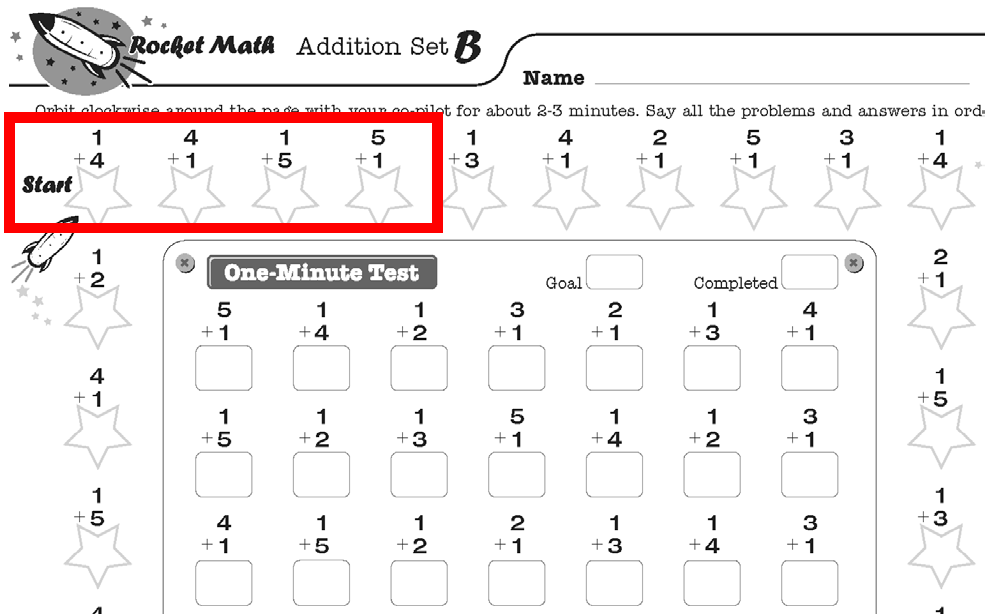
You know that there is a difference between the test problems and the practice problems, right?  The problems practiced around the outside are the recently introduced facts.  The problems inside the test box are an even mix of all the problems taught so far.  Sometimes students have forgotten some of the older facts.  For example, if there has been a break for a week or more, or if the student has been stuck for a couple of weeks, the student may have forgotten some of the facts from earlier and may need a review of the test problems.

How you could diagnose for this problem.  Have the student practice orally on the test problems inside the box with you.  If the student hesitates on several of the problems that aren’t on the outside practice, then the student needs to review the test items.

Solution. If you have this problem with quite a few students (for example after summer break or after Christmas break) then have the whole class do this solution.  For the next week, after practicing around the outside, instead of taking the 1 minute test in writing, have students practice the test problems orally with each other.  Use the same procedures as during the practice—two or three minutes with answer keys for the test, saying the problem and the answer aloud, correction procedures for hesitations, correct by saying the problem and answer three times, then going back—then switch roles.   Do this for a week and then give the one-minute test.   Just about everyone should pass at that point.

Solution.  If you have this problem with a handful of students, find a time during the day for them to practice the test problems orally in pairs.  If the practice occurs before doing Rocket Math so much the better, but it will work if done after as well.  They should keep doing this until they pass a couple of levels within six days.

If neither the first or the second solutions seem to work, write to me again and I’ll give you some more ideas.

Why give the Two-Minute timings in Rocket Math?

To prove whether students are making progress in learning math facts.

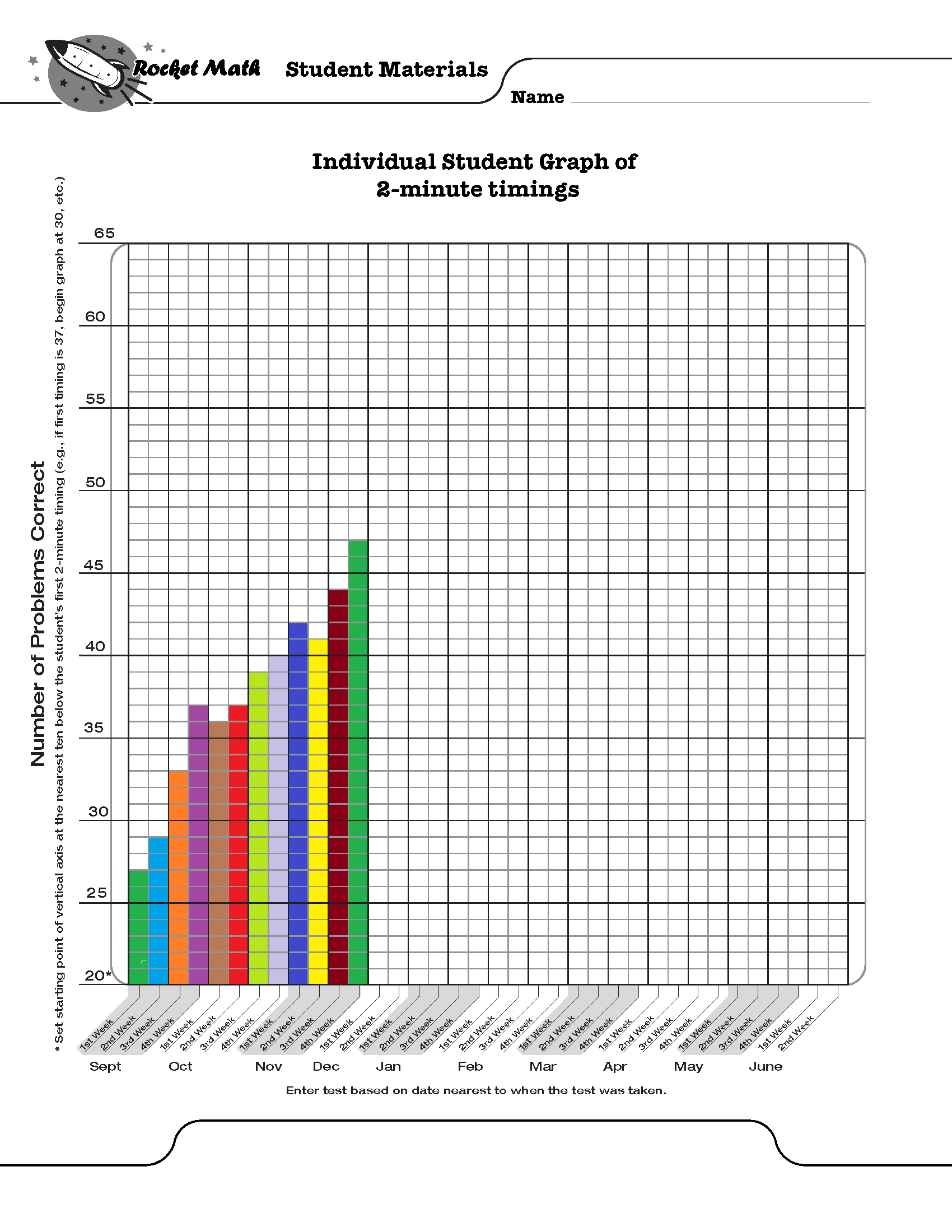
First of all, understand that the two-minute timings are NOT a teaching tool.  They are an assessment tool only.  Giving a two-minute timing of all the facts in an operation every week or two allows you to graph student performance.  You graph student performance to see if it is improving.  If the graph is going up, as in the picture above, then the student is learning.   If the graph is flat, then the student is not really learning.

The individual graphs should be colored in by students allowing them to savor the evidence of their learning.  The graphs should be shared with parents at conference time to prove that students are learning.  

Progress monitoring with two-minute tests are a curriculum-free method of evaluating a curriculum.  If you use the same tests you can compare two methods of learning facts to see which one causes faster growth.  This makes for a valid research study.

This kind of progress monitoring over time is also used in IEPs.  You can draw an aimline from the starting performance on the two-minute timing to the level you expect the student to achieve by the end of the year.  (Note the writing speed test gave you goals for the two-minute timing which you could use for your end-of-year goal.) The aimline on the graph, when it crosses the ending date of each quarter, will provide quarterly objectives that will enable quarterly evaluation of progress–required for an IEP.

These two minute timings are a scientifically valid method of proving whether students are learning math facts, in the same way that tests of oral reading fluency prove whether students are learning to read.  They can be used to prove to a principal or a curriculum director, for example, that Rocket Math is working and is worth the time, paper and money it requires.


Are your students wary of working with integers?

Many students find integers confusing.  If you add a negative to a negative are you getting more or less??? Over the years different “rules” have been used to try to remember what should happen.  Rules such as “two negatives make a plus” or “opposite signs subtract.”  Whatever is used to try to remember, it interferes with a student’s ability to quickly and reliably get the answers without having to stop and puzzle it out.

A screenshot of Rocket Math's beginning integers program where students learn through vertical graphs.A Vertical Number line is more intuitively obvious for learning integers.

I have posted a series of free lessons online (links below) that use a vertical number line to take some of the confusion out of the process.  Turns out there are a total of eight types of problems but all of them can be solved with the same process on the vertical number line.  Intuitively on a vertical number line, up is more and down is less.

(1) Mixed Integers Set A1 Positive add a positive

(2) Mixed Integers Set A2 Positive subtract a positive

(3) Mixed Integers Set D Negative add a positive

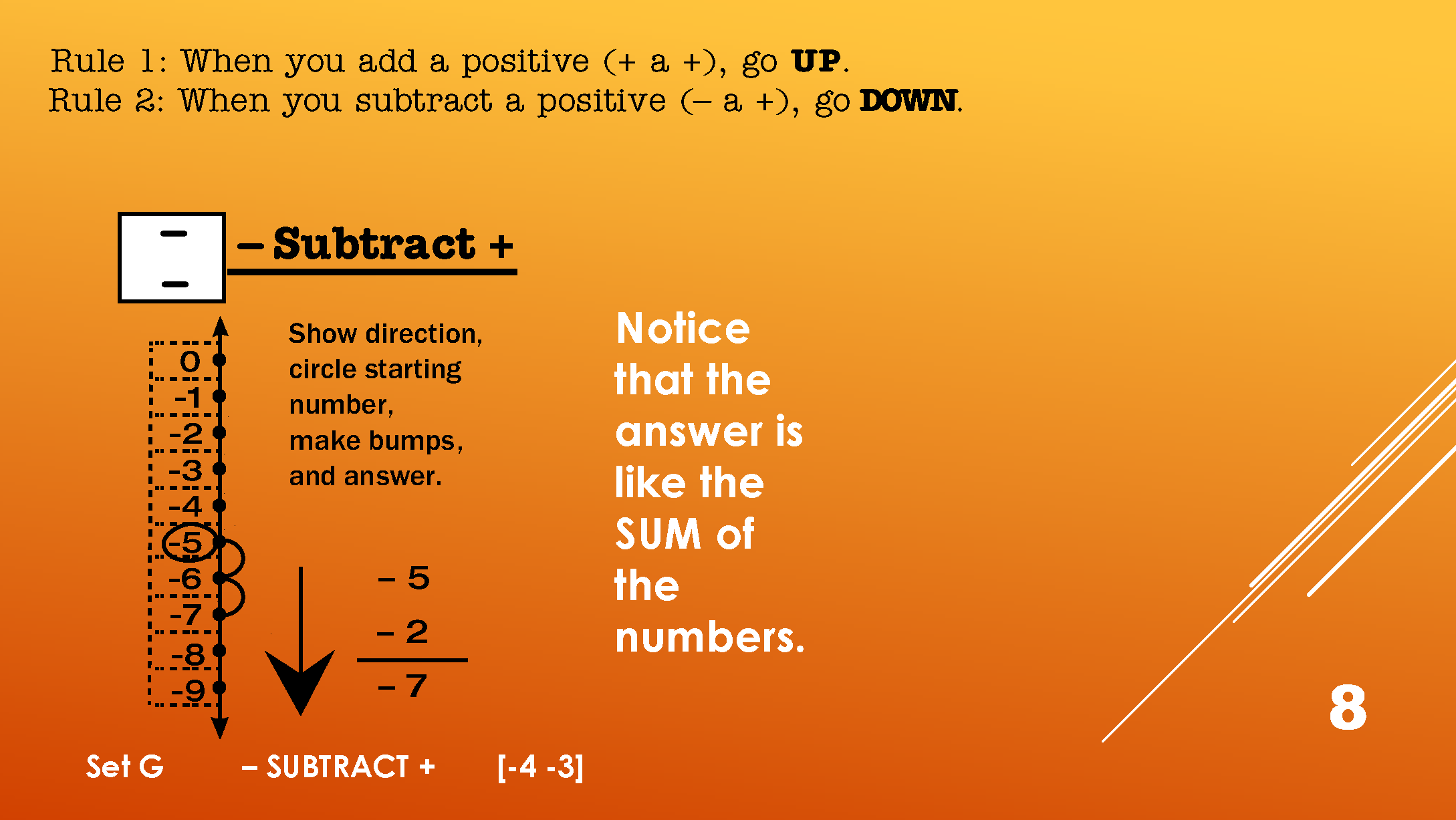
(4) Mixed Integers Set G Negative subtract a positive

(5) Mixed Integers Set J Negative subtract a negative

(6) Mixed Integers Set M Positive subtract a negative

(7) Mixed Integers Set P Positive add a negative

(8) Mixed Integers Set S Negative add a negative


Two rules to learn: when to go up and when to go down.

Using the vertical number line there are two rules to learn.  Rule 1: When you add a positive or subtract a negative you go up on the number line.  Rule 2: When you subtract a positive or add a negative you go down on the number line.

So the first thing to figure out is whether you’re going up or down.  Once you do that you simply make “bumps” going either up or down from where you start.  That gives you the answer without any uncertainty.  These lessons are quick (about 2 minutes) and identify a pattern of whether the answer is like the sum or the difference between the numbers.  Once students can recognize the pattern they can begin to answer fluently and without a struggle.

To help with the work of learning to quickly and easily recognize each pattern in Integers Rocket Math now includes three “Integers” Learning Tracks in our Worksheet Program Universal Level Subscription.    (Click here to get a 60-day initial trial subscription for less than the standard full-year subscription.)

Screen shot of Rocket Math's integers program list.

Learn adding and subtracting separately or mixed.

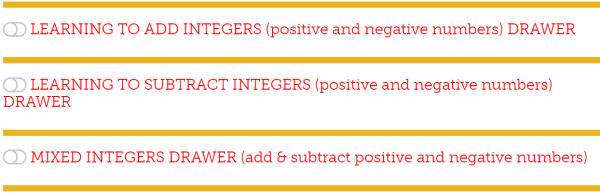
The first integers learning track, Learning to Add Integers, is limited to adding integers.  In the above list of lessons, the adding lessons are numbers 1, 3, 7, and 8.  The second integers learning track, Learning to Subtract Integers, is limited to subtracting integers and teaches the processes shown in lessons 2, 4, 5, and 6.  The third learning track, Mixed Integers Drawer combines all 8 processes into one learning track.  If students are likely to have issues or begin to find the Mixed Integers lessons difficult, have them do the separate operation first.

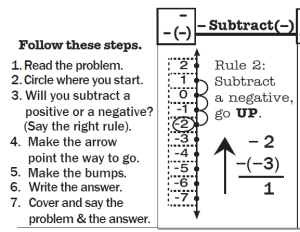
In the Rocket Math Integers lessons, students use the vertical number line to work a problem. A screen shot of Rocket Math's subtracting integers worksheet.In this example: -2 minus (-3).  They use a rule and then apply it to the number line to find the answer. Then they have a set of problems with the same pattern they can orally answer without having to use the number line.


Students practice with a peer partner

As with all Rocket Math programs, there is a 3-minute practice session, with a partner.  The partner who is checking has the answer key and corrects all errors immediately.  Then the two switch roles.  Then the practice is followed by a one-minute test.  If the student can answer the problems without hesitation the level is passed.  If it is still difficult the student stays at that level a bit longer.  When a new pattern is introduced the tests will have a whole row of problems that are the same pattern. When that level is passed the next test will have two types of problems in each row.  The next level has 3 types, then 4 types in each row.  Then the problem types are mixed.  This way the student develops fluency in recognizing the type of problem and how to derive the answer quickly.

Rocket Math has a money-back satisfaction guarantee.  If you try this and find it isn’t everything you hoped, for in terms of helping your students become fluent with integers, I’ll gladly refund your money.  I’m betting they’re going to love it.


Four star rating for Rocket Math Apps

Rocket Math App received 4 Stars!

App Names: Rocket Math Add at Home, Add at School, Multiply at Home, and Multiply at School

Developer’s name: Rocket Math, LLC

App Link :

https://itunes.apple.com/us/app/rocket-math-multiply-at-home/id1048024368?mt=8

Primary School Apps (5-7 Years)

Educational App Store Review

Rocket Math is an offshoot of an existing programme for schools designed to increase children’s speed and fluency in answering simple arithmetic. This app encourages frequent short sessions and is supported by plenty of information explaining its purpose and methods.

The purpose of Rocket Math is to build what its developer terms “automaticity” in arithmetic. A fluent reader does not need to decode simple and frequently encountered words letter by letter. The same can be true for frequently encountered arithmetic.

When automaticity is achieved in arithmetic the answers are available in an instant. The advantages of this, beyond speed, are that it leaves more of the person’s mental processes available for other aspects of the problem. If a person does not have to think about achieving simple arithmetic answers, he or she can concentrate on the more complex and lengthier aspects of a problem.

Rocket Math the app follows on from a well-established programme of the same name based on traditional written resources. Repeat practice and a steady increase in the breadth of the covered arithmetic are at the heart of its methods.

Children are taken through a series of stages in which they are faced with a rapid succession of arithmetic questions. Remember, the purpose of this app is to build fluency in frequently encountered arithmetic problems, not complex ones. As such, the questions will be simple ones and, at first, until the breadth expands, there will be little variation in them. Only three seconds is allowed per question so, for some children, developing enough fluency to progress will be difficult but others will thrive on the challenge.

Answers are given by typing them onto a built-in number pad. The app is simple to use and looks attractive. Its space-travel styling and theme add a game-like feel although it is not a game. Speech provides a response to incorrect answers and provides encouragement between levels. It all works very well and provides the exact type of practice that it promises.

An unusual but useful feature is that the app enforces its little-and-often recommendations by insisting on a thirty-minute break after 5 minutes of play. As multiple sessions are likely to yield better results than a single, marathon session, this is an excellent feature that will prevent children from relying on a last-minute catch-up rather than a steady engagement with the app. This, combined with a useful breakdown of each child’s performance in the student report screen, provides reassurance to adults that their children are making the best possible use of the app.

A family of apps is available and potential buyers should think about which they need. Two of the apps cover addition and subtraction and two cover multiplication and division. Your choice here is obviously dependent on what aspect you would like to cover.

The remaining choice is between a school and a home version. They are identical in functionality except that the home version is free to download with a lengthy trial period. The school version has a flat, one-off, fee. Prospective teachers would still be wise to download the home version first so that they can appraise the app’s suitability.

If they choose to utilise the app within their school then buying the school version will be a simpler process than the in-app purchase of the home version. It will also allow schools to utilise the volume purchasing programme whereby they can receive a discount for buying twenty or more of the same app.

Parents will be pleased to see that the app caters for up to three children. As each child engages with the app, parents can check to see how they are performing and offer help, encouragement or rewards as they see fit.   Some useful background information on the app’s purposes and usage are provided within the app itself and a more comprehensive overview of the Rocket Math ethos is available on the developer’s website.

All of the Rocket Math apps provide a learning opportunity that is tightly focused on realising their goal of improving children’s arithmetic fluency. As such, if this is a goal that you also share, you will find them good value and useful apps.

“Knowing” means never having to figure it out

Most people, for example, know their name, by memory.

In a previous blog I discussed  What does CCSS mean by “know from memory?”    

A reader asked the following question:

This topic of “know from memory” is something I have been digging into as a special educator. I wonder what your thoughts are about whether certain accommodations from these “know from memory” standards would actually be modifying the curriculum?

For example, if we used “extra time to respond” and the student had to use their fingers or some other method to count, would they then not be doing the standard?

This relates to where I’m at in middle school math, but I think that it’s reflected in the continuum of the common core maths.

Thanks.

Dr. Don’s response: 

Actually, your example is very clear that it is not “knowing from memory.” You are describing “deriving from a strategy” or what I call, “figuring it out.” When you know it from memory, when you recall the answer, then you stop having to “figure it out.”

Knowing from memory and figuring something out are two very different things. I used to ask workshop participants to imagine sitting next to me in a bar and asking me for my name. What if, instead of saying, “Hi, my name is Don,” something different happened?  What if, like the man pictured above, I was puzzled and said, “Wait a second, I have it here on my driver’s license.” Most people would likely turn their attention elsewhere while wondering what kind of traumatic brain injury I had sustained! They would very likely say to themselves, “OMG, that man doesn’t know his own name.”

The purpose of the verbal rehearsal that is a daily part of Rocket Math is to cement these basic facts in memory. Then when a student says to themselves, “8 times 7 is,” the answer pops into their mind with no effort. It takes quite a bit of practice to achieve that. However, the ability to instantly recall the answers to basic math facts makes doing mathematical computation a relative breeze. It make seeing relationships among numbers very obvious. It makes reducing fractions and finding common denominators easy. That’s why the Common Core thinks “knowing from memory” is so worthwhile. It’s why I began promoting Rocket Math in the first place.

Do you know the active ingredient in Rocket Math?

Timed tests are not the important part of Rocket Math.

The “active ingredient” in the Rocket Math prescription, the thing that makes it work, is not timed tests.  Timed tests don’t actually teach and often don’t really help students develop fluency.  The usual timed tests of a random selection of all the facts can assess fluency in math–but they don’t work to develop it!

The “active ingredient,” the thing that makes Rocket Math effective, is verbal rehearsal.  When students practice with their partner the students read the facts and RECALL the answers from memory and say them aloud.  That verbal rehearsal is what cements them into memory.  Reading the fact and recalling the answer from memory strengthens the neural connection.

Why do we give the daily tests in Rocket Math?  Not to teach, but only to assess whether the facts introduced thus far have been learned well enough for the student to have new facts added to what they are learning.  Individual students learn at different rates.  Some students need only a couple of days of practice to memorize two new facts while others may need several days.  The purpose of the daily tests is just to see if the student needs more practice time, or is ready to “swallow” some more facts.

As I note in my basic training presentation, “It’s like feeding mush to a baby.  You have to make sure they have swallowed the last mouthful before you give them more.”   See an explanation in this You Tube video in our Rocket Math channel: https://youtu.be/J8cWSDG0Di8

Looking for free math worksheets?

Do you want your students to learn OR are you just keeping them busy?

It’s OK if you need busywork.  

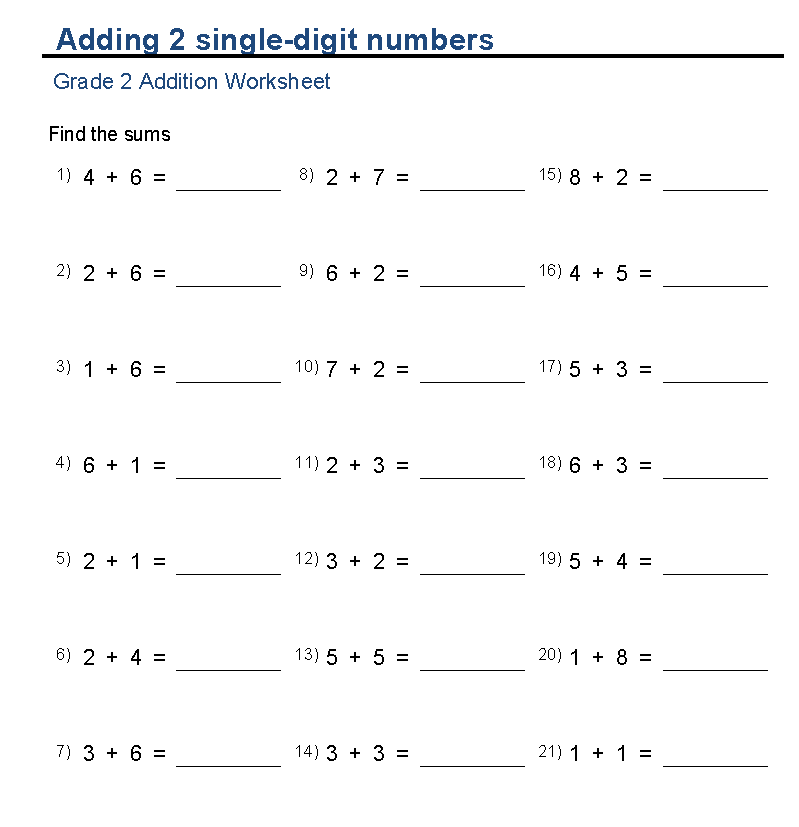
It’s critical to keep some of your students occupied in order for you to have the peace and quiet you need to teach other students.  Those free math worksheets of random facts are fine for busywork, provided students already know the facts.

Get a 60 day trial for only $13

Sign Up Now!

BUT

(and this is a big but) if you want students to actually learn facts, you need math worksheets that are more systematic than the usual fact practice worksheets.  A random mix of problems (on those free math worksheets) is fine for practicing what you already know, but it is USELESS for learning new facts.

Students who don’t know their facts are left painfully counting on their fingers to do their “work.” This just wastes their time and makes them come to HATE math.

I know, because I made my students do it for years. 🙁

 I discovered that with systematic practice students can actually learn math facts!

In order to learn new facts students must concentrate on a few they don’t know and practice those particular facts until they know them “by memory” without having to figure them out.  After students have learned those they can then tackle a few more.  That’s the only way to learn a bunch of facts.  That’s what Rocket Math does. Watch this video to see it in action.

 Rocket Math worksheets are not free, but they will actually teach. rocket math worksheets

Each sheet (A-Z) adds two new facts and their reverses, making the process of learning them painless.  By the time students have worked their way through the A-Z worksheets of an operation they know the facts “by heart” or as the Common Core calls it “by memory.”

If LEARNING is your goal, you’ll need something more effective than the free math worksheets.


Rocket Math has a MONEY-BACK guarantee.

If you spend the $13 to get a trial subscription and you decide Rocket Math doesn’t work or you don’t want to use the program, we’ll gladly refund your money.


Plus

Students have more fun and learn better when they are practicing orally, with a partner so they can get corrections and extra teaching on any facts they don’t know well.  That is part of how Rocket Math works.  So it won’t just be busywork.  Your students will actually learn the facts and be proud of it.


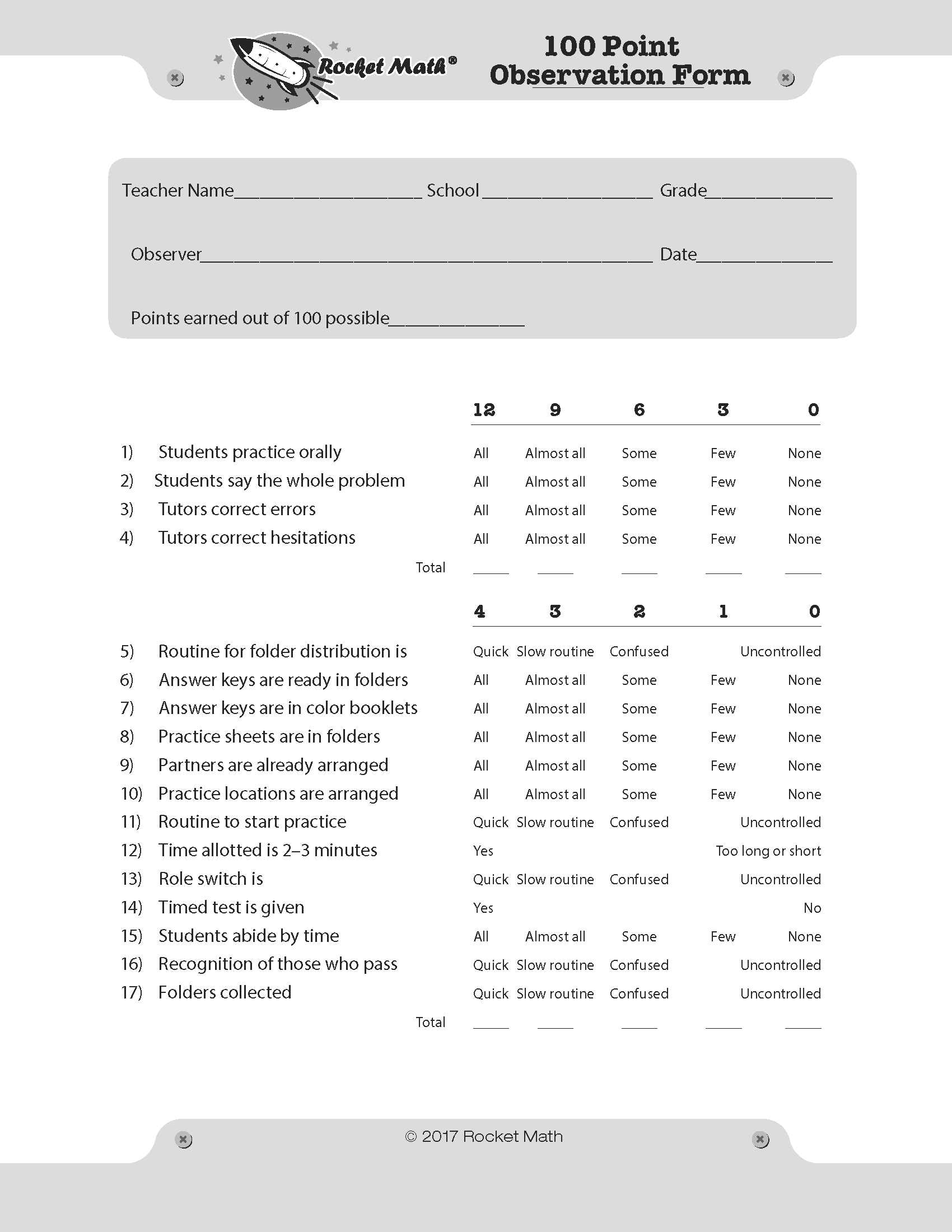
The 100-point observation form: How well do you implement Rocket Math?

Use the 100-point observation form to evaluate your implementation.

Use the 100-point Rocket Math Observation form to self-evaluate, or have someone observe your class doing Rocket Math and use the form to evaluate you.  The form observes and evaluates seventeen different indicators of the quality of your Rocket Math implementation.

You or your observer begin by looking at four important indicators of the quality of student practice.  The quality of the paired practice of your students provides most of the value of Rocket Math.  Accordingly, these four indicators provide nearly half of the 100 points.  If one or two of these things are not in place (tutors aren’t listening carefully and correcting errors AND hesitations, for example) the implementation will not earn high marks, because students won’t be learning nearly as well as they should or could.

The other thirteen indicators are mostly about the efficiency with which Rocket Math runs.  If it takes more than 15 minutes a day to complete Rocket Math, it won’t happen every day.  If Rocket Math doesn’t happen every day, students do not learn nearly as well as they should or could.

Where can you find the 100-point Observation form?

There are three places you can find this handy form.  (1) It is included in hard copy form in the Administrator and Coach Handbook which we sell and ship to you.

(2) The 100-point Observation form is also available for free on the Resources/Educator’s Resource page on our website where you can find this link to its pdf.

(3) And finally in the Rocket Math subscription filing cabinet, in the Forms and Information drawer, there is a section (pictured on the left) that is devoted to all the information in the Administrator and Coach Handbook and near the bottom you’ll see the 100-point Observation form for you to print out.

5 easy ways to get help running Rocket Math.

Here are 5 ways to get help with the procedures for successful Rocket Math implementation.

1.) Use the ***NEW*** search function.  At the upper left of the blue navigation bar is an icon of a magnifying glass.  Click on that and a search bar opens in the middle of the page.  Click within the search bar and you can type in whatever you are looking for.  It will bring up blogs, parts of the directions, basically anything I’ve written on the subject–which is a lot.  You can get pretty specific very fast, so try this first.  I’m very excited to have added this feature this week, which is why it is top of my list!

2)  FAQs.  Look at the Rocket Math FAQs page.  Click on the linked words to the left, or navigate to it.  The FAQs page is the third Rocket Math Filing cabinet on the webitem under ABOUT in navigation.  The FAQs page displays all of the questions from the teacher directions, and my answers, so you can scroll down to the topic you need quickly.   However, all the FAQs will show up in the search function as well.

2.5) The FAQs are also available in the Rocket Math filing cabinet.  They are in the top drawer, the “Forms and Information” drawer of the filing cabinet.  There are titles of the FAQs so you can open and print any one you wish.  Good for sharing with other staff.

3) Rocket Math YouTube channel. You can go to the Rocket Math YouTube channel.  Click on the linked words to the left, or search for Rocket Math in You Tube.  If you scroll down the page you can click on “View Full Playlist” and then you’ll be able to see all the topics that are available.  Right now there are 37 videos, but that could change if we add some more.

4) DVD training.  Order the Workshop Training DVD (#2004) for $29  This is the whole training from Dr. Don filmed and broken into chapters.  It is over 3 hours and gives a lot of rationale for the procedures we recommend.  Very helpful if Rocket Math is new for your staff.  Really important to do things as recommended.  Having coached this in many schools for many years, I can promise you it will go better if you follow the directions!

5) Contact Dr. Don.  Really.  You can call me (800) 488-4854 during west coast school hours and I’ll probably be able to answer the phone directly.  It’s a joy for me to talk about implementing Rocket Math with teachers, so don’t be shy.  But if you don’t reach me, please send an email to don@rocketmath.com rather than leave your phone number because during the school day teachers are very hard to reach.  I’d rather just write an answer in an email so we don’t miss each other.  And if it is a new question I’ll probably turn my answer into a blog that can be found through the search function.