How to reset your Rocket Math password

Four steps to get back into your account with a new password

There are 4 steps to get logged in if you haven’t done so since August 2017, or if your password doesn’t seem to work.  We have changed the look and location of the login screen.  You can access it from the top of the Rocket Math home page.

Step 1: Get to the login screen and click on “Reset Password.” 

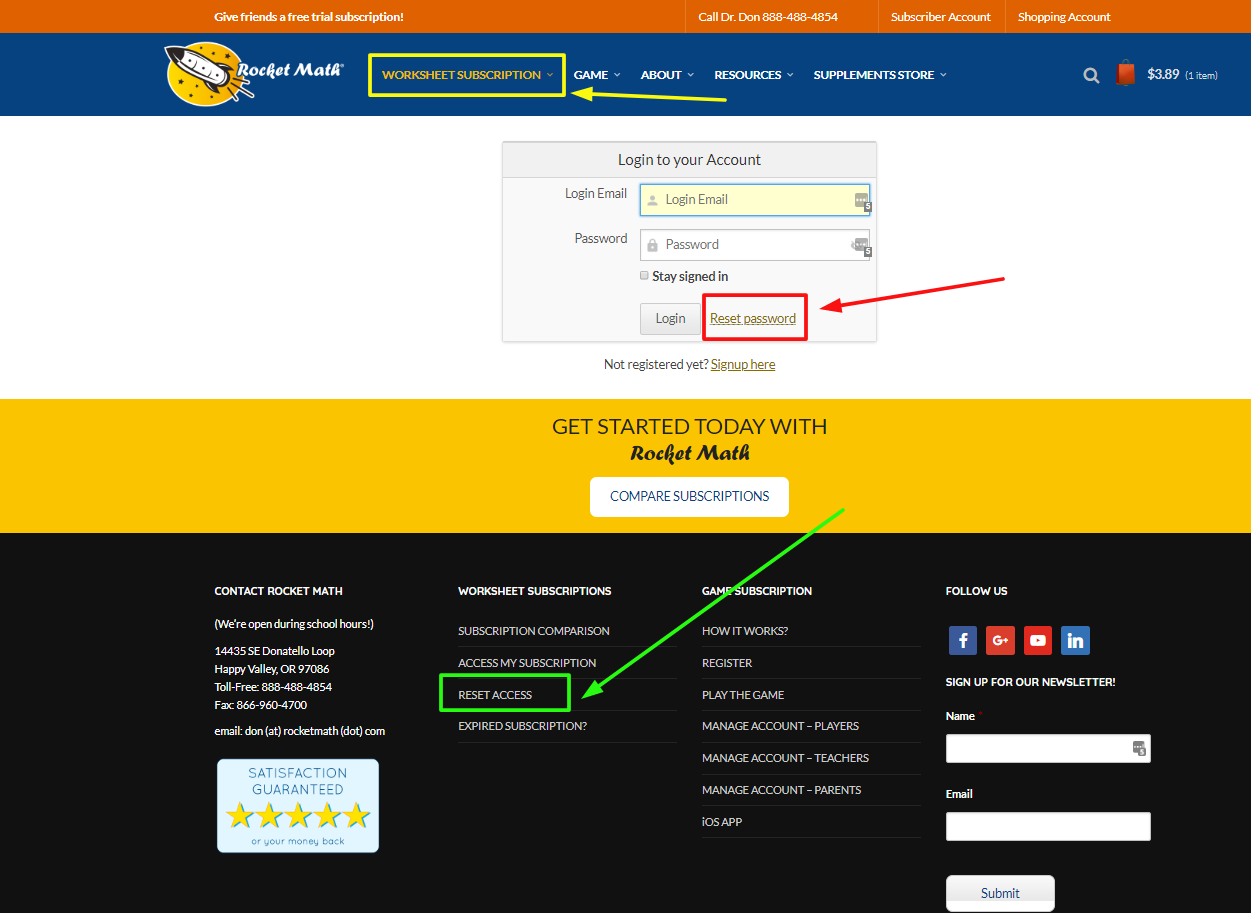
You can click on “Teacher’s Subscription” on the blue bar, or hover and pull down to “Login,” or click on “Subscriber Account” on the orange bar.  All of them will take you to the “Login to your Account”  screen pictured here. (We had to change everyone’s password in August with the new system, so your old password won’t work, so step one is to change it.)
 The good news is all you have to do is click on Reset Password and it will take you to a screen where you can request a Password Recovery email.
P.S. You don’t even have to enter your email address on this screen–but you probably already did, so don’t worry about it.
  

Step 2: Request a password reset.
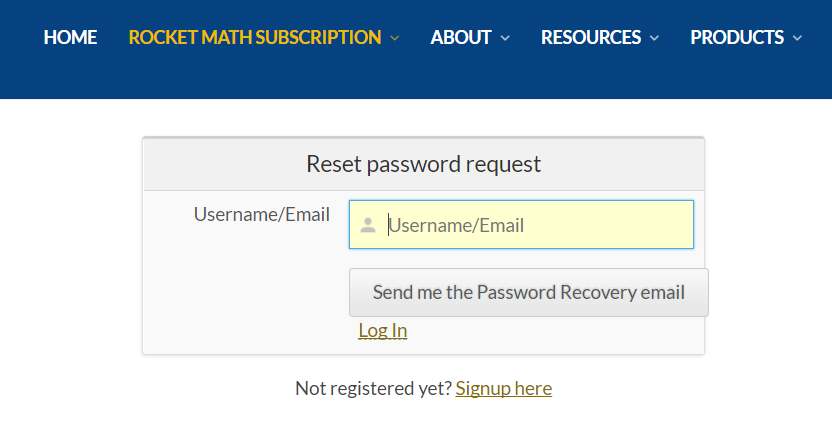

The Reset Password request asks you to tell the system where to send the Password Recovery email.  So fill in that box with your email address and then hit the button “Send me the Password Recovery email.”


Step 3: Open the email and Reset your Password.
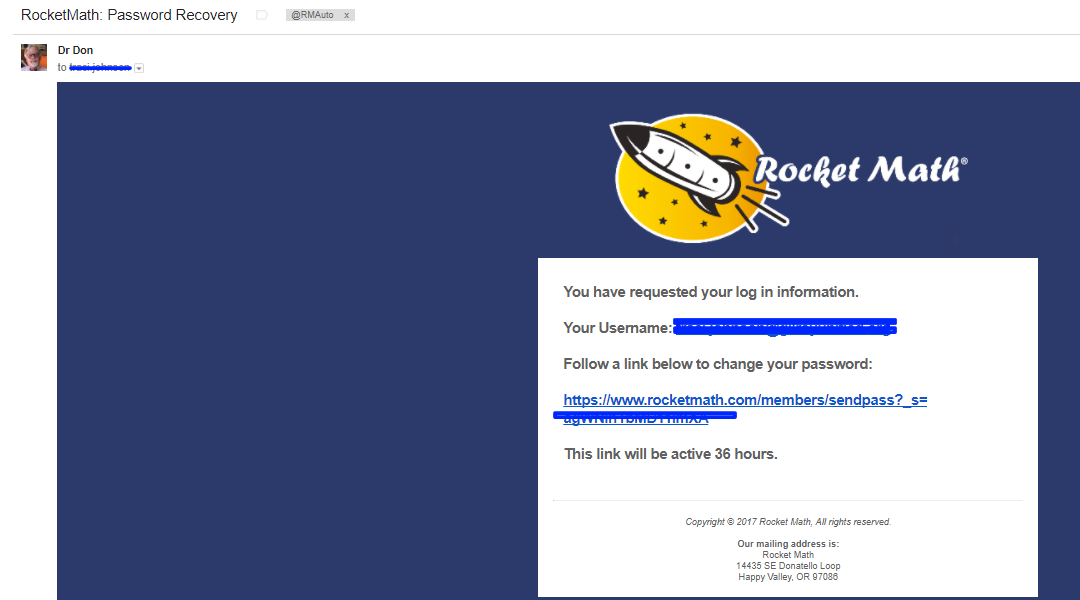
Look for and open the Rocket Math: Password Recovery email.
You’ll get (pretty much instantly, so you don’t have time to go refill your coffee) an email entitled Rocket Math: Password Recovery that looks like this.  It gives you a link to go to a place where you can enter a new password.
 
P.S. Hint: This new system doesn’t know your old password, so you can use it again, which I highly recommend, if is is one you can remember.

Step 4: Go back to the “Login to your Account” screen and login.

Now you go back to the Rocket Math home page and click on “Teacher’s Subscription” on the blue bar, or hover and pull down to “Login,” or click on “Subscriber Account” on the orange bar.  All of them will take you to the login screen where you enter your email (as username) and new password.

Why should you renew your Rocket Math Worksheet subscription?

Reason #1 to renew: So we can be here for you.

Your subscription enables Dr. Don and our team to be available to help you with Rocket Math.  We can be here to answer your questions, help you with your implementation, provide customer service at assistance@rocketmath.com and to continue to expand our offerings.
Every day we correspond with and often get to talk with customers who have questions and need help. We have added programs such as Add to 20, Subtract from 20, Fact Families, Skip Counting and others to the Worksheet Subscription. (Check out the list on this link.) We are quite excited about the Learning Computation programs for addition, subtraction, multiplication and division.  Additionally, we have added tools such as the classroom wide aimlines in Excel to keep track of the progress of your whole class.  Most exciting of all, I have developed the Online Tutor that students will be able to use at home and at school with one log-in. Your subscriptions make all of that possible.  Thank you.

Reason #2 to renew: It will extend your permission to copy. 

The second reason to renew is that your subscription gives you “permission to copy” the materials only for a limited time.  After the subscription expires, permission to copy the materials also expires (it is no longer granted).  As you can see, the footers on our materials now show your name and the expiration date.  Don’t embarrass yourself by continuing to print these materials after your subscription has expired.  In order to continue printing and copying the Rocket Math worksheets, I ask that you please renew your subscription.

Reason #3 to renew: Access the virtual filing cabinet.

The third reason to renew is so that you continue to have access to the Rocket Math filing cabinet on the web.  New and updated materials are constantly being added to the filing cabinet. The materials now number in the thousands of pages!
 You can much more easily print from the website filing cabinet, than you can from a paper master copy.  You can print from home and even print from your phone.
Worksheets are updated in the filing cabinet.  When anyone finds an error in one of the thousands of worksheets, I can change it the same day in this virtual filing cabinet.  When anyone asks for a new form, I can share it with everyone instantly.

How to access (get into) my Worksheet subscription

Access your Worksheet subscription by logging in where it says  “Worksheet Subscription,” (outlined in yellow.)  It will take you to the login page you are seeing here, or you can click this link now https://www.rocketmath.com/members/login.

If you can’t remember your password you can hit our handy “Reset Password” link (outlined in red) to change it.  That will ask you for your email.  After you enter it you can send yourself an email to change your password.

** Here’s a hint: we don’t mind if you “reset” your password to what you thought it was in the first place, even if that was what you had previously, we won’t tell you that you used that one already. In other words, you don’t really have to change it. 

If you still can’t get in, try the reset access button at the bottom of the page (outlined in green.)

Once you login you should be taken straight into the Rocket Math File cabinet (pictured to the right).  You can open drawers and print files right from here.  Note the drawers that are part of the Basic subscription are labeled in blue.  The red-labeled drawers are only accessible to those with a Universal subscription.

You can get to your account (to upgrade or renew or change something) by clicking on the “Subscription Manager” link (outlined in yellow).

Be sure to “Logout”  (outlined in red) when you’re done in the filing cabinet.

If your Rocket Math subscription has expired

What if your subscription to the Rocket Math “filing cabinet on the web” has expired?

If you are still using Rocket Math, please consider renewing your subscription now.  


I think subscriptions that renew automatically, even when you aren’t using them, are a rip-off, so we don’t use them.  With Rocket Math you will need to take action to renew your subscription.

If you can’t log-in to the page shown below, here is how to reset your password. 

How to Renew your subscription–in 2 steps.

1.  Click into the Subscription Manager page.

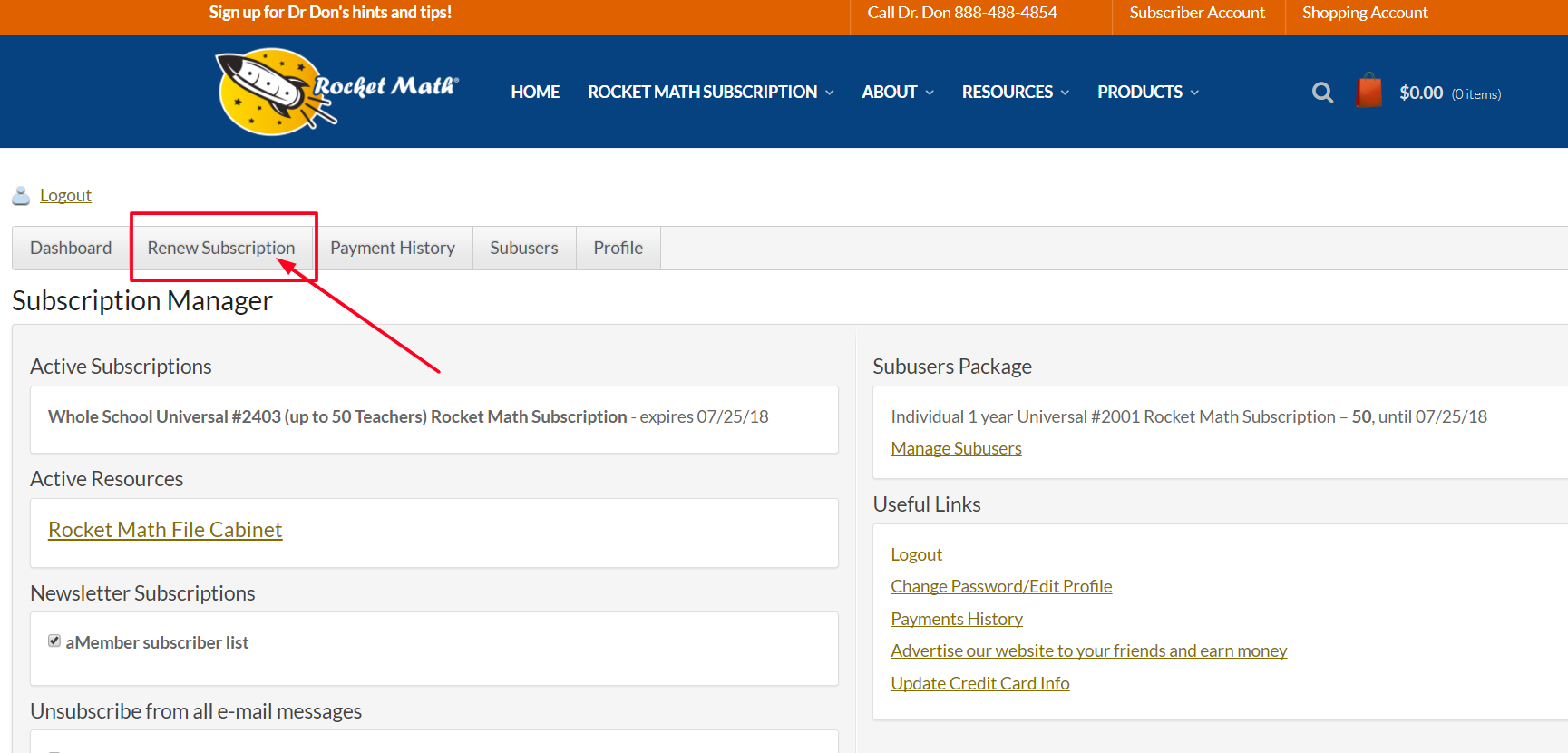
Once you are logged into your account you’ll see the blue header and in the center (outlined in yellow in the picture) you’ll see “Subscription Manager.”  Clicking on that will take you to your account page.

2.  Click on the Renew Subscription button. 

Your account page will look like this. The top bar has tabs including one to Renew Subscription.  Click on that and you can choose which type of  subscription you would like (Basic or Universal) and what size (individual, 3 teachers, 6 teachers or Whole School) and then choose your method of payment (credit card, PayPal, or Purchase Order).


 Thank you for your support.

Dr. Don

Rocket Math: Because going fast is more fun.


Learning subtraction computation–easily and confidently

In 18 easy-to-manage steps!

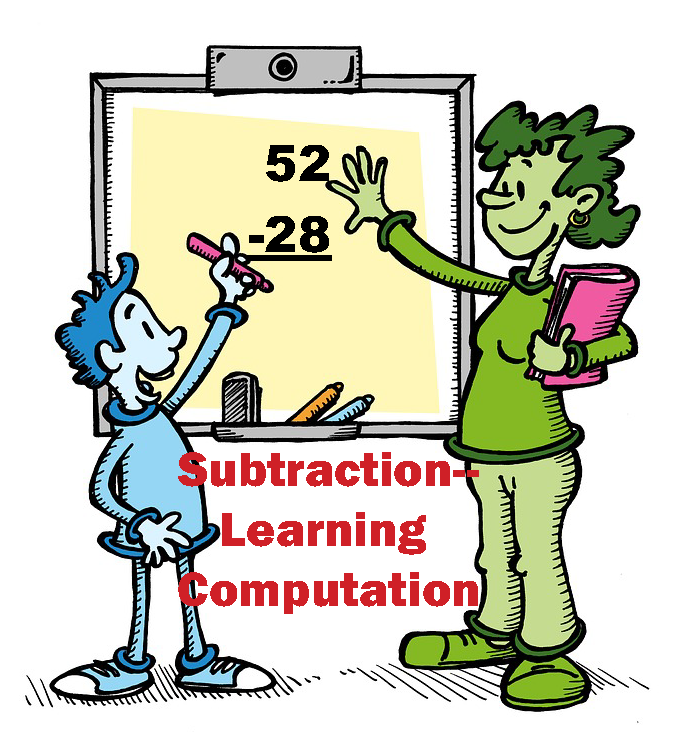
Rocket Math Universal Subscription now includes Subtraction–Learning Computation.

After becoming fluent with subtraction facts the best way for students to retain the knowledge of those facts is by doing subtraction computation.  If students have not been taught subtraction computation, Subtraction–Learning Computation breaks it down into 18 small, easy-to-learn steps that are numbered in a teaching sequence that leaves nothing to chance.  Even better the instructional materials include an assessment of all the skills in subtraction computation in order, so you can test the knowledge of the student(s) before beginning instruction to see where to start. You can use this assessment to find very specific “holes” in student skills and then have the exact problems and explanation to fill that hole.

Note that the number for each skill gives the grade level as well as indicating the teaching sequence.  Skill 3b is a 3rd grade skill and after skill 3g is learned the next in the sequence, skill 4a is best taught in fourth grade.  Minor changes have been made, but for the most part, the sequence of skills is drawn from M. Stein, D. Kinder, J. Silbert, and D. W. Carnine, (2006) Designing Effective Mathematics Instruction: A Direct Instruction Approach (4th Edition) Pearson Education: Columbus, OH.

(1b) Subtract from 2 digits; no renaming.

(2a) Subtract from 2digits; renaming required.

(2b) Subtract from 3 digits; borrow from 10s.

(3a) Subtract from 3 digits; borrow from 100s.

(3b) Subtract from 3 digits; borrow either place.

(3c) Subtract tens minus one facts.

(3d) Subtract from 3 digits; zero in 10s; borrow 10s or 100s.

(3e) Read and write thousands numbers, use commas.

(3f) Subtract from 4 digits; borrow from 1000s.

(3g) Subtract from 4 digits; borrow once or more.

(4a) Subtract from 4 digits; zero in 10s or 100s column

(4b) Subtract from 4 digits; zero in 10s column, 1 in 100s.

(4c) Subtract hundreds minus one facts.

(4d) Subtract from 4 digits; zero in 10s and 100s column.

(4e) Subtract 1, 2, or 3 digits from 1,000.

(4f) Subtract 5 and 6 digits with borrowing.

(5a) Subtract thousands minus one facts.

(5b) Subtract from a number with four zeroes.

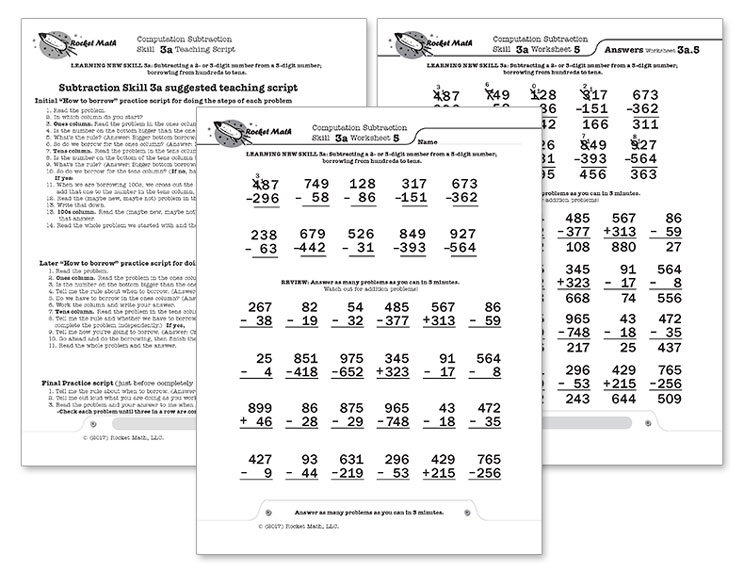
For each skill there is a suggested Teaching Script giving the teacher/tutor/parent consistent (across all the skills we use the same explanation) language of instruction on how to do the skill.  My favorite part is the rule students are taught for when to borrow (often confusing for students): Bigger bottom borrows.  Simple, easy-to-remember and consistently correct.  The script helps walk the student through the computation process.  For the teacher, in addition to the script, there are answer keys for the five worksheets provided for each skill.

Each worksheet is composed of two parts.  The top has examples of the skill being learned that can be worked by following the script.  After working through those examples with the teacher the student is then asked to work some review problems of addition problems that are already known.  The student is asked to do as many as possible in 3 minutes—a kind of sprint.  If all is well the student should be able to do all the problems or nearly all of them, but finishing is not required.  Three minutes of review is sufficient for one day.

There are five worksheets for each skill.  Gradually as the student learns the skill the teacher/tutor/parent can provide progressively less help and the student should be able to do the problems without any guidance by the end of the five worksheets.  There are suggestions for how to give less help in the teaching scripts.

Learning multiplication computation–NEW program in Rocket Math

After becoming fluent with multiplication facts the best way for students to retain the knowledge of those facts is by doing multiplication computation.  If students have not been taught multiplication computation, this program breaks it down into small, easy-to-learn steps that are numbered in a teaching sequence that leaves nothing to chance.  Even better the instructional materials include an assessment of all the skills in multiplication computation in order, so you can test the knowledge of the student(s) before beginning instruction to see where to start.

Note that the number for each skill gives the grade level as well as indicating the teaching sequence.  Skill 3b is a 3rd grade skill and after skill 3e is learned the next in the sequence is skill 4a.  The sequence of skills is drawn from M. Stein, D. Kinder, J. Silbert, and D. W. Carnine, (2006) Designing Effective Mathematics Instruction: A Direct Instruction Approach (4th Edition) Pearson Education: Columbus, OH.


(3b) Multiplying 1-digit times 2-digit; no renaming

(3c) Multiplying 1-digit times 2-digit; carrying

(3d) Multiplying 1-digit times 2-digit, written horizontally.

(3e) Reading and writing thousands numbers, using commas.

(4a) Multiplying 1-digit times 3-digit

(4b) Multiplying 1-digit times 3-digit; zero in tens column

(4c) Multiplying 1 digit times 3 digit, written horizontally

(4d) Multiplying 2-digits times 2-digits.

(4e) Multiplying 2-digits times 3-digits.

(5a) Multiplying 3-digits times 3-digits.

(5b) Multiplying 3-digits times 3-digits; zero in tens column of multiplier.

For each skill there is a suggested Teaching Script giving the teacher/tutor/parent consistent (across all the skills we use the same explanation) language of instruction on how to do the skill.  The script helps walk the student through the computation process.  For the teacher, in addition to the script, there are answer keys for the five worksheets provided for each skill.

Each worksheet is composed of two parts.  The top has examples of the skill being learned that can be worked by following the script.  After working through those examples with the teacher the student is then asked to work some review problems of addition problems that are already known.  The student is asked to do as many as possible in 3 minutes—a kind of sprint.  If all is well the student should be able to do all the problems or nearly all of them, but finishing is not required.  Three minutes of review is sufficient for one day.

There are five worksheets for each skill.  Gradually as the student learns the skill the teacher/tutor/parent can provide progressively less help and the student should be able to do the problems without any guidance by the end of the five worksheets.  There are suggestions for how to give less help in the teaching scripts.

You have to require your students to model

Have them model the correction procedure rather than the latest fashions.

You can’t just tell your students the three steps of the Rocket Math correction procedure.  That’s not enough to be sure they know it.  The best way to determine if the students know the procedure is to require them to model it.

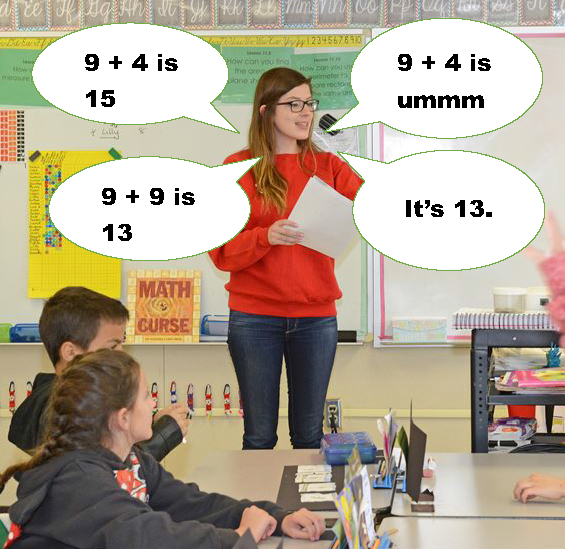
Do this, not just when you start Rocket Math, but any time you see that students are NOT doing the correction procedure the right way.  If they start to slip or zone out, the best thing to do is stop them from doing Rocket Math and spend a few days requiring them to model how to correct your errors, one at a time, while everyone listens.   Do it for ten minutes each day (during Rocket Math time) for several days–at least until you have had every student get a chance to “be your checker.”

Require them to model the correction procedures while you role play being a student making errors.

You have to role play being a student and you have to make the ALL the errors which they have to learn how to correct.  You have the worksheet and your students have the answer key in front of them.  Choose one at a time to be your “checker.”

First, ask that student WHEN should they should correct you.  They should say (in any order),

When you make an error. 

When you hesitate. 

When you say the problem wrong. 

When you don’t say the whole problem and the answer. 

Second, ask that student HOW they should correct you.  They should say (in order)

1.  Stop. Interrupt the student and say the correct problem and the answer.

2. Repeat.  Have the student repeat the correct problem and answer three times. 

3. Back up.  Have the student back up three problems and begin again.  

Third, begin practicing as if you were a student and then make errors.  Then require the student you’ve selected to be your checker to model the three-step correction procedure.   They should interrupt you and say the whole problem and the answer, ask you to say it three times, and then after you’ve repeated it three times, they should tell you to back up three problems and begin again.  You’ll end up counting together and coming to agreement about where to start and then beginning again.  But remember, they have to know not just HOW to correct, but also WHEN to correct.

Fourth, be sure to make all four kinds of errors to see if your “checker” recognizes all of them.  Try reading just the answers and see if your checker follows the correction procedure.  Definitely do a two second hesitation and if they don’t jump in to correct you, prompt them to do so.  Read the problem wrong as well as say the wrong answer.  Prompt the correction procedure if the student doesn’t do it the right way or at the right time.  If you have to prompt a student then they aren’t ready yet.  Keep going around the class, calling on each of your students to be your checker, and make sure they do it correctly and prompt them if they don’t.  Go back and call on any students who needed prompting and see if they can do it without prompting now. Keep making them model the correction procedure until everyone can do it the right way WITHOUT PROMPTING.

**The correction poster (pictured above) is available in the Rocket Math store under Organization and Training materials.  Item #2014 Corrections poster $18 

“Knowing” means never having to figure it out

Most people, for example, know their name, by memory.

In a previous blog I discussed  What does CCSS mean by “know from memory?”    

A reader asked the following question:

This topic of “know from memory” is something I have been digging into as a special educator. I wonder what your thoughts are about whether certain accommodations from these “know from memory” standards would actually be modifying the curriculum?

For example, if we used “extra time to respond” and the student had to use their fingers or some other method to count, would they then not be doing the standard?

This relates to where I’m at in middle school math, but I think that it’s reflected in the continuum of the common core maths.

Thanks.

Dr. Don’s response: 

Actually, your example is very clear that it is not “knowing from memory.” You are describing “deriving from a strategy” or what I call, “figuring it out.” When you know it from memory, when you recall the answer, then you stop having to “figure it out.”

Knowing from memory and figuring something out are two very different things. I used to ask workshop participants to imagine sitting next to me in a bar and asking me for my name. What if, instead of saying, “Hi, my name is Don,” something different happened?  What if, like the man pictured above, I was puzzled and said, “Wait a second, I have it here on my driver’s license.” Most people would likely turn their attention elsewhere while wondering what kind of traumatic brain injury I had sustained! They would very likely say to themselves, “OMG, that man doesn’t know his own name.”

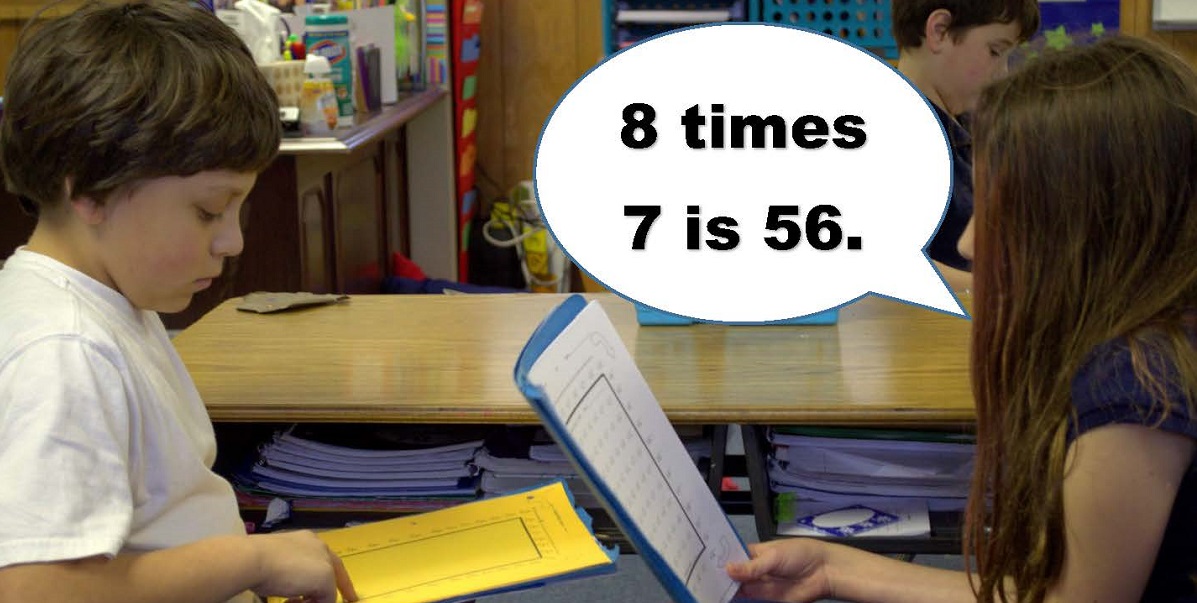
The purpose of the verbal rehearsal that is a daily part of Rocket Math is to cement these basic facts in memory. Then when a student says to themselves, “8 times 7 is,” the answer pops into their mind with no effort. It takes quite a bit of practice to achieve that. However, the ability to instantly recall the answers to basic math facts makes doing mathematical computation a relative breeze. It make seeing relationships among numbers very obvious. It makes reducing fractions and finding common denominators easy. That’s why the Common Core thinks “knowing from memory” is so worthwhile. It’s why I began promoting Rocket Math in the first place.

Do you know the active ingredient in Rocket Math?

Timed tests are not the important part of Rocket Math.

The “active ingredient” in the Rocket Math prescription, the thing that makes it work, is not timed tests.  Timed tests don’t actually teach and often don’t really help students develop fluency.  The usual timed tests of a random selection of all the facts can assess fluency in math–but they don’t work to develop it!

The “active ingredient,” the thing that makes Rocket Math effective, is verbal rehearsal.  When students practice with their partner the students read the facts and RECALL the answers from memory and say them aloud.  That verbal rehearsal is what cements them into memory.  Reading the fact and recalling the answer from memory strengthens the neural connection.

Why do we give the daily tests in Rocket Math?  Not to teach, but only to assess whether the facts introduced thus far have been learned well enough for the student to have new facts added to what they are learning.  Individual students learn at different rates.  Some students need only a couple of days of practice to memorize two new facts while others may need several days.  The purpose of the daily tests is just to see if the student needs more practice time, or is ready to “swallow” some more facts.

As I note in my basic training presentation, “It’s like feeding mush to a baby.  You have to make sure they have swallowed the last mouthful before you give them more.”   See an explanation in this You Tube video in our Rocket Math channel: https://youtu.be/J8cWSDG0Di8

Keeping track of progress in Rocket Math

Which students are progressing as fast as they should be in Rocket Math?

And how fast should they be progressing, anyway?

Over the years of helping teachers and schools implement Rocket Math I have learned that a complete laissez-faire attitude about student progress can mean that some students get stuck for weeks on the same sheet.  Needless to say, students who get stuck, come to hate Rocket Math.  When this happens, those students don’t get through all the operations they should learn.  So we need to intervene, and give them more help.  It turns out that some students need more practice, sometimes two or three times more practice, to learn the facts than their peers.  To get such students through one operation a year means they have to have extra practice sessions scheduled in each day.  Here’s a link to a blog about how to provide extra help.

But which students need extra practice sessions?   Under Resources/Educator Resources I’ve created two versions of a tool that can help.

Whole Class Excel Rocket Math (2 operations in a year) Aimline.  This is pictured to the right.  It is needed for 2nd grade and 4th grade and up when students need to finish one operation and do a second one in a year.  The expectations needed to pass two operations in one year are basically that students should pass two sets each week.  If they have studied some the year before, they will be able to pass sets in the first operation at a quick pace.  For example if they have done much of Rocket Math Addition in first grade, in second grade they should be able to pass those addition sets again in a day or two.  That will put them ahead of the expectations and they should have a plus by their name most of the year.  Conversely, if they are not able to pass sets quickly, (see the students highlighted in yellow) they will get a minus by their name and should start getting extra sessions scheduled daily.

How does the Excel Aimline work?

Please note: The pictured EXAMPLE Rocket Math Excel Aimline is available from the link or in the Resources/Educator Resources page for you to download. 

Take the blank template and save it for next year.  Then fill out one for this year.  Look at a calendar and on row 4 enter the month and on row 5 enter the starting day of each week in the school year.  so each column numbered 1 through 36 will correspond to a week in your school year.  In row 7 you see the green expected set to be passed by the end of that week.  At the end of week 1 we expect that students will have at least passed Set A.   By the end of week 2 they should have passed Set C to be on pace to finish two operations in a year.

Entering student names.  Starting in row 10 you enter the student names in column B.  This class only has ten students, but I’m guessing yours probably has more!   Cool thing about excel is you only have to enter those names once.  And if you’re really good you can freeze that column so you can easily see it later in the year.

Entering weekly information.  Each week grab all the student folders and for each student enter the highest set they have passed.  You can see that from the Rocket Chart on the outside of the folder, so you don’t even have to open the folders.  If the letter they have passed is equal or higher than the green set expected at the top of the column for that week, then put a plus by the letter they have passed.

Look at Alvin Ailey at the top of my class list.  Week 1 he had passed both Set A and B, so I wrote “B” in his square.  I put a plus because it is exceeds the expected level for the first week.  By the second week he had also passed Sets C and D.  Only up to “C” is expected,  so I wrote “D” and also gave him a plus.  Alvin is rocking it!

Look at Cindy Crawford a little further down the class list.  Week 1 she had passed Set A, so I wrote an “A” in her she got a plus because she met the expectation.  But by week 2 she had only passed Set B, when C is expected to be passed, so I wrote “B” in her square, with a minus indicating she is below expectation.  Now I highlighted her square yellow, but that’s kind of advanced so you don’t really have to do that.  Only Excel experts can do that, although it really makes it easy to pick out who needs help.  We can see that Cindy continues to make slow progress and continues to get minuses.  She needs to have extra practice sessions scheduled to finish two operations this year.  That pace is fine for one operation per year, but not two.

Look down at Gary Grummond.  He didn’t pass even Set A by the end of the first week so I wrote “np” in the first square.  He continues to make progress the next few weeks, but not fast enough to complete two operations in a year.

Row 8 Fraction of students meeting expectation.    After entering all the students for the week you can see how you are doing overall in your class.  Make a fraction with the numerator being the number of students who are meeting the expectation over the denominator of the number of students in the class.  You want a high fraction nearer to 1.

If that fraction falls below 70%, meaning more than 30% of your class is not on track, then you should institute a class-wide intervention.  Either add an extra practice session each day, or see if there is room to improve the quality of practice.  See these blogs and posts about how to monitor for the quality of practice.

Whole Class Excel Rocket Math (1 operatipon per year) Aimline.   In grades 1 and 3 where students are expected only to complete one operation in a year, you can use this Excel Aimline.  The expectations needed to pass one operations in a year are basically that students should pass one set each week.   Everything else about how you use the excel form is the same.  Note that if you want students to do two operations in the year (for example both subtraction and multiplication in 3rd grade) then you would use the two operation aimline.