The Online Game never teaches anything wrong.

Are your students complaining that the Online Game said they were wrong, when they were right?  This is similar to a problem we found with students and their checkers in the Worksheet Program. Bear with me a second while I explain.

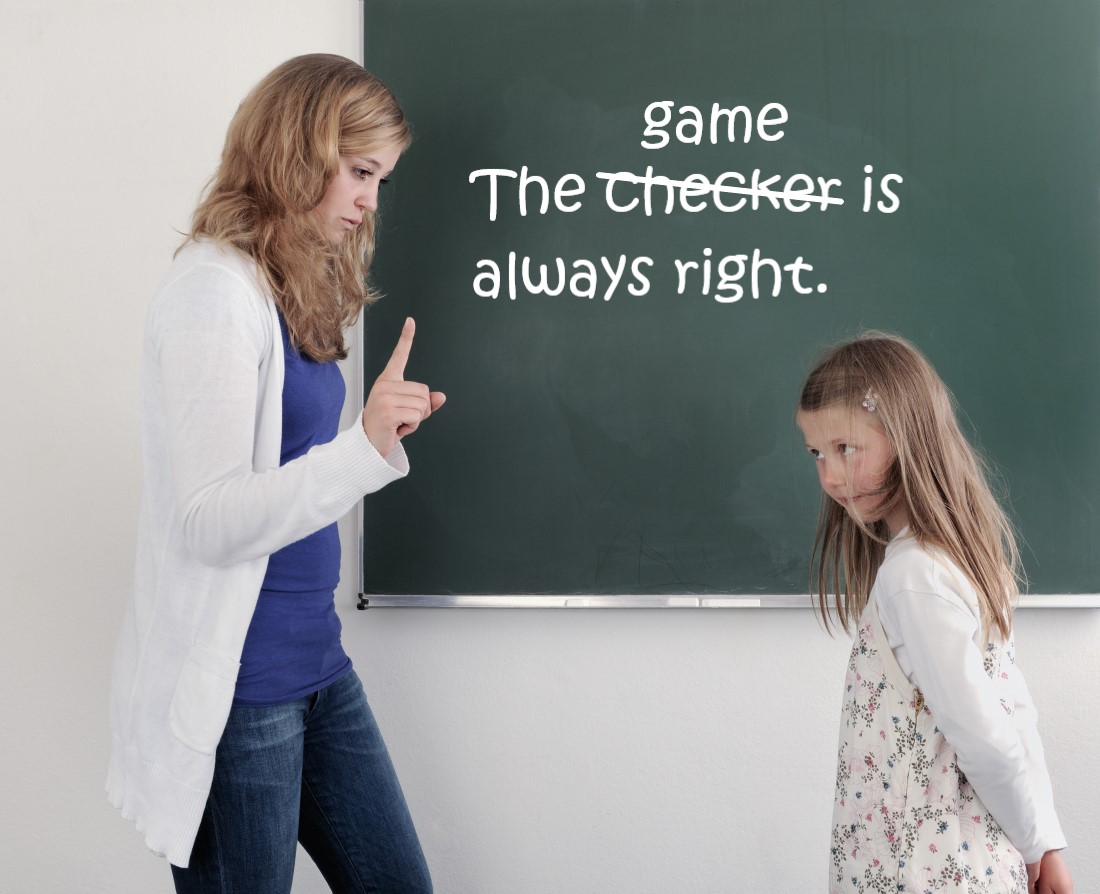
In the Worksheet Program students often complain to their teacher that their checker made them do the problem over, even though they weren’t wrong.  Trying to adjudicate such a dispute is nearly impossible, as veteran teachers have learned the hard way.  The extra practice didn’t hurt the students and you’re going to be inundated with complaints if you try to adjudicate them. In workshops we always counseled teachers to respond to such complaints with, “The checker is always right.  Just do the problem over again.”

The extra practice that the Online Game) makes a student do is never harmful.  The problem and the answer that Mission Control gives is never wrong.  When students complain to you about the game telling them a right answer was wrong, just tell the student, “The game is always right. Just do the problem over again.

The Online Game only says right answers, so it’s not wrong.

The correction procedure says both the problem and the correct answer.   Students may say, “But, that’s what I put!” They are not confused. They are just complaining that they were “unjustly” corrected.  An unjust correction is relatively unimportant compared to an actual error.

The program never says a student’s answer is “wrong.”  The game does a correction whenever it does not process the correct answer within the time limit.  The student may hit the correct answer just a fraction of a second too late to be processed by the game. Even though correct, the game will say “Time’s Up” and do a correction.

Sometimes a student misses the button they mean to hit, they make a “typo,” and the game buzzes and the screen shakes “no.” Sometimes, a glitch occurs and it skips ahead to the next problem and processes the last answer as incorrect. However, the game can only say a problem and its correct answer as those are the only words that are recorded.  There are no recorded errors.  For example the game will say, “Six plus two equals eight. Go again.”  After that the game waits for the student to enter the correct answer AND waits for the student to hit the checkmark. No amount of arguing, “But that is what I put!” or “But that wasn’t the problem I was answering” will change it.

The extra practice caused by an “unjust correction” is not harmful.

Students should listen to Mission Control while it is displaying and saying a problem and the correct answer.  Then the game will show the problem just stated without the answer.  Students will know what they should do. They should just enter the answer and hit the checkmark.  Students should just do the problem over again regardless of whether or not they think they entered the right answer.  The game never says anything incorrect and the extra practice won’t hurt them. While an unjust red “X” for an error seems terrible to students, it will not do anything other than give them more practice, which is good for them.

We  offer a $50 gift certificate to the store of your choice if you can capture an error by the game on video, as we have never seen the game make an error and can’t replicate the problem.

The Wall Chart motivates and prevents unhealthy competition.

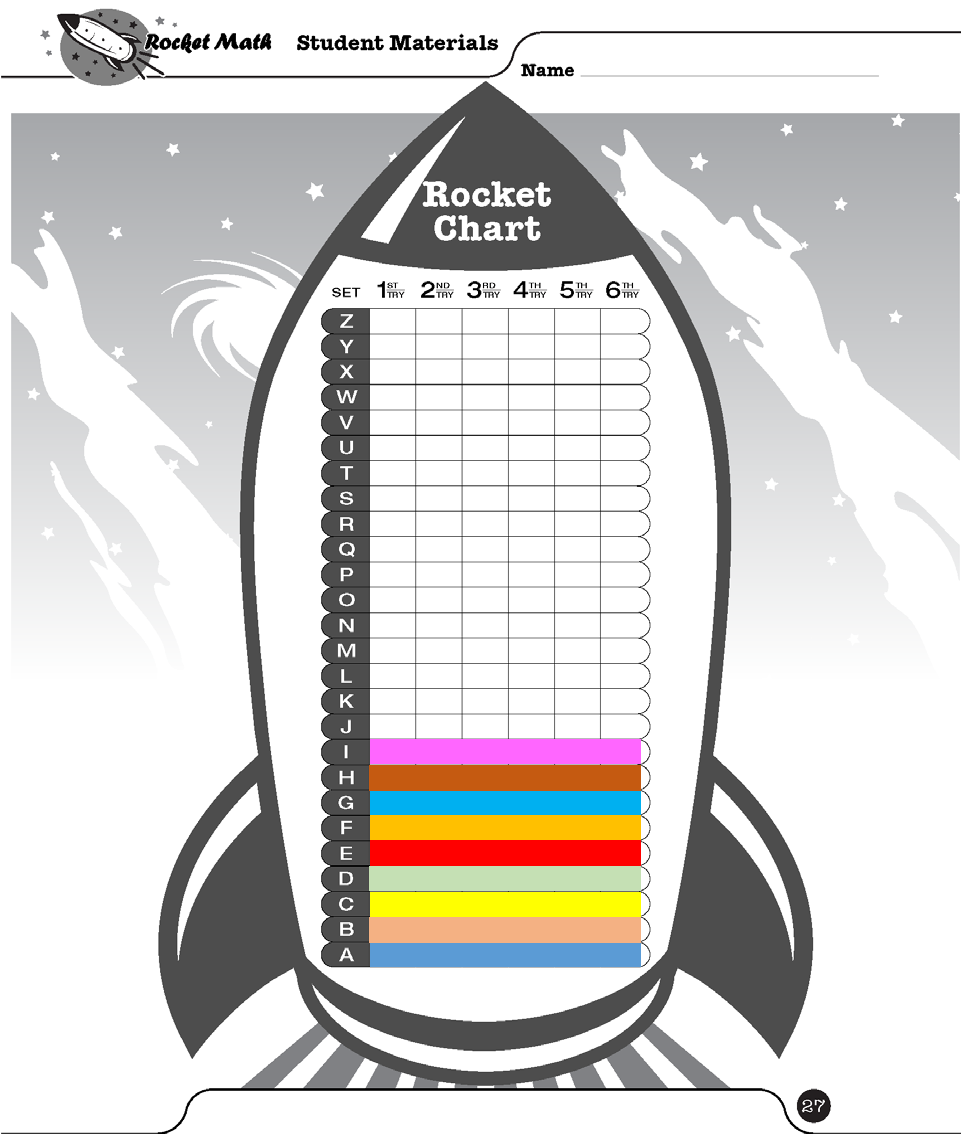
The Rocket Chart gives students a visible sign of their success.

Students working in Rocket Math begin to see themselves as clearly successful.  Being able to color in the levels of their Rocket Chart as they pass them, makes their progress visible.  As they color in the Rocket Chart they become very invested in their progress through the levels. They are naturally proud of their accomplishments. Whenever Dr. Don visits a classroom, students want to tell him what level they are “on” if they get a chance.

Competition may develop to unhealthy levels

However, not all students progress really quickly or easily, while others surge ahead. Sometimes, unhealthy competition may develop among students sometimes.  Some students begin to feel really bad about their slower progress. Worse yet, some students in the lead may begin to act arrogantly or disrespectfully.  The Rocket Math Wall Chart is designed to curb that competition and to build a sense of esprit de corps.

The Wall Chart puts all the students on the same team.

star_sticker

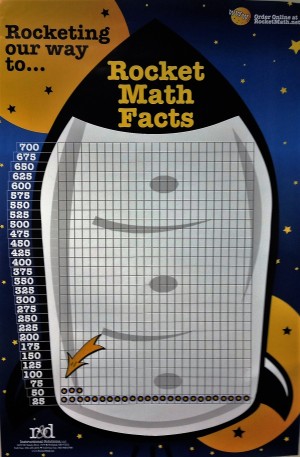
Over 700 star stickers come with the Wall Chart.  Each time a student passes a level the teacher awards them with a star sticker, which they take up to the Wall Chart and put into one of the squares in the chart.  Students fill the chart from the bottom up.  The teacher sets a goal in a few weeks, which date is marked on the goal arrow, and the goal arrow is placed a couple of rows up from where the students are now.  (You can just see that in the picture above.)


Students develop pride in their whole class.

If the students fill in the squares up to the arrow–before the date specified on the arrow–they earn a group reward such as extra recess time, or music during math, or a congratulatory note home, or a popcorn party, etc.  Wall chart half filledIn this way, each time a student passes a level they are putting up a score for the whole team.  It is good for everyone.  The teacher is able to praise the class for their hard work and accomplishments, and the whole class is able to feel good about their collective effort.

The Wall Chart shows visitors (like principals) how well the class is doing.

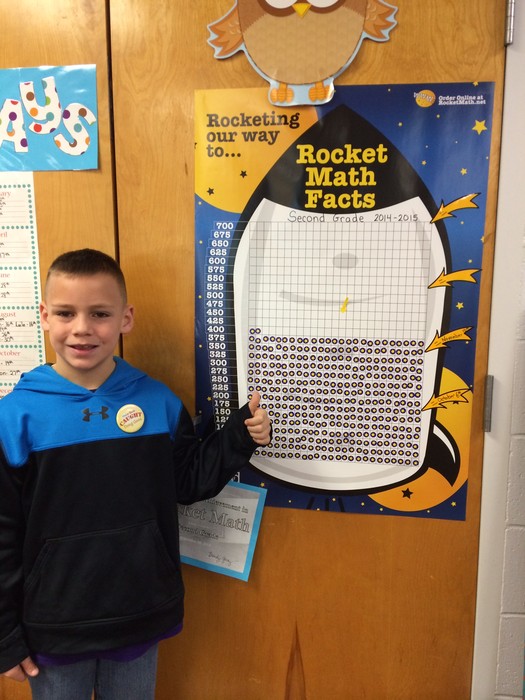
Passers-by as well as interested administrators can praise the class as a whole for their successes with Rocket Math.  A savvy administrator may reward the class with a “free space” to help themselves keep track of progress. See this blog.  In many schools, classes post their completed Rocket Chart on their door with all 725 stickers in place!   The Rocket Math Wall Chart becomes a focus of pride and recognition for the whole class.  The Rocket Math Wall Chart (#2005) includes directions for how to use it effectively,, plenty of star stickers, four goal arrows, and the chart itself.   They are cheaper by the dozen if you need more.

Struggling with math: Rocket Math Online Tutor corrections prevent it in the first place.


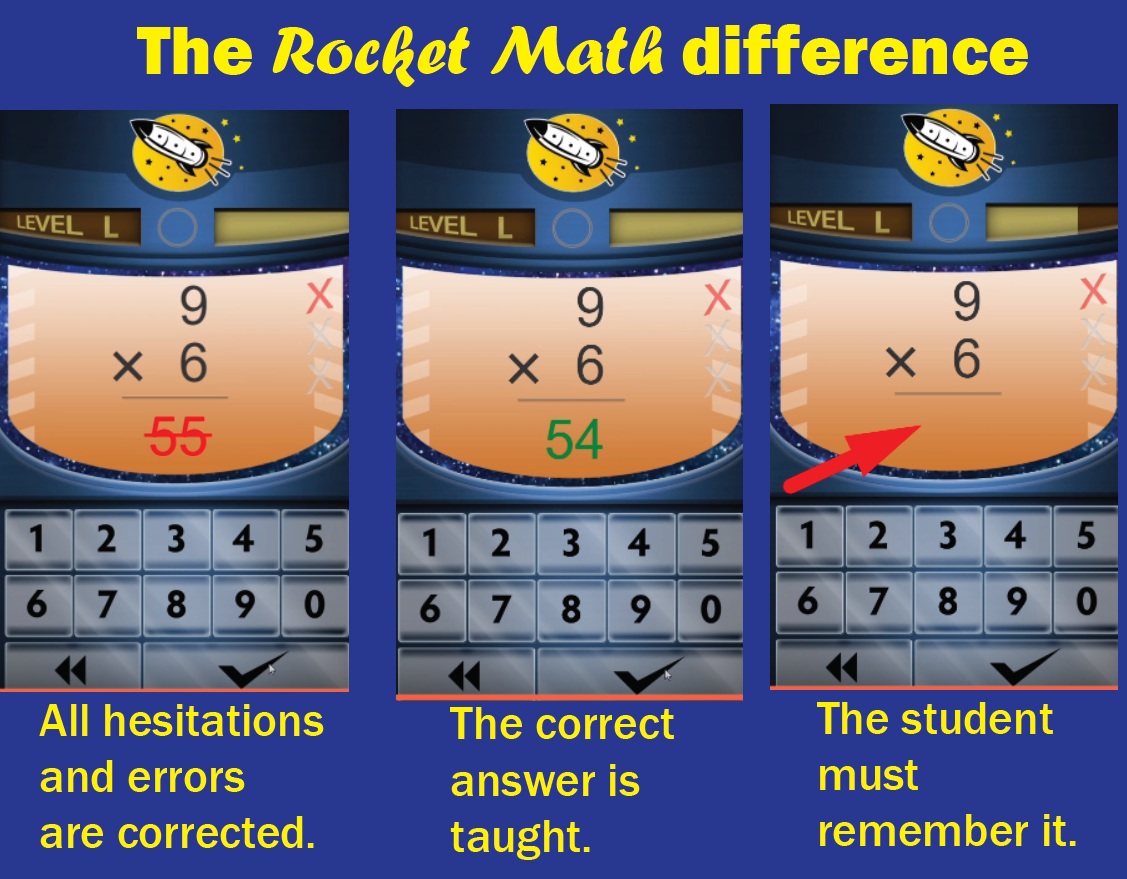
Teachers often worry about what they need to do to find out what problems their struggling students will be struggling with in the Rocket Math Online Tutor. The answer is to see exactly how all the help that students need is built into the game. Your students have been taught and remediated BEFORE you can even know about it.  All errors or hesitations are corrected immediately.  The answer is given and then taken away, so the student has to remember it.  Then the student has to enter the answer.  Then the problem is presented again.  Then if answered correctly, the student gets an intervening problem and then gets to answer the missed problem again.  That is repeated once more before the student back to the regular sequence of facts.  View this 30-second video to see exactly how game corrections work.


Make the best use of the Online Game by watching these short videos

Part 1: First steps in making best use of the Online Game

Part 1 covers the first steps that a teacher needs to know how to do.

After students are set up in the Rocket Math Online Game these are things a teacher should know about how to do, in order to make the best use of the Online Game. This video explains several key features of the Online Game and how to manage those from the teacher dashboard. Includes information on how to:

  • log into your account,
  • get HELP and FAQs,
  • report glitches,
  • print the Parent Letter,
  • print the Color in Rocket Chart,
  • enable Learning Track alerts,
  • change Learning Tracks, and
  • change Teacher Mgrs. 

Part 2: Fluency data from the 1-minute tests races

Part 2 explains how to collect fluency data from the 1-minute tests races.

To make the best use of the Rocket Math Online Game the teacher should collect data from the scheduled 1-minute races (after Sets A, i, R, & Z), as students work through the A to Z curriculum. Collecting this data can prove that students are improving their fluency.  It can be used to document progress in IEPs or other learning plans.  Teachers should also assign 1-minute races to measure fluency progress on a regular basis.

Part 3: Review student Progress

Part 3 explains about all the data available on the Review Progress tab.
The Review Progress Screen gives a lot of student data.  It begins with two charts that provide an overview of what all the students have accomplished.  Then there is data specific to each student using it. There’s more than a dozen columns of data available for each student and which data is displayed can be customized.  This video covers it all in detail. 

Part 4: Why is the game speed so fast?

Some students are put off by having to answer math facts in 3 seconds because they are used to figuring out math facts.  The purpose of Rocket Math is to replace “figuring out” math facts with simply “knowing” math facts from memory.  That is instantaneous, but it takes practice to commit all these facts to memory.  So Rocket Math won’t let students move on until they can answer instantly without hesitation.  This video explains this important principle.

Part 5 Motivating your students

Teachers should support the work of learning math facts by recognizing students as they work through the A to Z levels of the Rocket Math Online Game. Providing students with the Color in Rocket Chart is the first step. Publicly awarding Learning Track Certificates when students finish is another. The Toughness Certificate is another form of recognition. Keeping the length of time that students can play shorter than they want it to be, is another way of motivating the practice necessary to learn this vital skill. Ultimately the teacher’s attitude about how important this work is will make the difference in motivating students.

Best Math Facts App Comparison: Rocket Math vs. XtraMath

A math facts app is a great tool to use for your students. There are plenty of math facts apps out there that let students practice math facts they have already learned. Few apps actually teach math facts. But apps from Rocket Math and XtraMath are exceptions. While both apps teach students math facts, one is more effective and fun.

The two best apps for actually teaching math facts

Math facts apps from Rocket Math and XtraMath effectively teach math facts because they have four essential characteristics:

  1. Both math facts apps require students to demonstrate fluency with facts. Fluency means a student can quickly answer math fact questions from recall. This is the opposite of letting a student “figure it out” slowly. Neither app considers a fact mastered until a student can answer a fact consistently within 3 seconds.
  2. Both math facts apps zero in on teaching (and bringing to mastery) a small number of facts at a time. This is the only way to teach math fact fluency. It’s impossible for students to learn and memorize a large number of facts all at once.
  3. Both math facts apps are responsive. Apps simply do not teach if they randomly present facts or do not respond differently when students take a long time to answer a fact.
  4. Both math facts apps only allow students to work for a few minutes (15 minutes or less) before taking a break. Teachers and parents may want to keep students busy practicing math facts for an hour, but students will come to hate the app if they have long sessions. A few minutes of practice in each session is the best way to learn and to avoid student burnout.
  5. Both math facts apps re-teach the fact if a student makes an error. While both Rocket Math and XtraMath re-teach facts, they re-teach them differently.

While both apps contain these important features and teach math facts, there are a few vital elements that make an effective app like Rocket Math stand out.

An effective math facts app gives a student a sense of accomplishment
The difficult thing about learning math facts is persevering. There are so many to learn! It takes a while, and students have to persevere through boring memorization tasks. The best way to help students learn their math facts is to give them a clear sense of accomplishment as they move through each task.

How XtraMath monitors progress

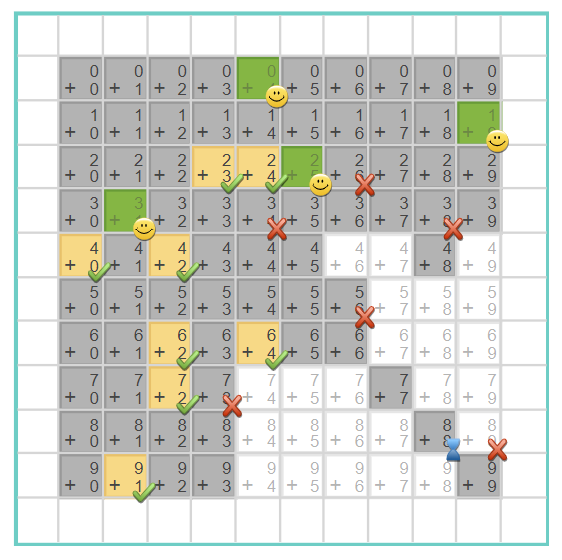
To develop a sense of accomplishment among its app users, XtraMath displays math facts on a grid. XtraMath tests the student and marks the ones that are answered quickly (within 3 seconds) with smiley faces. It takes a couple of sessions to determine what has been mastered and what hasn’t, so there isn’t a sense of accomplishment at first. This grid is displayed and explained, but it’s not easy to monitor progress. Over time, there are fewer squares with facts to learn, but there isn’t clear feedback on what’s being accomplished as students work.

How Rocket Math monitors progress
Conversely, Rocket Math begins recognizing student progress immediately and continues to celebrate progress at every step. The Rocket Math app begins with Set A and progresses up to Set Z. Each lettered set has three phases: Take-Off, Orbit, and the Universe. That means there are 78 milestones celebrated in the process of moving from Set A to Set Z.


The Take-Off phase has only 4 problems to learn. They are repeated until the student gets 12 correct in a row. When the student does that, the doors close (with appropriate sound effects) to show “Mission Accomplished.” They also are congratulated by one of a cast of voices. Something along the lines of, “Mission Control here. You did it! Mission Accomplished! You took off with Set A! Go for Orbit if you dare!” With this type of consistent (and fun!) recognition, students clearly understand that they are progressing, and they get the chance to keep learning “if they dare!”
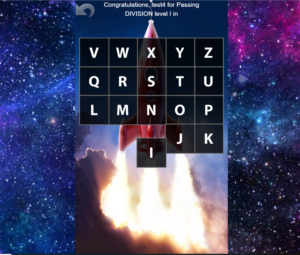
Congratulation screen shot from Rocket Math's math facts app

In addition to the three phases, students progress through the sets from A to Z. Each time a student masters a set, by going through all three phases, the student gets congratulated and taken to their rocket picture, as shown above. When a level is completed, the tile for that level explodes (with appropriate sound effects) and drops off the picture, gradually revealing more of the picture as tiles are demolished.

In the picture above, the tile for “I” has just exploded. After the explosion, a student is congratulated for passing Level I and encouraged to go for Level J if they dare. When you talk to students about Rocket Math, they always tell you what level they have achieved. “I’m on Level J!” a student will announce with pride. That sense of accomplishment is important for them to keep chugging along. Rocket Math also has available Learning Track certificates from Dr. Don and the teacher for completing through Level Z.

An effective math facts app corrects errors—effectively.
Neither of these math fact apps allows errors to go uncorrected. Students will never learn math facts from an app that does not correct errors. That puts these two apps head and shoulders above the competition. However, these two apps correct errors very differently.

How XtraMath corrects errors

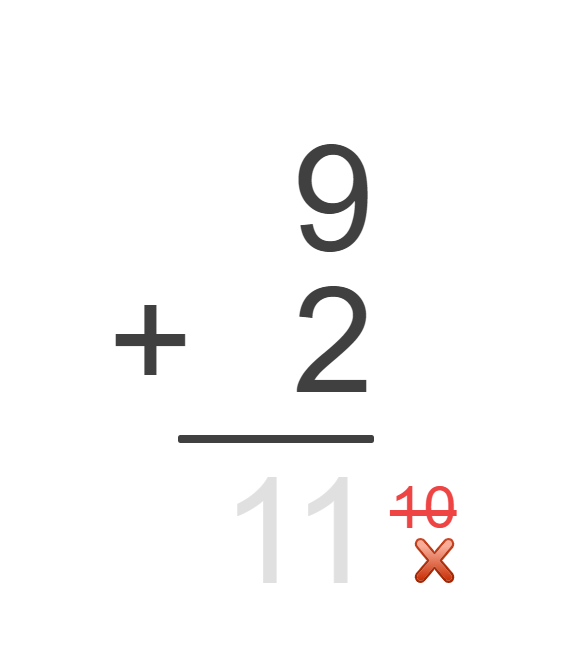
On the left, you can see the XtraMath correction is visual. If a student enters the wrong answer, the app crosses the incorrect answer out in red and displays the correct answer in gray. A student then has to enter the correct answer that they see. This is a major mistake. In this case, students don’t have to remember the answer. They just have to enter the numbers in gray.

How Rocket Math corrects errors
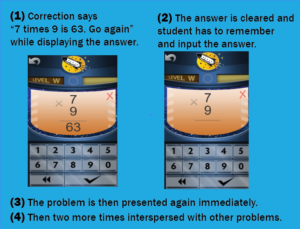
comparison of two screen shots from Rocket Math’s math facts app

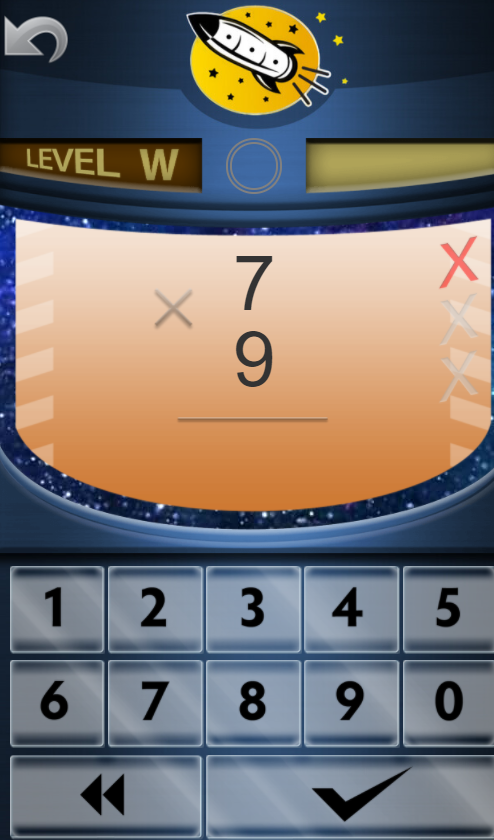
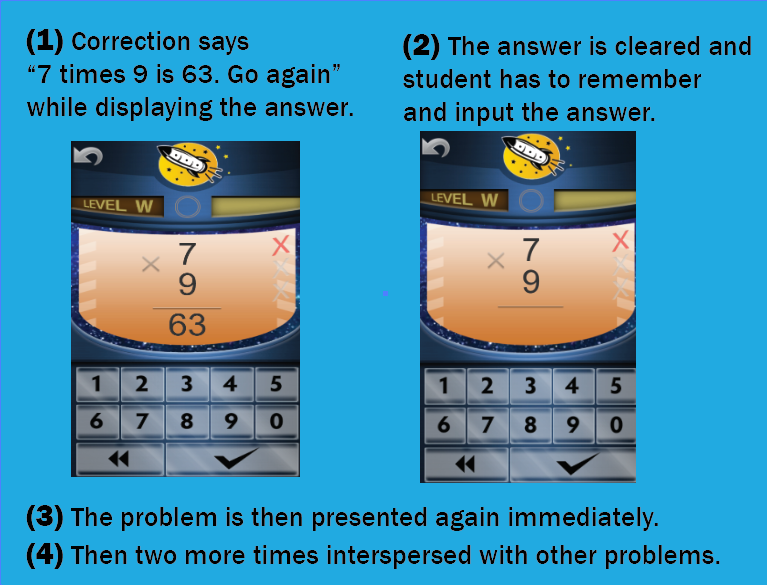
Rocket Math, however, requires the student to remember the answer. When a student answers incorrectly, the screen turns orange, and Mission Control displays and recites the correct problem and answer. In the pictured situation, Mission Control says, “Seven times nine is sixty-three. Go again.” Then the answer clears, and the game waits for the student to enter the correct answer. Under these conditions, the student has to listen to the correction and remember the answer, so they can enter it correctly.

Once the student correctly answers that target problem, the app presents the problem again. Then it presents it twice more interspersed with other problems.

If the student answers the previously missed problem correctly within the three seconds, the game notes the error, and the student continues through the phase. If the student fails to answer the problem correctly again, the correction process repeats until the student answers correctly. Having to listen to and remember the answer, rather than just copy the answer, helps students learn better.

An effective math facts app gives meaningful feedback

Without feedback, students can’t learn efficiently and get frustrated. But the feedback cannot be generic. It has to dynamically respond to different student behavior.

How XtraMath’s app gives feedback

XtraMath’s charming “Mr. C” narrates all of the transitions between parts of each day’s lesson. He welcomes students, says he is happy to see them, and updates students on their progress. He gives gentle, generic feedback about how you’re getting better and to remember to try to recall the facts instead of figuring them out. However, his feedback remains the same no matter how you do. In short, it is non-contingent feedback, which may not be very meaningful to students.

How Rocket Math’s app gives feedback
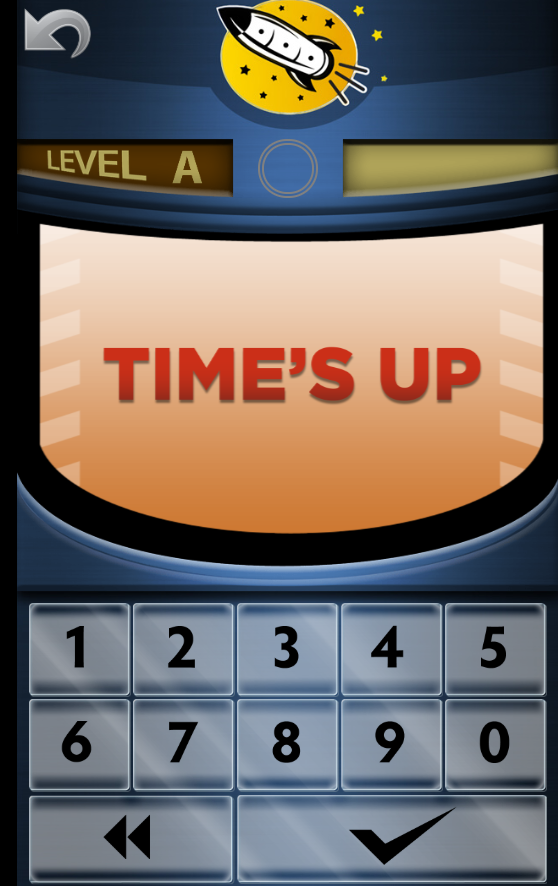
Time's up screenshot of the Rocket Math math facts app

Differing from XtraMath, Rocket Math offers students a lot of feedback that is contingent. Contingent feedback means that students will receive different types of feedback depending on their responses.

The Rocket Math app gives positive feedback for all the 78 accomplishments noted above. It also doles out corrective feedback when the student isn’t doing well.

As noted above, students receive corrective feedback on all errors. They get feedback when they take longer than three seconds to answer too. The “Time’s Up” screen on the right pops up, and Mission Control says, “Oh, let’s practice to make this easier. Listen and remember the answer.”  After being told the problem and the correct answer, students get a chance to answer that fact again and redeem themselves–proving they can answer it in 3 seconds.

Keep Trying screen shot of Rocket Math math facts app

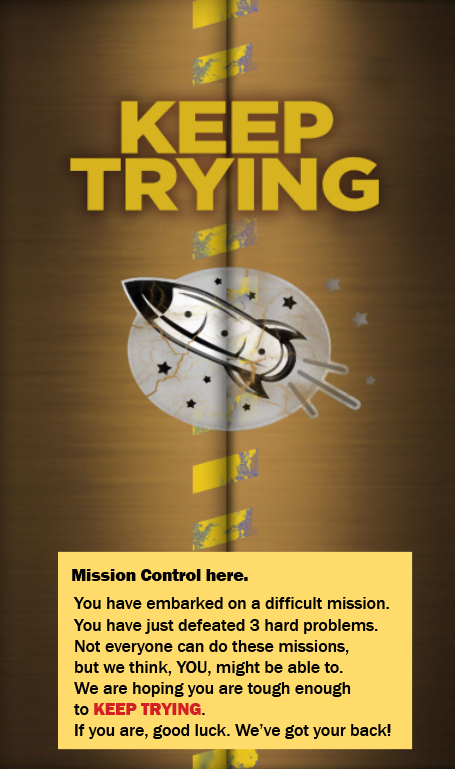
The app tracks errors, and three errors mean the student needs more practice on this part. The doors close (with appropriate sound effects). The student is given encouragement that they have defeated three hard problems and a challenge to “Keep Trying” if they are tough enough. At that point, the “go” screen appears, and the student has to hit “go” to open the doors (with appropriate sound effects) and try it again.

When it comes to recognizing a student’s success, the Rocket Math app holds nothing back. After a student completes a phase, one of the cast of voices gives enthusiastic congratulations, as noted above.

Typically, students don’t have to “Keep Trying” more than once or twice in a phase, but they still feel a real sense of accomplishment when they do complete the phase. The feedback students get from Rocket Math matters because they have to work hard to earn it.

How much does an effective math facts app cost?

It is hard to beat the price of XtraMath, which has a free version. It is $2 per student to have a few more options and $500 per school. XtraMath is run by a non-profit based in Seattle. They have a staff of six folks in Seattle, and they do accept donations. Their product is great, and they are able to give it away.

Rocket Math is run by one person, Dr. Don, with part-time help from two friends. He supports the app, its development, and himself with the proceeds. He answers his own phone and is happy to talk with teachers about math facts. The Rocket Math Online Tutor is a good value at $6 a year per seat (when ordering 20 or more seats). The Online Tutor has price breaks at 100, 1000 and 10,000 seats. As one principal customer of Rocket Math said, “We used to have XtraMath. We’d rather pay a little bit more for Rocket Math because the kids like it a lot better.” Another teacher reported, “My students are loving this program. I was using Xtra math, but now they are in love with Rocket Math!”

Prove that students using the Rocket Math Online Game are improving in fact fluency!

Document improved fluency by assigning a 1-minute RACE.

We have a feature that will allow you to assign a fluency test to all or some of your students. We call it a “1-minute RACE.”

To Assign a Fluency Test 1-Minute RACE:

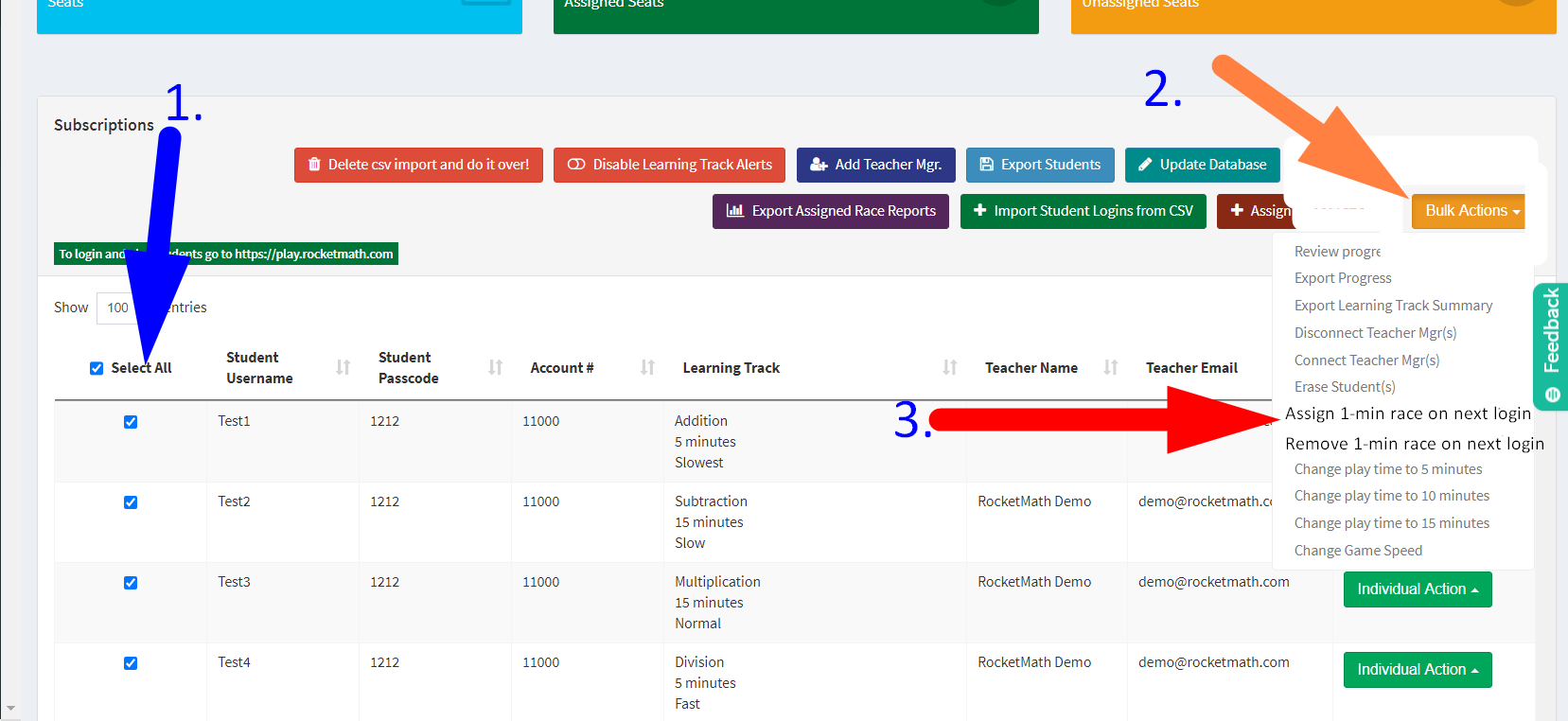
1) Select the students to whom you want to assign the test RACE, or Select All.

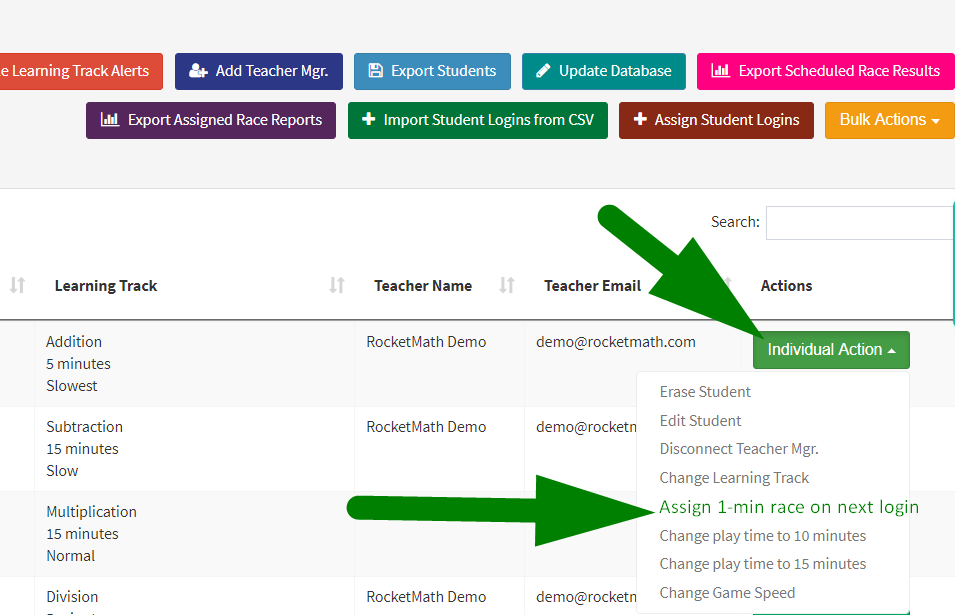
2) Click on the orange Bulk Action button.

3) Pull down to “Assign 1-min RACE on next login.”

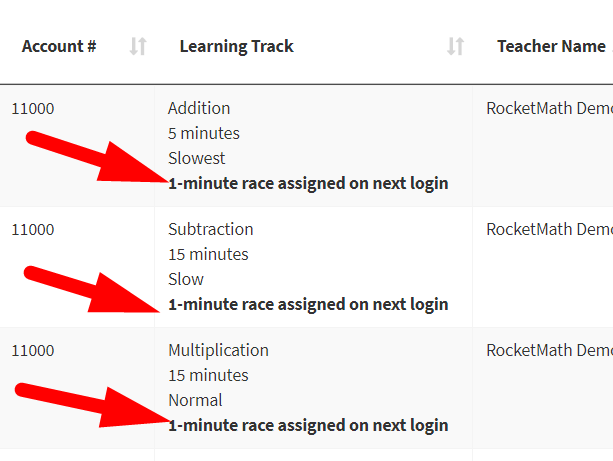
After doing that, in your dashboard you will see that the 1-minute race has been assigned on the next login. 
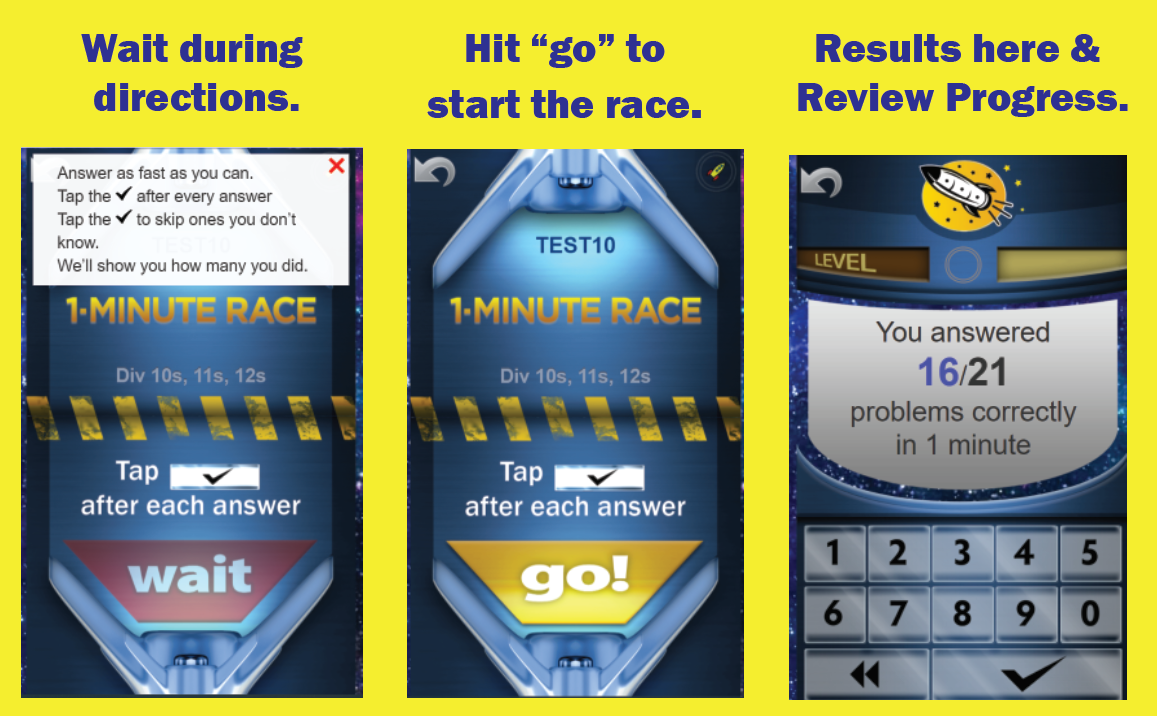
The next time those students login, they will be given the mission of doing a 1-minute race with ALL the facts in the Learning Track they are studying. They can skip facts they don’t know, by hitting the checkmark.

Here’s what the students experience.

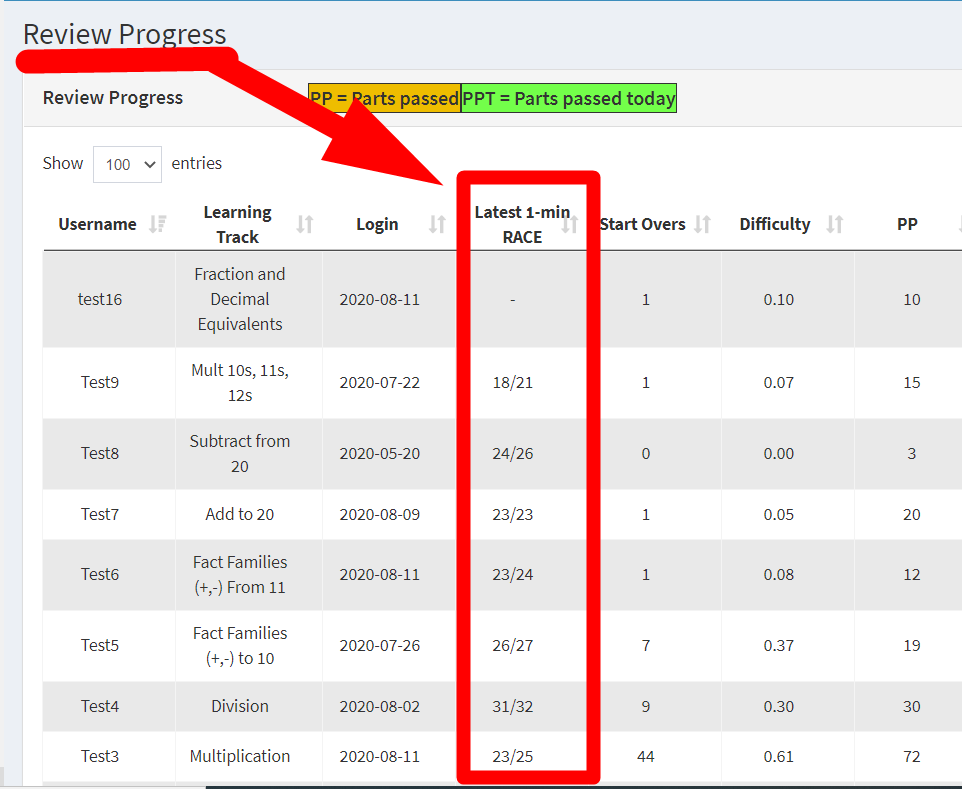
A 1-minute test RACE is also automatically SCHEDULED after Sets A, i, R, and Z. See their latest results in Review Progress!

Assign a 1-minute RACE individually also–at any time you wish.

You can assign a 1-minute RACE at any time for specific individuals as well, using the green Individual Action button at the end of their row.


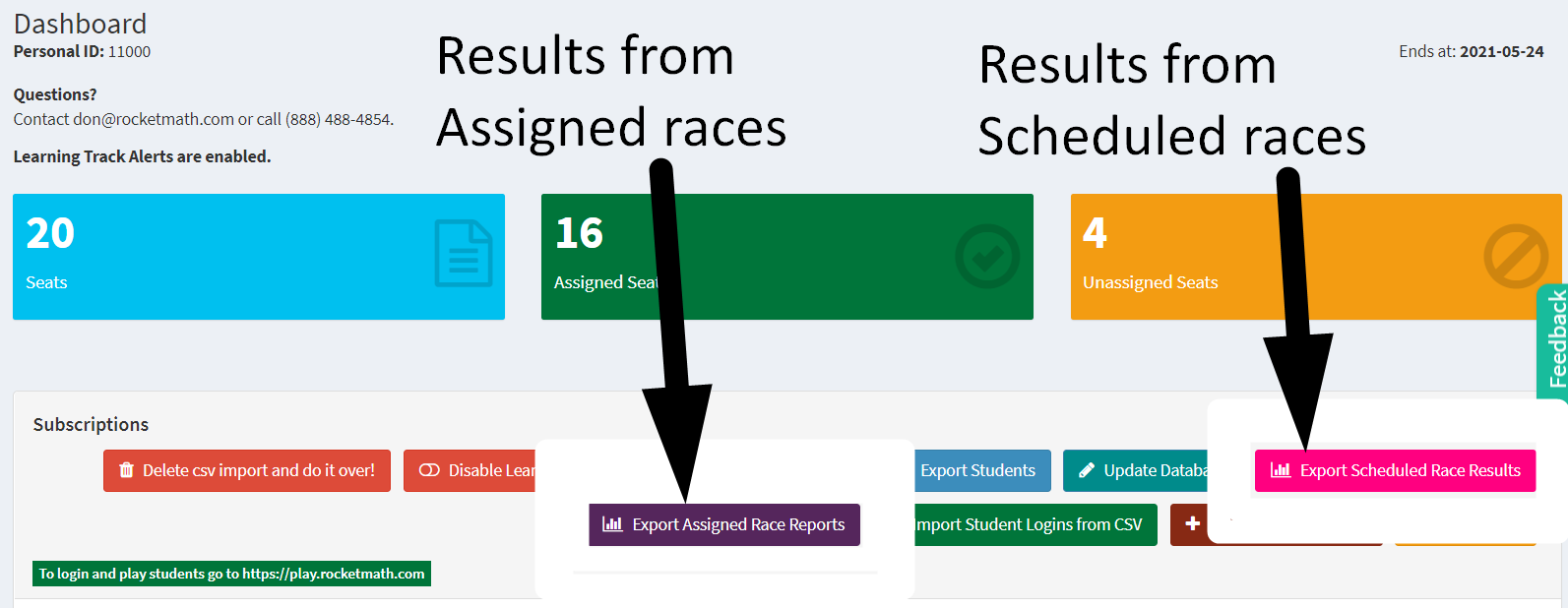
  • Export the test RACE results in spreadsheets. 

    • Separate exports for results from RACEs you Assign from the RACEs that are Scheduled after working through some levels in the Online Game (After sets A, i, R, and Z).

  • See averages across your class or school. 

    • Each spreadsheet will show the average for your class as a teacher or for the school in the account of the Subscription Manager or owner.  There are separate averages for each Learning Track.
  • See trends over time.

    • You’ll see the improvement each student makes from the beginning after Set A to each of the subsequent tests RACES.

Rocket Math Wins Editors Choice Award From All Digital School

Rocket Math Wins Editors Choice Award From All Digital School

Rocket Math - All Digital School Editors' PickRocket Math is pleased to announce that we have won the editor’s choice award in math programs from All Digital School (ADS). With so many turning to online education, Rocket Math has been uniquely positioned to grow and adapt to these changing times. Our program has helped thousands of students across the country to learn math efficiently and enjoyably. We’re glad that this hard work has paid off and are thrilled to be recognized for our efforts.

All Digital School is a digital educational resource platform that compiles educational materials and tools that students everywhere can use online. ADS was founded to help educators, parents, and students to find the best materials, websites, and tools available during the pandemic. Their goal is to help everyone receive the best possible learning experience, no matter where they live. ADS is committed to providing an accessible online community for teachers and parents, creating a space where fellow educators can compare notes and review resources. This valuable online education provider now has over 4000 active resource listings for students of all ages.

You can see the Rocket Math program page at ADS here.   

Editors at ADS regularly review their listings and choose resources that stand out in their respective fields. In the most recent review of mathematics programs, Rocket Math was selected as a standout favorite and recognized with an editor’s choice award. This distinctive honor pushes us to work even harder and demonstrates our unwavering commitment to provide every student with the opportunity to master math facts.

About Rocket Math:  For over a decade, Rocket Math has served as an educational resource that allows students to learn math quickly, thoroughly, and happily. Rocket Math stresses that all students can learn math and that students are motivated by seeing their own progress and success. 

Why Teach Multiplication Facts to Struggling Pre-Algebra Students?

You want your middle-grade students to complete the pre-algebra math topics so they are ready to begin to study algebra in 8th or 9th grade. A disheartening number of middle-grade students have not memorized basic multiplication facts (times tables). Students must know multiplication facts to follow, absorb, and implement pre-algebra topics.  How to teach multiplication facts to struggling students? How can a teacher help their struggling students learn multiplication facts when a lot of their students do not need to do that work? 

Rocket Math Online Tutor includes learning tracks for pre-algebra skills as well as basic multiplication and division facts. Within the Rocket Math Online Tutor, teachers assign students the learning tracks that they most need.


Math Strategies for Struggling Students

a student who does not know her math facts is counting on her fingers.

Students who do not know their multiplication facts are constantly distracted from learning math strategies by having to stop and “figure out” basic facts. Every time they are asked to provide the answer to a multiplication fact, they have to turn their attention to working it out or looking it up. By the time they have gone through their process, they have lost the thread of the strategy they are supposed to be learning. The most important thing a math teacher can do for struggling math students is to help them bring math facts to automaticity. Then answering math fact questions no longer interferes with learning multi-step strategies for solving math problems. 


Why Multiplication facts are Important to Learn Before Middle School Math

A student sits frustrated in class because he doesn't understand his basic math facts.

Many pre-algebra math topics assume students have a ready knowledge of multiplication facts to even understand. When I was a middle-grade teacher, my remedial students were unable to follow or understand topics such as Finding factor pairs, reducing fractions, equivalent fractions, converting fractions, unlike fractions, and so on. I realized that it was because they did not know basic multiplication facts. When I reduced 8/24 to ⅓ it was like magic because they did not quickly recognize the multiplication facts involved. They didn’t understand the concepts we were trying to learn because they did not see the relationships they were supposed to know. When I asked them to think of the factor pairs of 36 they were unable to find them all, no matter how much time I gave them. While students can do multi-digit multiplication problems using a times table chart, it does them no good in pre-algebra topics because it takes too long, even if they know what to look up. Now let’s look at how to teach multiplication to struggling students using Rocket Math Worksheets or Rocket Math Online Tutor. 


How to Teach Multiplication to Struggling Students Using Rocket Math

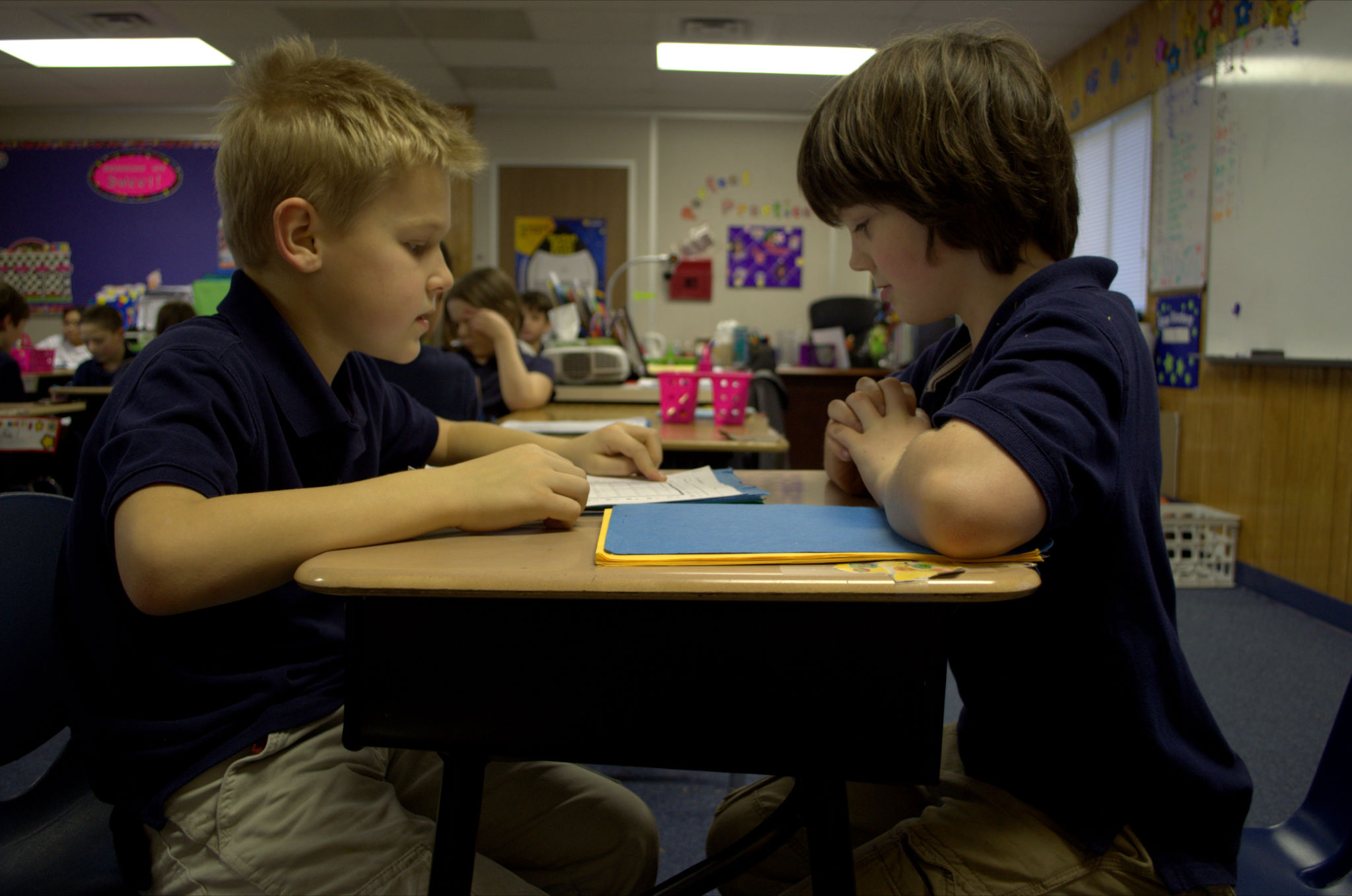
Two students use Rocket Math Worksheets to practice their math facts.

Students who have not yet mastered multiplication facts are going to require a very effective teaching methodology to learn them. The haphazard, leave-it-up-to-the-student methods have already failed them. By now, these students lack confidence in their ability to learn the facts, so you need a sure-fire system. 

Rocket Math is just such a system. Both the Worksheet Program and the Online Tutor systematically introduce students to the facts in a careful sequence that they can do. The Worksheet Program and Online Tutor ask students to memorize only two facts and their reverses at a time.  

Students demonstrate mastery of those facts by answering them without hesitation. Then Rocket Math will add two more facts and their reverses. Small steps at a time, systematically the students can memorize the facts and answer them instantly from memory. If students practice every day, within a few weeks you’ll see a dramatic improvement in their recall of multiplication facts. 

But what about the students who already know their multiplication facts? Rocket Math has something for them as well. 


Rocket Math Programs for Advanced Students 

Teachers can assign Rocket Math as a 10-minute warm-up or cool down for all their students whether they are behind or advanced. Rocket Math has several pre-algebra topics for those students who already know their multiplication facts. Each of these topics will help them do pre-algebra processes more fluently and to quickly recognize relationships that they have memorized.


Learning Track 13: Identifying Fractions

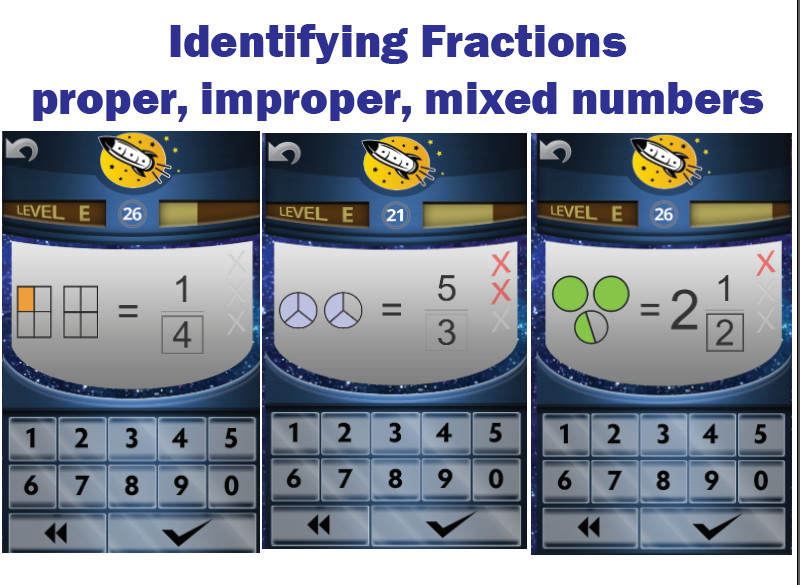
Screenshot of Rocket Math Online Game for identifying fractions.When students initially learn about fractions they are often only shown proper fractions. As a result, they have a limited understanding of fractions and can be confused by improper fractions or mixed numbers. The Rocket Math programs (both Worksheet and Online Tutor) prevent this problem.  From the start, we teach students using examples of both proper and improper fractions as well as whole numbers and mixed numbers. Students learn to identify over 90 different fractions quickly and easily by getting lots of practice. Their understanding of fractions will deepen and become more flexible as they learn to recognize many examples of fractions.


Learning Track 14: Equivalent Fractions

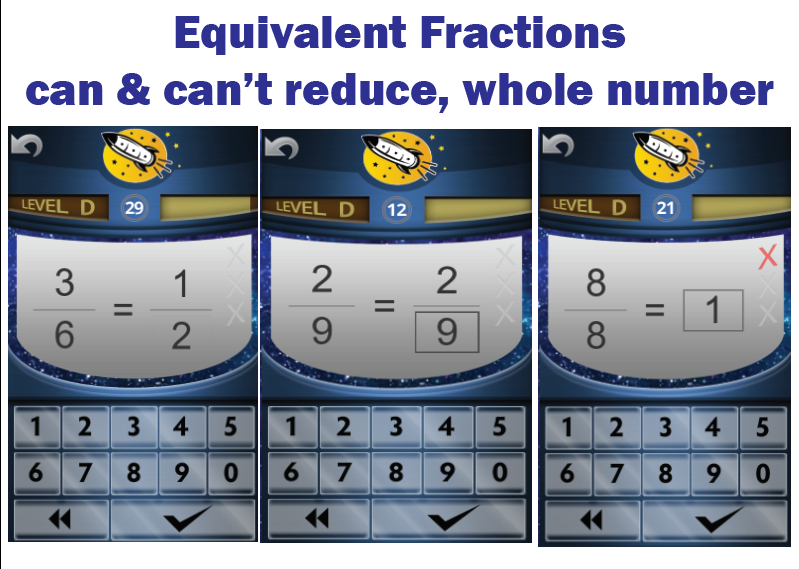
Screenshot of Rocket Math Online Game of Equivalent Fractions practice.Students will memorize the most common equivalent fractions with this Rocket Math Learning Track. They will also learn to identify a number of fractions, such as 2/9,  that do not “reduce” or for which there are no equivalent fractions in lower terms. Students also learn to recognize a fraction equal to 1 whole in its various forms. When students don’t instantly know the answer they are told the equivalent fraction and given practice on it. The computer gives help in the Online Tutor.  Their partner gives that help in the Worksheet Program. By the end of the program, students will learn over 90 equivalent fractions. This gives students an excellent start on being able to manipulate fractions quickly and easily.


Learning Track 15: Factors & Primes

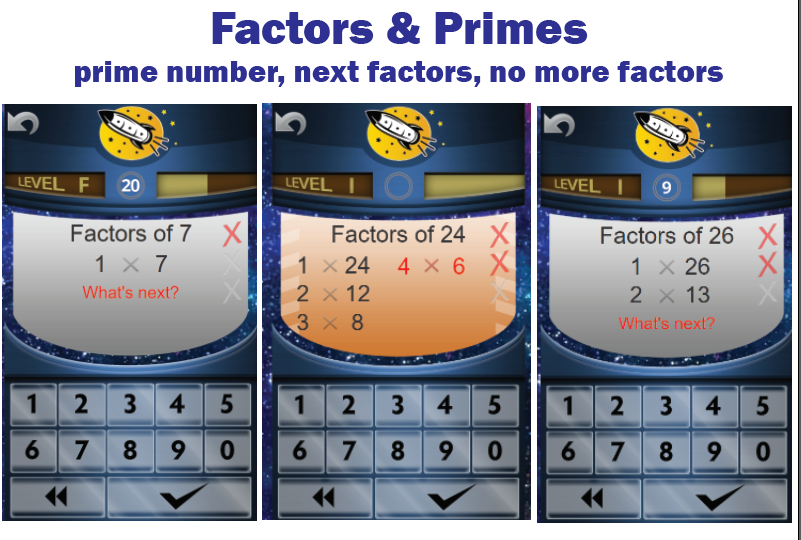
factors and primes game screensStudents are required to “find the factors” when dealing with unlike fractions and reducing fractions. Rocket Math Worksheet and Online Tutor teach students how to find factor pairs. Students learn how to find all the factor pairs and what they all are for many common numbers. They also learn to identify prime numbers and their characteristic of having only one and themselves as factors. Students learn the factor pairs in order and know the “last” factor pair when they see it. When the game asks “What’s next?” students can provide the next pair of factors or click the checkmark to indicate there are no more factors. When students go through this Learning Track they will no longer hesitate when asked for the factors of common numbers.


Learning Track 16: Fraction & Decimal Equivalents

Screenshot of Rocket Math Online Game of Fraction & Decimal Equivalents practice.

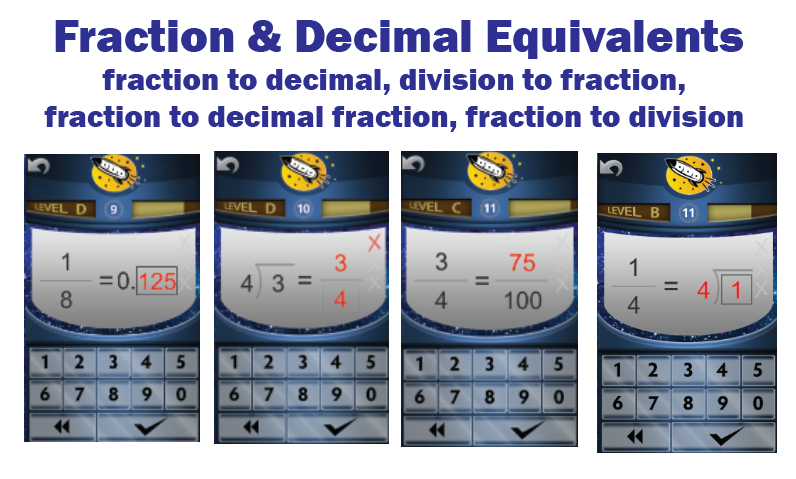
Common fraction and decimal equivalents should not require a laborious process to “figure out.” Students should just know these, so this Learning Track in the Online Tutor allows them to memorize a bunch of common decimal and fraction equivalents. Having a facility with a lot of fraction and decimal equivalents means faster computation as well as a way to check their process when manipulating fractions and decimals. Students also learn another essential pre-algebra skill that often confuses them.  They learn to correctly and fluently translate a fraction into a division problem and vice-versa.

“Test Drive” any of the 16 Learning Tracks in our Online Game demo accounts. 

Register for a 14-day free trial of Online Tutor for all your students

Explore the options for subscribing to the Worksheet Program.

Learning Math by Fact Family vs One Operation at a Time

A Fact Family is an innovative way to group the learning of math facts. Some people are die-hard advocates of this way to learn facts. Yet students successfully learned math facts for decades without ever considering them as being composed of families. This blog discusses the pros and cons of learning with fact families. 


 What is a Fact Family


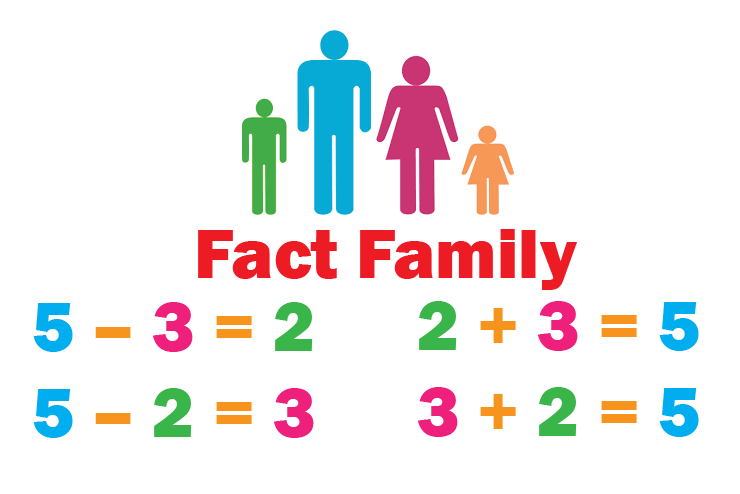
A fact family is a set of four math facts made with the same three numbers. The numbers 2, 3, and 5 can make a family of four facts: 2+3=5, 3+2=5, 5−3=2, 5−2=3. The numbers 2, 3, and 6 can make a different fact family: 2×3=6, 3×2=6, 6÷2=3, 6÷3=2.  


Why are Fact Families Important?


Fact families help children see that adding and subtracting are the opposite of each other. Multiplication and Division fact families do the same. Learning fact families may help students develop more flexibility in their number sense.   


Benefits of Thoroughly Learning a Single Operation at a Time


Rocket Math Addition Fact Family worksheet for students.

When it comes to memorizing math facts, students traditionally learn one operation at a time. They memorize only the Addition facts, typically in first grade. Not until later do students learn the concept of Subtraction, and then they begin memorizing Subtraction facts, usually in second grade. With Rocket Math, students will master Addition facts much better than most first graders. Students using Rocket Math will know Addition facts instantly without having to stop and think about them. When students have mastered Addition facts, an unusual thing happens when introduced to Subtraction. Students instantly recognize that the Subtraction facts are the opposite of those Addition facts they know so well, usually without even being told. This recognition does not typically happen in second grade with students who haven’t truly mastered Addition facts.  Therefore teachers think they need to teach in fact families to get students to recognize the reciprocal nature of Addition and Subtraction.   


Which Way is Better?


Only if students thoroughly master Addition facts, can they quickly recognize the reciprocal nature of Subtraction. Students find it easier when memorizing facts, to stick with Addition, rather than switching back and forth between adding and subtracting as is required by learning in fact families. They tend to memorize faster in single operations than they do in fact families.  However, if students memorize in fact families, they will learn the reciprocal nature of the fact families right from the beginning. They may learn it more thoroughly. That may help them develop more flexibility in their number sense. So that’s not a bad thing.


How to Learn Math with Fact Families and Single Operations


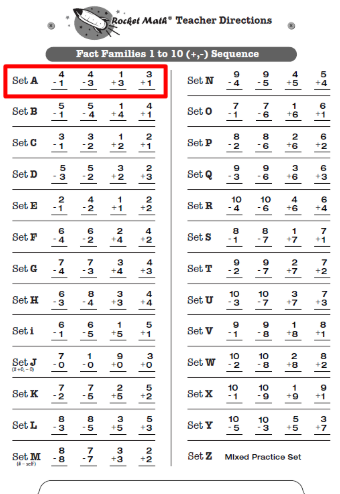
Teacher's directions worksheet for addition and subtraction fact families.Rocket Math offers separate Addition and Subtraction sequences, as well as fact family sequences. Both the Online Game and Worksheet Program provides these. If teachers (or their regular math curriculum) are wedded to fact families, they are available to use. Usually, the first fact families learned are Addition and Subtraction Fact Families through 10, then Fact Families from 11.  


I would recommend beginning with learning the operations separately: learning Addition facts (1s to 9s) first, followed by Subtraction facts (1s to 9s). For some students, this may be all they have time to learn.  If students have time, use Fact Families as a review. If the student has time, it would be beneficial and relatively easy for them to do Fact Families (+,-) to 10 and then Fact Families (+,-) from 11 afterward. Students will learn the facts more thoroughly, and the reciprocal nature of Addition and Subtraction will be deeply ingrained. This is quite simple in the Online Game, as it only involves switching the student to another Learning Track, and doesn’t require a new filing crate, as in the Worksheet Program.  


Using Rocket Math to Teach Single Operations & Fact Families


Rocket Math offers separate Addition and Subtraction sequences, as well as fact family sequences through the Online Game and the Worksheet Program. For teachers looking to teach Addition and Subtraction math fact families, Rocket Math offers two sequences of Fact Families; the first, Fact Families to10 and the second, Fact Families from 11. For teachers looking to teach in separate operations, Rocket Math offers separate sequences for learning Addition facts (1s to 9s) first, followed by Subtraction facts (1s to 9s). If the operations are learned separately, fact families can be used as a review. 


What’s the best order or sequence to do Learning Tracks?

First learn the fundamentals; add, subtract, multiply, divide (0-9s).

There are over 20 different Rocket Math Learning Tracks to help students learn math facts. A common question teachers ask is in what sequence should they teach the various Rocket Math learning tracks? The fundamental operations of Addition, Subtraction, Multiplication, and Division (0-9s) have priority and must be mastered by all students. Addition (0-9s) in the first grade. Addition and Subtraction (0-9s) in the second grade. Multiplication (0-9s) (as well as Addition and Subtraction) by the third grade. Then, all four, including Division (0-9s) by fourth grade. If a student is on track, those fundamentals have first priority.

Optional learning tracks once the basics are already mastered

The rest of the learning tracks are less critical and should be offered to students only after the basics have been mastered. The only exception would be in a school where Kindergarteners did not get a chance to learn how to quickly and easily write numerals, through using the Rocket Writing for Numerals program. In that case, you might take the first two months of the first grade year to run students through Rocket Writing for Numerals before beginning Addition (0-9s).

Here’s a link to a printable version of the graphic above.

Kindergarten Students have things to learn before beginning Addition Facts

A teacher sits with four kindergartners and is holding up her hand to count how many pencils they have on the desk.There are three Learning Tracks in the Universal Level of the Worksheet Program that can help kindergarteners get ready for memorizing Addition Facts in the first grade. These programs are not like the main part of Rocket Math, because they are not set up for peer practice.  Instead, the teacher leads instruction, because the little ones don’t really have good skills for working together yet. Using the Beginning Numerals  Learning Track, the teacher can teach students how to use their rote counting skill to count objects and identify the numeral that goes with that number of objects. Next the Rocket Writing for Numerals Learning Track will teach students how to correctly, legibly, and efficiently write the numerals 0-9.  There are 72 pages in this program, so it will take most of the school year for students to work through it.  The third teacher-led learning track is Conceptual Addition.  This learning track teaches students what addition is all about by teaching them to count objects to add them together.  Most importantly, it teaches student how to “count-on” from a number other than one, so they can add up numbers more than their ten fingers.  Click the link to see more information about that.

First-grade Students Should Learn Addition Facts


Students practicing their math facts together.If first-grade students are taking all year to get through sets A-Z in Addition, they need some extra help. You should intervene to help students who take more than a week to pass a level. Often they need to practice better or with a better partner, and some may need to practice a second time during the day or at home in the evening. 

Another intervention would be to use Rocket Math Online Tutor for Addition facts, as students seem to progress much more quickly in the online game.  The Online Tutor has an adjustable game speed for first-grade students who are having trouble (their difficulty score is over 3) moving their fingers fast enough. First-grade students who finish the 0-9s can move on to the Add to 20 programs for the remainder of the year.


Second-grade Students Must Know Both Addition & Subtraction Facts


The Rocket Math Online Game Additions fact family example page.

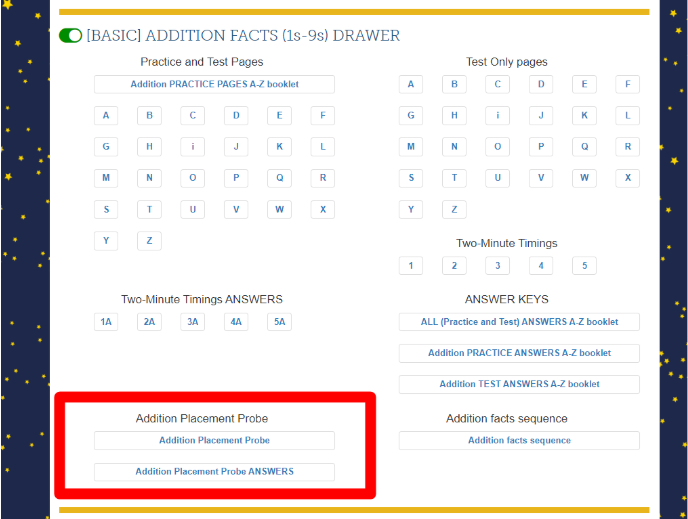
Second-grade students must have completed Addition (0-9s) before starting on Subtraction (0-9s).  They can also test out of Addition through the Placement Probes which are available within the Addition drawer in the Rocket Math Worksheet program virtual filing cabinet. Addition has priority for second graders who cannot test out of Addition in first grade or didn’t complete it in first grade. Only after getting through Set Z of Addition, should they move into Subtraction (0-9s). Second-grade students who complete Addition and Subtraction (0-9s) can move on to Skip Counting or Conceptual Multiplication, which both do a great job of preparing students to learn Multiplication facts. After that students could do the Subtract from 20 learning track.

Fact Families is Another Way to Learn Addition & Subtraction Math Facts

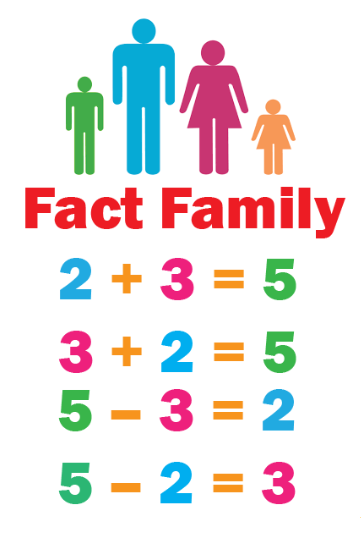
A chart showing the Addition and Subtraction fact family of 2, 3, and 5.There is another way to learn facts, through learning fact families. Instead of learning only Addition facts, students can learn Addition and Subtraction facts at the same time. A fact family consists of four related facts, for example: 3+2 = 5, 2 + 3 = 5, 5 – 3 = 2, 5 – 2 = 3.  


It is challenging for students to switch between Addition and Subtraction. But it does drive home the reciprocal nature of the two. There is no evidence that it is better to learn in fact families than it is to separate the operations. That’s why we offer both alternatives.  You must of course, teach the concepts of both addition and subtraction before students can learn in fact families. Students can learn Add-Subtract fact families up to 10 in first grade. Then in second grade they can learn the Addition and Subtraction upper fact families, from 11 to 18 in second grade.


Third-grade Students Must Learn concept of multiplication and then learn the facts

Third graders can begin the year working on addition and subtraction facts or reviewing them in fact families.  They should NOT begin memorizing multiplication facts until after they have learned the concept of multiplication in their math curriculum or used the Rocket Math Conceptual Multiplication learning Track.  After they have learned the concept of what multiplication is all about, then have them memorize Multiplication facts 0-9s.  Once multiplication is mastered, if there’s time, students who need to can go back to master addition and subtraction facts.

As in Addition and Subtraction, students can learn Multiplication and Division by fact families, provided you teach both concepts first. In third grade, just the Multiply-Divide Fact Families through 20 need to be mastered. Once all three of these basic operations are under their belt, I’d recommend the Identifying Fractions learning track next followed by the Equivalent Fractions, followed by the Factors learning track.


Fourth-grade Students Should Know Both Multiplication and Division Facts

Effective math teaching strategies help students of all levels be successful at math.

Fourth-grade students need to have completed Multiplication before going on to Division.  They can also do Multiply-Divide Fact Families to 20 and then Multiply-Divide fact families from 21 on. If they complete Multiplication and Division (0-9s), they should go back and do Addition and Subtraction (0-9s), if those are not mastered, either straight up by operation or in families. Then students can go on to Identifying Fractions learning track next followed by the Equivalent Fractions, followed by the Factors learning track. They can go on to 10s, 11s, 12s Division, but it is less valuable than the pre-algebra skills of factors and fractions.


Fifth-grade Students & Up Need to Know the four fundamental Operations First, Then Branch Out


Fifth-grade students should have completed all four fundamental operations (1s-9s). If students have not completed these fundamentals (and cannot test out of them with the Placement Probes), then the sequence they should follow is Multiplication, followed by Division, then go back and complete Addition followed by Subtraction. Again, as an alternative, students can learn the basic facts in families. The same recommendations hold for students in any grade after fifth.

Once students have mastered the four fundamental operations, add, subtract, multiply, divide(0-9s), the supplemental pre-algebra programs are recommended. These will help more than learning the 10s, 11s, 12s facts. I would recommend this order: Identifying Fractions, then Factors, followed by Equivalent Fractions, followed by Learning to Add Integers, Learning to Subtract Integers, then Mixed Integers.

Rocket Math Worksheet & Online Tutor

Learn more about Rocket Math: in just 2 minutes!  Rocket Math has a fun video for you to learn more about how Rocket Math works. Or check out our website at www.rocketmath.com 

Here is a quick and easy chart to help understand which operation/skill students need to learn in which grade level and which Rocket Math Worksheet and Rocket Math Online Tutor Learning Track they should be at.

Age Grade Operation/Skill Rocket Math Worksheet Rocket Math Online Tutor Learning Track
5-6 Kindergarten Writing Numerals Beginning Numerals

Rocket Writing for Numerals

Conceptual Addition

In development
6-7 First Writing Numerals

Addition

Rocket Writing for Numerals

Addition 0 through 9s

Fact Families 1 to 10 Add and Subtract

Add to 20

Addition (0-9s)

Fact Families (+, -) to 10

Add to 20

7-8 Second Addition

Subtraction

Addition 0 through 9s

Fact Families 1 to 10 Add and Subtract

Add to 20

Subtraction 1s through 9s

Add-Subtract Fact Families 11 to 18

Skip Counting

Subtract from 20

Addition (0-9s)

Subtraction (0-9s)

Add-Subtract Fact Families to 10

Add-Subtract Fact Families from 11

Add to 20

Subtract from 20 

8-9 Third Multiplication Multiplication 0 to 9s

Multiply-Divide Fact Families to 20

Multiplication 10s, 11s, 12s

Identify Fractions

Equivalent Fractions

Multiplication (0-9s)

Multiply-Divide Fact Families to 20

Multiplication 10s-11s-12s

Identify Fractions

Equivalent Fractions

9-10 Fourth Multiplication

Division

Multiplication 0 to 9s

Division 0 through 9s

Multiply-Divide Fact Families to 20

Multiply-Divide fact families from 21

Identify Fractions

Equivalent Fractions

Factors

Multiplication 10s, 11s, 12s

Division 10s, 11s, 12s

Multiplication (0-9s)

Division (0-9s)

Multiply-Divide Fact Families to 20

Fact Families from 21

Identify Fractions

Equivalent Fractions

Factors & Primes

Multiplication 10s-11s-12s

Division 10s-11s-12s

10+ Fifth and up All Basic Operations

Fractions

Positive/Negative Numbers

Basic Addition, Subtraction, Multiplication, and Division

Identify Fractions

Equivalent Fractions

Factors

Learning to Add Integers

Learning to Subtract Integers

Mixed Integers

Addition, Subtraction, Multiplication and Division (0-9s)

Identify Fractions,

Equivalent Fractions,

Factors & Primes,

Fraction & Decimal Equivalents