Dr. Don’s 20-point Online Game Checklist

Checklists have been found to improve accuracy and efficiency in everything from building houses to open-heart surgery.  Although implementing the Rocket Math Online Game is not anywhere near as difficult, this checklist of the things a teacher needs to do to get the program up and running may prove helpful.

Most of the items are linked to the directions for how to accomplish them and why they need doing.  This document (without all the pictures) is also on Google Drive.

Dr. Don’s 20-point Online Game checklist 

For Effective Rocket Math Online Game Implementation


Links in this document take you to directions on how to accomplish it and why it is worthwhile to do so. 

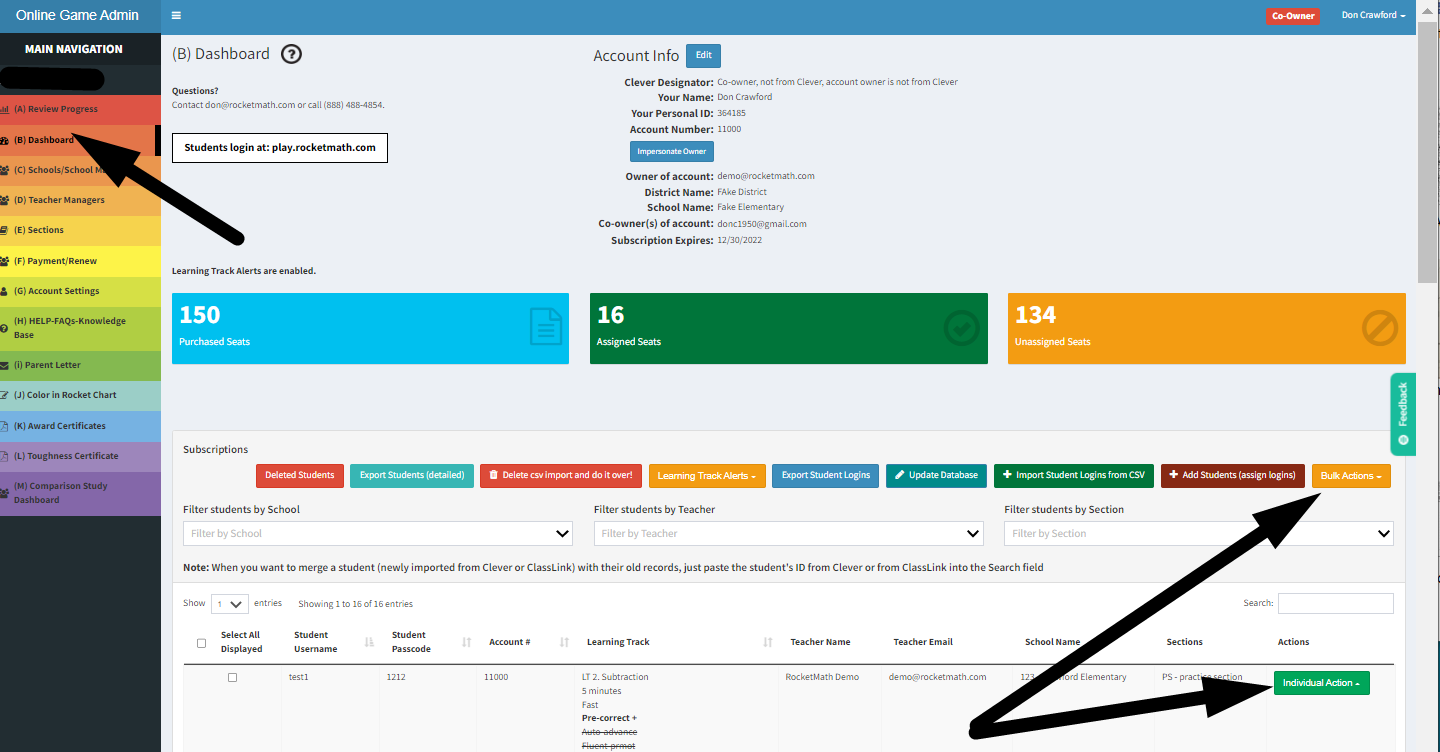
SET UP AHEAD OF TIME FROM YOUR DASHBOARD

  1. ____ Schedule Rocket Math sessions at least once a day, preferably twice.
  2. ____ Start students in correct Learning Track. 1-3 Addition * 4th & up Multiplication.
  3. ____ Sessions are limited to 10 minutes with a 20 minute break required before playing again.
  4. ____ Enable Daily Progress Reports: know who’s completed sessions and who’s passed levels.
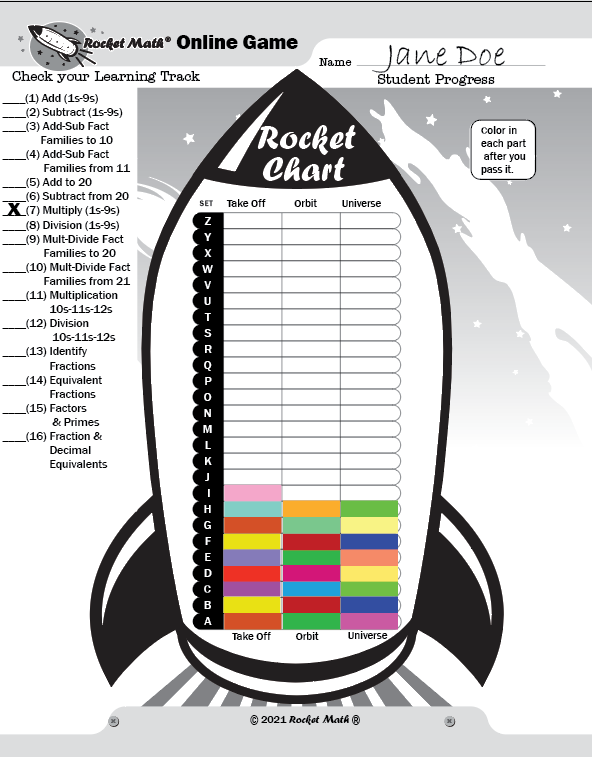
  5. ____ Print out Color in Rocket Charts and give it to all students.
  6. ____ Enable Learning Track Alerts—so you can award them as soon as students finish.
  7. ____ Print out Parent Letter—so you can assign this as homework.
  8. ____ Enable Fluency Promotion and Auto-Advance for all students.  
  9. ____ Assign Fluency Testing (1-min Races). Do it the same day each week. 
  10. ____ Post Toughness Certificate to use with those who need help with perseverance.  

BEFORE EACH DAILY SESSION

  1. ____ Group recognition (stand up and take a bow) for students who have done Rocket Math as homework (more sessions completed than done in class the day before).
  2. ____ Group recognition (stand up and take a bow) for students who’ve improved on 1-minute race. 
  3. ____ Award Star Effort Awards for any who’ve achieved that level of effort. 
  4. ____ Award Learning Track Certificates for any who completed one. 
  5. ____ Give students time to color in their Rocket Charts for parts passed yesterday (see 3). 
  6. ____ Give star stickers for the Wall Chart (if you have it) to students who have passed a level.

DURING EACH DAILY SESSION

  1. ____ View and praise Star Effort screen for several students—note who might earn a certificate.
  2. ____ Walk around and monitor–look at screens and praise students who are working.
  3. ____ Require students to show you their “Session Completed” screen before logging off.
  4. ____Check the difficulty score of students who complain.  If their difficulty score is over 3.0, observe and diagnose their problem or adjust speed. If it’s under 3.0 use Toughness Certificate.

________________________

* After 3rd graders have learned the concept of multiplication, they should be moved ahead into LT. 7 Multiplication


Dr. Don’s Worksheet Program Checklist

Checklists have been found to improve accuracy and efficiency in everything from flying airplanes to brain surgery.  Although implementing the Rocket Math Worksheet program is not anywhere near as difficult, this checklist of the things a teacher needs to do to get the program up and running may prove helpful.

Most of the items are linked to the directions for how to accomplish them and why they need doing.  This document (without the pictures) is also on Google Drive.

Dr. Don’s Worksheet Program checklist 

SET UP AHEAD OF TIME

  1. ____ Schedule 10-to-15-minute Rocket Math sessions at least once a day.
  2. ____ Choose a Learning Track for your class.  (How to choose a Learning Track advice)
  3. ____ Set up the Math Facts crate for your chosen Learning Track and fill with worksheets.
  4. ____ Print out Four forms for each student and A-to-Z Answer booklets for the Learning Track.
  5. ____ Create folders for each student—fill with the four forms you printed in Step 4.
  6. ____ Set up students in partner pairs, with at least one hard-working student in each pair.

      TEACH STUDENTS HOW TO PRACTICE AND CORRECT

  1. ____ Come to understand the practice and correction procedure for yourself.
  2. ____ Make all your students model the correction procedure as you role play making errors

GIVE THE WRITING SPEED TEST TO SET INDIVIDUAL GOALS

  1. ____ Give the Writing Speed Test (should be in their folders) and collect student folders. 
  2. ____ Use the results to set individual goals on the Goal Sheet

BEFORE EACH DAILY LESSON

  1. ____ Hand out student folders and recognize students who passed a level yesterday.
  2. ____ Give students time to color in their Rocket Charts for parts passed yesterday. 
  3. ____ Give star stickers for the Wall Chart (if you have it) to students who have passed a level.

DURING EACH DAILY SESSION

  1. ____ Practice saying the problems and answers aloud while their partner corrects.
  2. ____ After two to three minutes, the students switch roles and practice again.
  3. ____ Give the 1-minute test to everyone, based on their current worksheet.
  4. ____ Collect student folders of students who have passed by meeting their individual goal. 

AFTER EACH DAILY SESSION

  1. ____ Check to see that 1-minute tests are 100% correct and met their individual goal. 
  2. ____ Replenish student folders with six copies of the next worksheet.  Reuse unused worksheets.
  3. ____ Students who don’t pass take home worksheet and practice for homework

EVERY WEEK OR TWO GIVE 2-MINUTE PROGRESS MONITORING TEST

  1. ____ Progress Monitoring tests numbered 1 through 5 at back of the math facts crate.
  2. ____ Skip practice that day.  Give the test for 2-minutes.  
  3. ____ Correct as a group: students chorally say the answers and mark their own papers.
  4.  ____ Students graph the results in the Individual Student Graph stapled into their folders. 

Star Effort Awards Motivate all your students and do it fairly.

Recognizing effort (rather than success) can motivate everyone

anxious student after timed testNot all students will be above average in their academic ability.  Learning comes harder for some than it does for others.  Recognizing only academic success can cause students who are finding the going slow and difficult, to get frustrated and give up.

On the other hand, if you recognize effort, then everyone has a shot at the recognition.  Students can be motivated to try something at which they feel they can succeed.  If you recognize effort, in the form of sessions completed in Rocket Math, everyone realizes they can achieve that recognition.  Everyone can do “effort” so if you want to motivate everyone, recognize effort.


Recognizing effort (rather than success) is fair to everyone.

Is it fair to recognize only the students who find it very easy to learn things?  Academic ability is not evenly distributed.  Some have to work much harder to learn things.  If they work just as hard as the talented student, shouldn’t they get recognized?  If you recognize effort, that is fair to everyone.


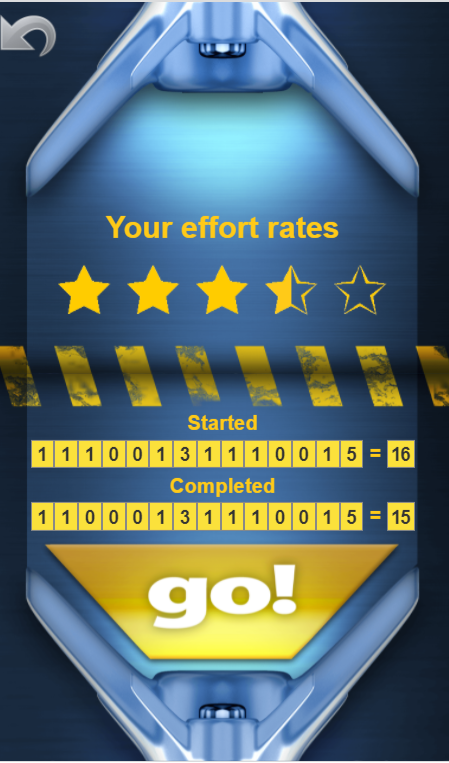
Star Effort Rating screen shows student effort.


When students log into the Online Tutor, they see their effort rating screen.  Students earn stars for how many sessions they have COMPLETED in the last 14 days. Two sessions earn one-half of a star.  So 8 sessions will earn two stars and so on.  The stars they have earned show on the effort rating screen when each student logs in.

You should circulate while students are logging in and comment on their level of effort.  At first you may only see one or two stars, but be sure to publicly praise the students who are putting forth the most effort.  You might put the names of the students with the most number of effort stars on the board.  You could ask if anyone has earned 2 stars, to raise their hand.  Anyone can put forth effort, so it is very fair to praise and recognize effort.  The more effort they put forth, they more stars they will earn. (And not coincidentally, the more they will learn!)

Star Effort Award Certificates for 8 or more sessions in the last 14 days.

You can also print out a certificate and award it when students reach these levels of effort.  Award these on a regular basis, such as every two weeks–so students know when another award ceremony is coming.  When you reward some students for their effort, students who are watching, realize they can do it. Students know they can get an award next time, if they give more effort.  The benefit of the motivation is for the ones sitting in their seats watching.  Motivation is most effective for students who don’t get it!

If you reward everyone, the ceremony will have no effect. The students watching the ceremony (and not getting a award) will feel motivated to work harder and put in more effort so as to win a Star Award the next time you do awards. This why they need to know that you’ll be giving out awards again later.

Once a student earns a two-star award, their goal is to earn a three-star award.  Don’t give them another two-star award, instead they should be striving for a three-star award.  Once most people have earned a three-star award, then the big deal becomes earning a four-star award, and so on.  The students who have put in the most effort and the students who have just reached new levels of engagement, those are the ones who should be getting the awards in the ceremony.

Making it into a ceremony signals the importance of the award.

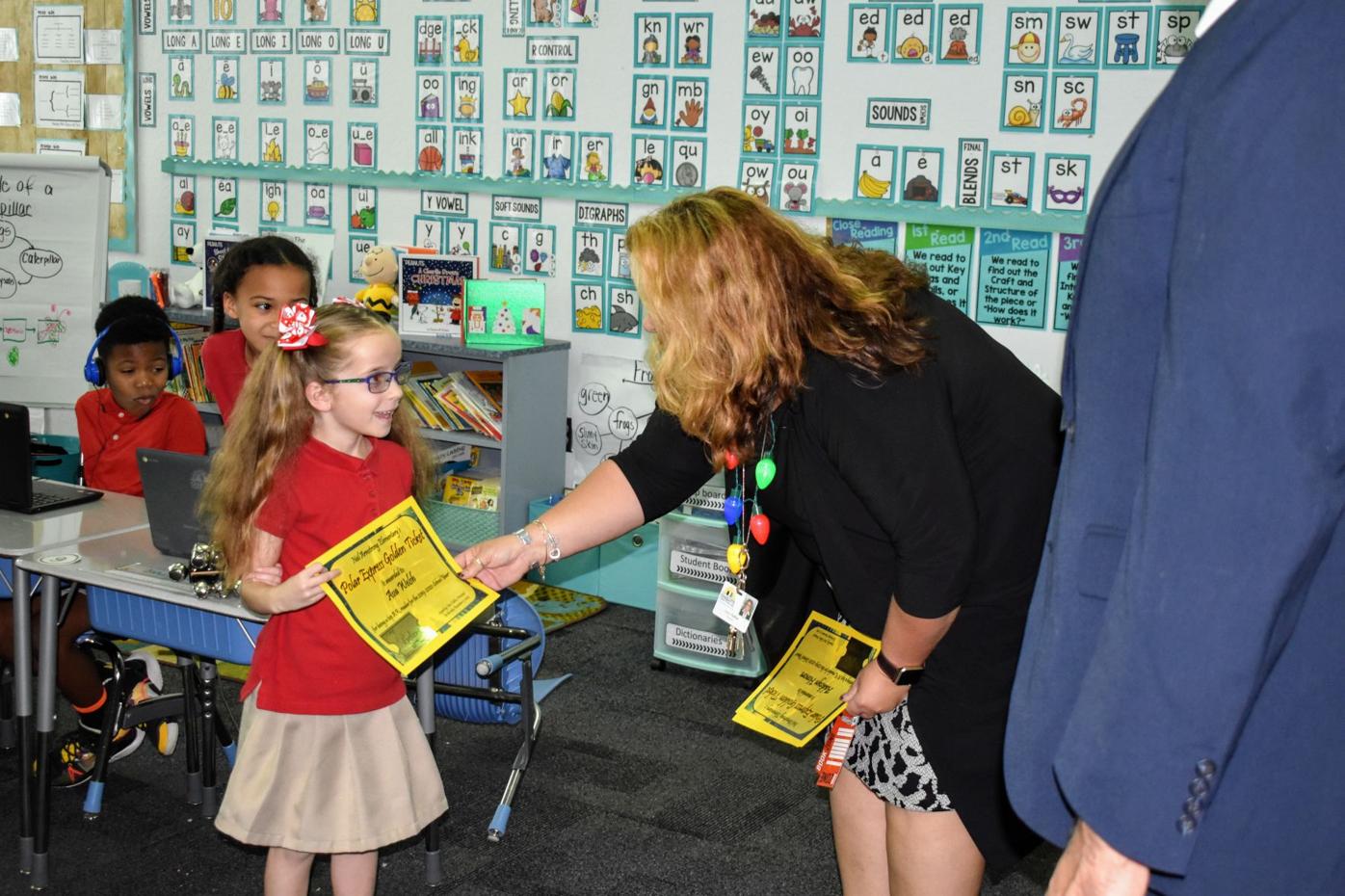
The importance of an award is directly related to how important it seems to the adults in the room.  Casually handing out awards without fanfare signals the awards aren’t very important.  Conversely, bringing another outside adult, such as a math coach, parent, or principal, into the room and handing out the awards with a little ceremony signals that this is an impressive accomplishment.  Have both adults shake the hand of the award recipient, and form a little receiving line, so that each recipient shakes the hands of the adults and all the other recipients.  Then a round of applause for all the winners.  Takes five minutes, but the effort to do the ceremony signals that this is an impressive achievement.

The first Star Effort Award is for 8 sessions in 14 days earning a 2 star effort awardThat is nearly a session every day. This level of effort (daily sessions) is your goal for all students.  Working with the Online Tutor daily is needed to really make progress on learning math facts.

Who is working hard enough to earn Star Effort Awards?

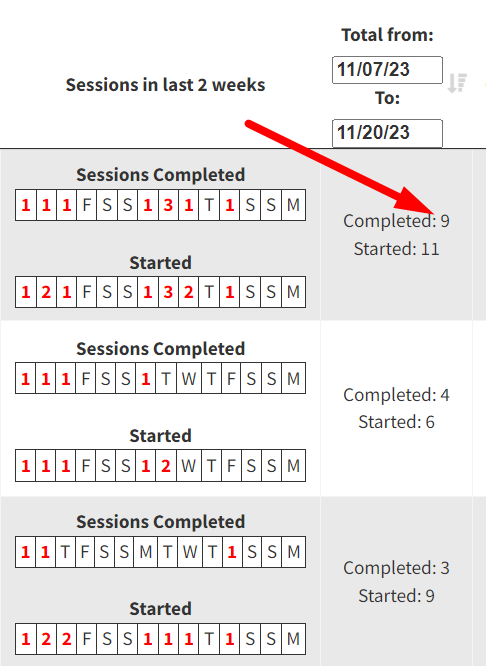
Go to the Review Progress page to find the individuals who are working the hardest.  Scroll down to the individual student rows and scroll to the right to see the “Total” column.  This column shows the number of sessions over the last two weeks by default.  (It is adjustable as to which dates to be covered–if you want to recognize the last month for example).  This selection shows the last 14 days from 11/07 to 11/20.   This column will tell you exactly who is working the hardest.  Click at the top of the column until it is sorting downward and you can see at the top which students are completing the most sessions. The top student in the example to the left is showing 9 completed sessions. Therefore this student has earned the two-star effort award.  It’s the place to start.  By giving out this award, you signal to the rest of the class, that they too could earn awards for their effort.

This total data tells us the level of effort students have been putting forth to learn their math facts.  If you monitor this number and recognize students putting forth the most effort, you’ll get more students engagement.  School managers can do this for the whole school.  Teacher managers can do it for their class.  This is key to motivating their effort and then their learning. 

You should have a goal of getting students to do Rocket Math as homework too.

12 sessions in 14 days for a 3 star effort award. In 14 days there are 10 school days, so getting up to 12 sessions in 14 days means that some students are doing two sessions in a day, and probably are doing it as homework.  By recognizing this level of effort you are on your way to having students do this as homework.  Here are more ideas on how to motivate students to do Rocket Math as homework.

Once students are doing Rocket Math as homework regularly you’ll see students doing 16 sessions in 14 days for a 4 star effort award. You may want to help students realize that a 4 Star Effort award is better than a three or two star award.  “I mean a two-star award is good and all, but a 4-star award is really amazing!” 

20 sessions in 14 days for a 5 star effort award. That’s one session each day in school and one more for homework. At this level of effort your students are going to make great progress in Rocket Math.   Rocket Math can guarantee you’ll get improved fluency because it is an effective intervention.  Your students will, we guarantee, become quite fluent in math facts and will find math to be easier and more enjoyable than ever.



Math Fact Benchmarks: Guarantee To Meet Them With Student Effort & Rocket Math Online Game

Not meeting benchmarks: what should it mean?

When it comes to learning math facts, most students have had no opportunity to learn them in a systematic way.  Unless they have had an extraordinary school or an unusual teacher they have not received structured, systematic learning opportunities to memorize math facts. After three decades working in schools across the country, I know this to be the case.  Without systematic practice and effort, students will not meet math fact benchmarks. They won’t meet the Common Core expectation that students will “know [math facts] by memory.”   Whose fault is that?  It is not the student’s fault, nor the parent’s fault.  So “not meeting benchmark” should mean that here is an area where the school needs to provide some intervention to build fluency.

Are you certain your fluency intervention is effective?

The teacher and the school have an obligation to provide an intervention that is effective.  Some so-called “interventions” do not reliably produce increased fluency.  An essential part of using an intervention is to measure its effectiveness.  [That’s why IEP goals are supposed to have measurable short-term objectives!]  The best way to measure the effectiveness of a fluency intervention is with timed, curriculum-based fluency assessments.

If you measure the same way for the same amount of time, you can see if fluency is increasing. You can see that the student’s fluency is increasing if the student can complete more items during the timed test each time you measure. If the vast majority of all of the students improve in fluency, then you can be certain that the intervention is effective. The graph above shows that for Multiplication, 23,540 students have increased in fluency as they worked through the Rocket Math Online Game.  See evidence from all 16 Learning Tracks here.

Rocket Math Online Game is effective

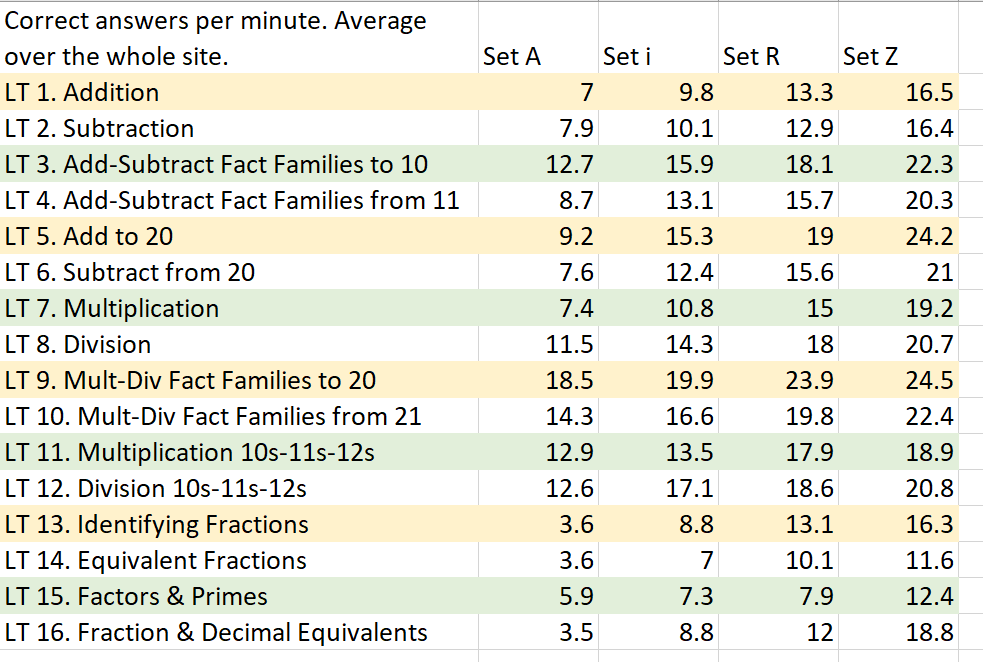
As students work through the levels in each Learning Track in the Rocket Math Online Game, they are tested after completing the first level (A), then after completing 33% at level I, and then after completing 66% at level R, and then after they finish at level Z.  Each test is a 1-minute fluency test of a random selection of facts taught in that Learning Track.  Therefore, the scores are comparable. When the number goes up at each point in the curriculum, you can be sure that students are increasing in fluency.  The chart to the right shows site-wide data. You can see students improve on average as they work through the Learning Tracks in the Online Game.  You would not expect students to meet benchmarks until they have completed Set Z in the Learning Track.

Math fact fluency benchmarks in the Online Game: 16/minute in addition and subtraction.

The 1-minute RACEs in the Rocket Math Online Game are a good way to measure math fact fluency.  On average students exceed 16 per minute correct at Set Z and the average at the beginning is much less.  So a reasonable benchmark is 16 correct problems per minute.

The teacher can assign a 1-minute RACE at any time and the student will need to do it upon their next login.  The results will be available in the Review Progress screen as well as be exported from the button that gives “Results from Assigned races.”  However, the best measure of whether a student can meet the benchmark is after Set Z, when they have completed the Learning Track.  You can see the score by clicking on the pink button for exporting “Results from Scheduled Races.”

You can see the screenshot of an example of the results from scheduled races for all 16 Learning Tracks across our website.  You can see the Account Average shows improvement at each level.   Those scores after Set Z show that nearly all students are proficient by the end of the Learning Track.  So we know that the Online Game is an effective intervention.  But there’s a catch. At the Level Z test data there are no scores for students who had not completed Set Z in Multiplication.  Students have to actually play the game in order to learn.

Students must participate to learn: monitor and recognize effort

Assigning an effective intervention will not help unless students are engaged and participate.  Instead of reporting on benchmarks of academic achievement, why not report on benchmarks of effort?  Each time students login and complete a session (five, ten or fifteen minutes in length) on the Online Game their session is recorded towards their effort score for the last 14 days.  Students should complete a session every day in school and some at home for homework.  In the effort rating system every four sessions completed earns a star, so 15  completed sessions over the last 14 days earned the student to the left 3 and 1/2 stars.

If you monitor the effort scores and recognize students who are putting forth great effort, you’ll get more students participating.  Completing 12 sessions in the last two weeks is good effort and earns 3 stars.  16 sessions over the last two weeks would earn 4 stars!

You might consider giving out Star Effort Awards (available in the teacher section of the site) once a month for students who are putting forth super-star effort.  If you reward effort, we guarantee you’ll get achievement.   Soon after doing that, you’ll probably have to start awarding Learning Track certificates for students who are completing Learning Tracks. All awards are available on the admin page on Tab (K) in the main rainbow navigation bar.


Rocket Math Online Game & Fluency Test Proven Effective

Fluency tests are called 1-minute races

Starting in the fall of 2020, the Rocket Math Online Game began scheduling 1-minute races for students as they worked through the 16 different Learning Tracks taught in the game. The 1-minute races present a random selection of all the facts in each Learning Track.  Students are allowed to skip facts they haven’t learned yet, but the scores shown here are the correctly answered problems. The races (really fluency test) are scheduled after sets A, i, R, and Z.  They are scheduled after students complete Set A, so we know they know how to use the interface and answer questions.  So that score is really a starting score.  Then intermediate in their learning after finishing Set i and Set R.  Finally, after Set Z. So the score after Set Z represents the fluency they have achieved by playing through the 26 A to Z levels in that Learning Track.

A screenshot of Rocket Math’s Fluency Test showing the student’s scores.

Data show improved fluency as students work through every Learning Track

It is clearly obvious that there is a steady rise in fluency as students work through each Learning Track.  Note that fluency test scores go up steadily at each measuring point in every Learning Track.  Remember, the tests are exactly the same every time, a random selection of problems taught in the Learning Track.  The fact that students can answer more correctly on each test, shows clearly that they are learning and the data prove it.  That is very important, as you don’t purchase this game simply to entertain children.  The goal is improved fluency and it is being achieved.  Individual results will of course vary.

Fluency Test: An excellent tool for research

These 1-minute races can also be assigned by the teacher at any time, or even on a weekly basis.  However, the scheduled tests demonstrate best the effect of the Online Game as the amount of work done to reach the tests is equal among students.   Both scheduled and teacher-assigned results are kept, and the results of these tests can be exported in excel files, so they are available for research purposes.  There are many options of things to be studied.  For my purposes, I love that we can so definitively prove that the Rocket Math Online Game works.

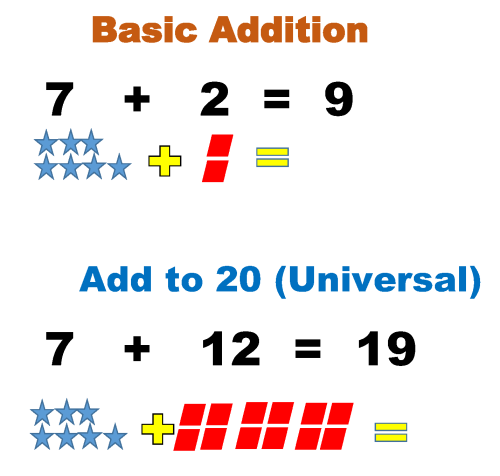
Add to 20 (e.g., 13+6, 4+11, 15+5) Learning Track

List of Learning Tracks Continue to purchase

Why teach Add to 20 facts?

The Common Core suggests that students be able to compute mentally facts  such as 11 + 7, 4 + 13, and 16 + 3.  These obviously build on the basic single digit facts such as 1 + 7, 4 + 3, and 6 + 3. Students should find these fairly easy to master but they still need some practice to commit them to memory.

LOOK OUT! Because all the answers are two digits, the number of problems students can be expected to answer will go down!

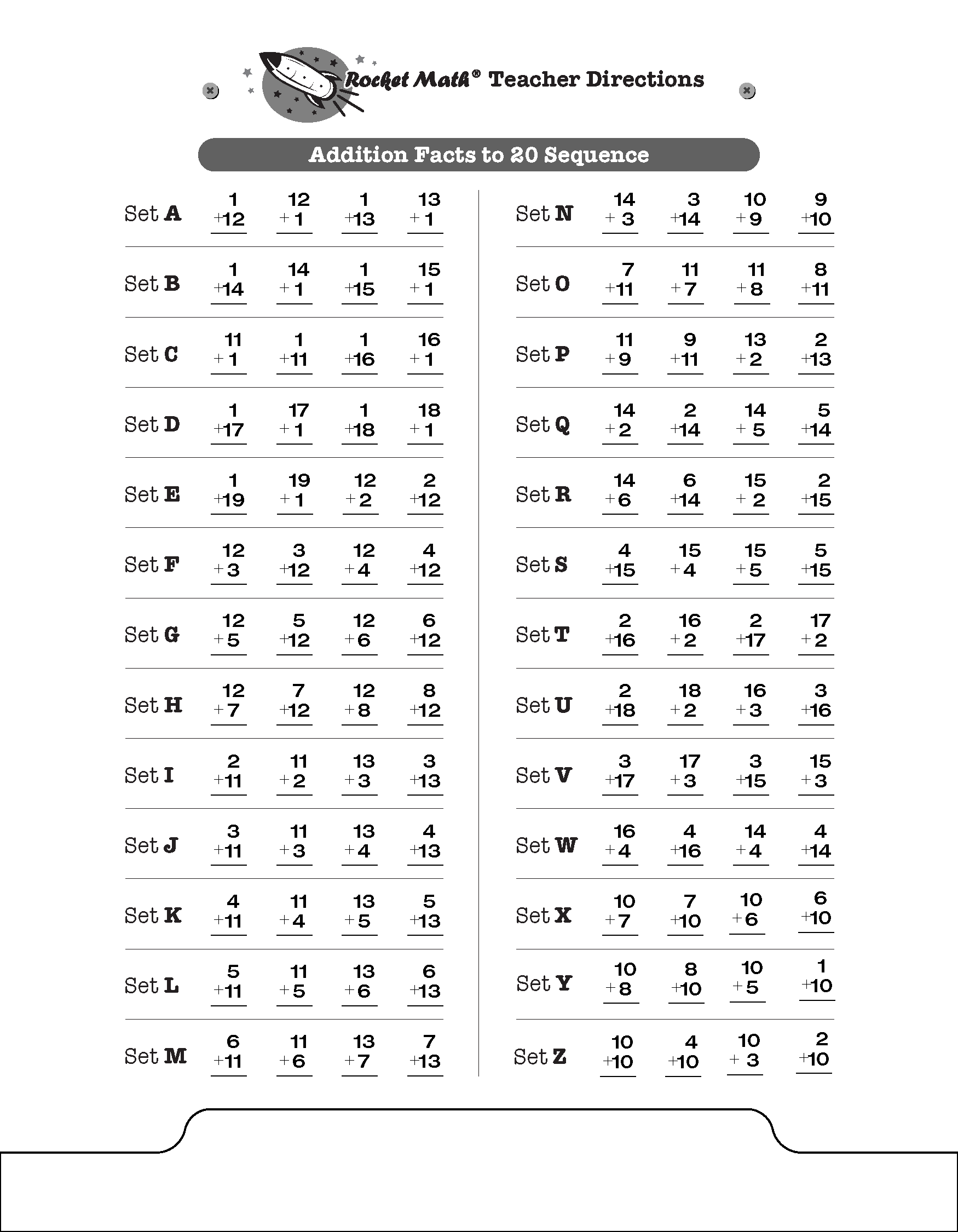
You must give the special Add to 20 Writing Speed Test to set new lower goals for your students.  Below you can see the sequence of facts that will be learned in the Add to 20 Learning Track.  Otherwise, this Learning Track is exactly the same as the basic Addition Rocket Math program and uses the same forms–that can be found in the forms and information drawer.

Multiplication 10s, 11s, 12s Learning Track

List of Learning Tracks Continue to purchase

Why teach Multiplication 10s, 11s, 12s facts?

This teaches  the 10s, 11s, and 12s multiplication facts, e.g., 10 x 7, 11 x 4, 12 x 6.  This Learning Track is optional.  Can be used by those students who have mastered the 0 through 9s Rocket Math multiplication facts.  Especially helpful for students who complete the 0s through 9s quickly and need something else to work on during “Rocket Math” time.  These facts are not critical to be able to do multi-step multiplication, but they are useful to know by memory.  The tens and elevens mostly follow a simple rule and aren’t hard to memorize.  Because there are 12 inches in a foot, it is helpful to know multiples of twelve, especially when measuring.  Finally, this is an excellent review because it includes cumulative review of the 0-9s facts while gradually teaching the 10s, 11s, and 12s facts.

How does the Learning Track work?

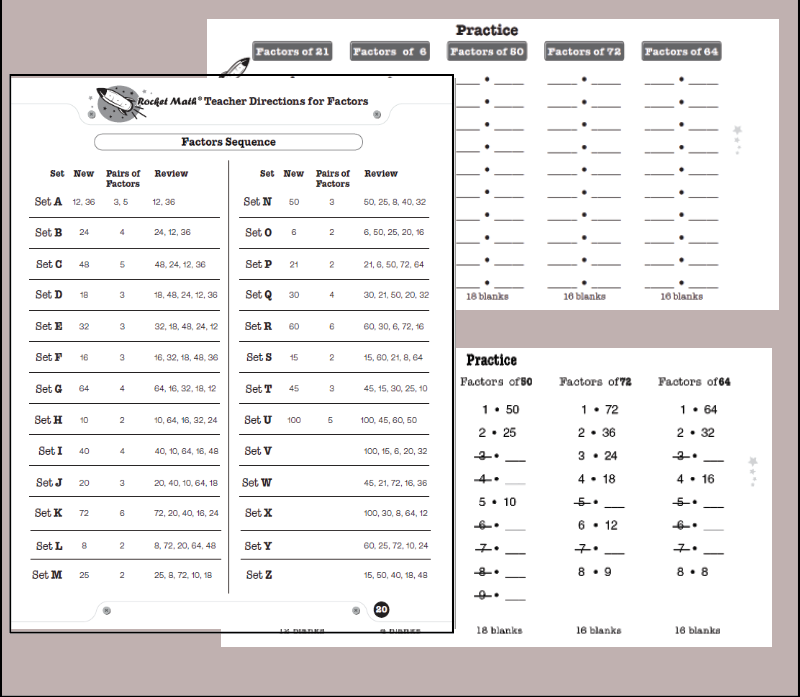
This Learning Track includes the same Rocket Math process, worksheets, and routines. The sequence of facts learned in Multiplication 10s, 11s, and 12s can be seen above.

Factors (finding all the factor pairs) Learning Track

List of Learning Tracks Continue to purchase

What do students learn?

Students learn a systematic way of finding factor pairs, which results in being able to memorize the factor pairs of common numbers.

What are the factor pairs of 24? Answer: 1 and 24, 2 and 12, 3 and 8, 4 and 6. This is what students learn by memory.

By following our systematic “How to Factor” procedure, students are certain to find and remember all the factor pairs of common numbers.

Read more about this method on this blog or watch the video below.

Finding the greatest common factor and simplifying fractions will be a breeze after students learn this easy method and practice finding all the factors of these common numbers. Students learn all the factor pairs for these numbers in this sequence: 12, 36, 24, 48, 18, 32, 16, 64, 10, 40, 20, 72, 8, 25, 50, 6, 21, 30, 60, 15, 45, and 100.

Video Lesson on “How to Factor” for students

Click here to see the critical “How to Factor” online video lesson from Dr. Don.

Or paste this into your browser so students can watch the lesson:  https://www.educreations.com/lesson/view/how-to-find-all-the-factors-of-a-number/46790401/?ref=link

How students use this Learning Track

Students practice with a partner, take a daily one-minute timing, fill in a Rocket Chart, just like regular Rocket Math. There are also special directions for the things that are different in the Factors Learning Track.

Be sure to give the special Writing Speed Test for Factors. It’s found in the virtual filing cabinet drawer. It gives the student special goals for writing factor pairs.


Mixed Integers (adding and subtracting positive and negative numbers) Learning Track

List of Learning Tracks Continue to purchase


Mixed Integers combines Adding Integers and Subtracting Integers

If this mixed set goes too fast or is confusing for your students, an alternative is to start students with the two Learning Tracks that teach addition and subtraction separately.  The four addition processes are taught separately in the Learning to Add Integers Learning Track.   The four subtraction processes are taught separately in the Learning to Subtract Integers Learning Track.  If students have done those two Learning Tracks first, this will be a review and will be easier.

Mixed Integers teaches eight processes and two rules.

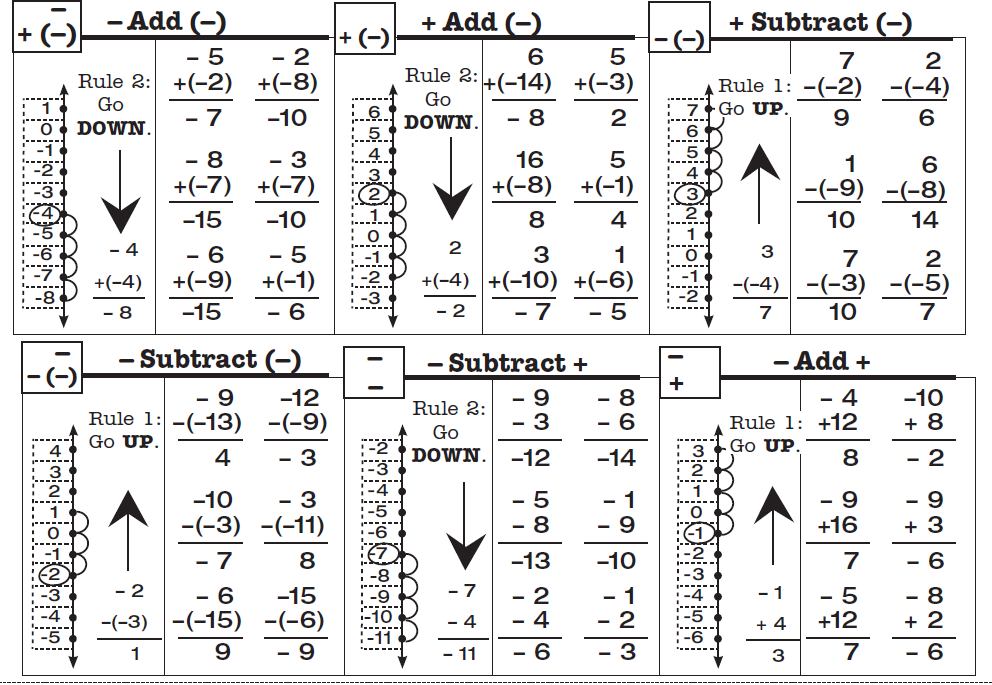
Mixed Integers displays problems on a vertical number line and then teaches students two rules about how to solve problems that add or subtract positive and negative numbers.
Rule 1:  When you add a positive number OR subtract a negative number, go UP.
Rule 2:  When you subtract a positive number OR add a negative number, go DOWN.

Students learn how these rules play out when starting with a positive number and a negative number, gradually learning these two variations of all four types of problems.  They learn to solve a problem type using the number line and then to recognize the pattern of each problem type by working several examples of each type.  This practice gives them a chance to build fluency with each problem type as they work with their partner on the top half of the page.  You will probably not be surprised that there is a one-minute test on each set.  The goals are slightly different than before.  Students are to be 100% accurate and to meet or beat their goal from the special writing speed test for mixed integers.

Video lessons teach the 8 processes.

There are 8 types of mixed integers problems (see below), between positive and negative numbers and the two operations. 8 online lessons teach students how each type of problem is solved and why it is correct.  (1) Mixed Integers Set A1 Positive add a positive

(2) Mixed Integers Set A2 Positive subtract a positive

(3) Mixed Integers Set D Negative add a positive

(4) Mixed Integers Set G Negative subtract a positive

(5) Mixed Integers Set J Negative subtract a negative

(6) Mixed Integers Set M Positive subtract a negative

(7) Mixed Integers Set P Positive add a negative

(8) Mixed Integers Set S Negative add a negative


Learning to Subtract Integers (positive and negative numbers) Learning Track

List of Learning Tracks Continue to purchase

How does this Learning Track teach?

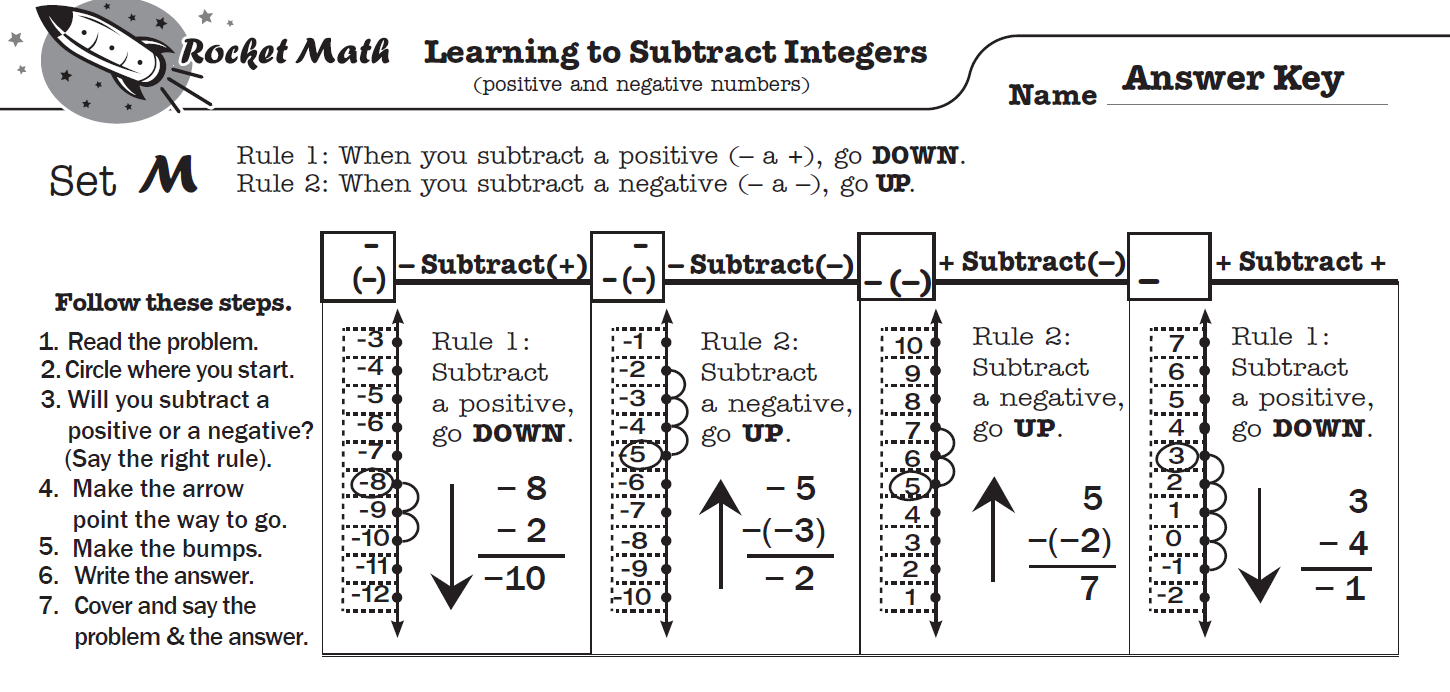
Learning to Subtract Integers displays problems on a vertical number line and then teaches students two rules about how to solve problems in which you subtract positive and negative numbers.

Rule 1:  When you subtract a positive number, go DOWN.
Rule 2:  When you subtract a negative number, go UP.

Doing problems on the vertical number line is more intuitively appealing because UP is more and DOWN is always less.  This makes crossing zero a little easier to comprehend.

Total of four problem types to learn.

Students learn how these two rules play out with two types of problems: when starting with a positive number and when starting with a negative number. Students gradually learn all four types of problems.  On each worksheet they see how to solve each problem type using the number line working with their partner.  Then students learn to recognize the pattern of each problem type by orally answering several examples of each type with their partner (going around the outside of the page).  You will probably not be surprised that there is a one-minute test on each set.   Students are to be 100% accurate and to meet or beat their goal from the special writing speed test for Learning to Subtract integers (the fastest goal is only 28 problems in a minute).

Online Video lessons can teach students the process.

Here are links to the 4 online lessons teach students how each type of problem is solved and why it is correct. These are available in the virtual filing cabinet as well.

(1) Subtract Integers Set A Positive subtract a positive

(2) Subtract Integers Set B Positive subtract a negative

(3) Subtract Integers Set G Negative subtract a negative

(4) Subtract Integers Set L Negative subtract a positive